Often, we spend a significant amount of time trying to understand blocks of code, comprehend the parameters, and decipher other confusing aspects of the code. I thought to myself, can the much-hyped AI Agents help me in this regard? The system that I were to create had a clear objective: to provide helpful comments, flags on duplicate variables, and, more importantly, test functions to see the sample outputs myself. This looks very much possible, right? Let’s design this Agentic system using the popular LangGraph framework.
LangGraph for Agents
LangGraph, built on top of LangChain, is a framework that’s used to create and orchestrate AI Agents using stateful graphs (state is a shared data structure used in the workflow). The graph consists of nodes, edges, and states. We’ll not delve into complex workflows; we’ll create a simple workflow for this project. LangGraph supports multiple LLM providers like OpenAI, Gemini, Anthropic, etc. Note that I’ll be sticking to Gemini in this guide. Tools are an important asset for Agents that help them extend their capabilities. What’s an AI Agent, you ask? AI Agents are LLM-powered, which can reason or think to make decisions and use tools to complete the task. Now let’s proceed to designing the flow and coding the system.
Workflow of the system
The goal of our system will be to add documentation strings for functions and flag any issues as comments in the code. Also, to make this system smarter, we’ll check if the comments already exist to skip adding the same using the agentic system. Now, let’s look at the workflow I’ll be using and delve into it.
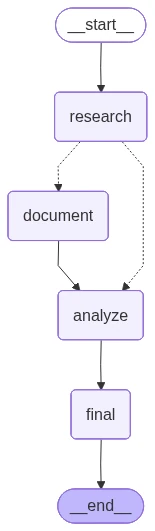
So, as you can see, we have a research node which will use an agent that will look at the input code and also “reason” if there is documentation already present. It’ll then use conditional routing using the ‘state’ to decide where to go next. First, the documentation step writes the code based on the context that the research node provides. Then, the analysis node tests the code on multiple test cases using the shared context. Finally, the last node saves the information in analysis.txt and stores the documented code in code.py.
Coding the Agentic system
Pre-requisites
We will need the Gemini API Key to access the Gemini models to power the agentic system, and also the Tavily API Key for web search. Make sure you get your keys from the links below:
Gemini: https://aistudio.google.com/apikey
Tavily: https://app.tavily.com/home
For easier use, I’ve added the repository to GitHub, which you can clone and use:
https://github.com/bv-mounish-reddy/Self-Documenting-Agentic-System.git
Make sure to create a .env file and add your API keys:
GOOGLE_API_KEY=

TAVILY_API_KEY=
I used the gemini-2.5-flash throughout the system (which is free to an extent) and used a couple of tools to build the system.
Tool Definitions
In LangGraph, we use the @tool decorator to specify that the code/function will be used as a tool. We have defined these tools in the code:
# Tools Definition

@tool

def search_library_info(library_name: str) -> str:

   """Search for library documentation and usage examples"""

   search_tool = TavilySearchResults(max_results=2)

   query = f"{library_name} python library documentation examples"

   results = search_tool.invoke(query)

   formatted_results = []

   for result in results:

       content = result.get('content', 'No content')[:200]

       formatted_results.append(f"Source: {result.get('url', 'N/A')}\nContent: {content}...")

   return "\n---\n".join(formatted_results)
This tool is used by the research agent to understand the syntax associated with the Python libraries used in the input code and see examples of how it’s being used.
@tool

def execute_code(code: str) -> str:

   """Execute Python code and return results"""

   python_tool = PythonREPLTool()

   try:

       result = python_tool.invoke(code)

       return f"Execution successful:\n{result}"

   except Exception as e:

       return f"Execution failed:\n{str(e)}"
This tool executes the code with the inputs defined by the analysis agent to verify whether the code works as expected and to check for any loopholes.
Note: These functions are defined using the inbuilt LangGraph tools: PythonREPLTool() and TavilySearchResults().
State Definition
The shared data in the system needs to have a clear structure to create a good workflow. I’m creating the structure as a TypedDict with the variables I’ll be using in the agentic system. The variables will provide context to the subsequent nodes and also help with the routing in the agentic system:
# Simplified State Definition

class CodeState(TypedDict):

   """Simplified state for the workflow"""

   original_code: str

   documented_code: str

   has_documentation: bool

   libraries_used: List[str]

   research_analysis: str

   test_results: List[str]

   issues_found: List[str]

   current_step: str
Agent Definitions
We used a ReAct (reasoning and acting) style agent for the ‘Research Agent’, which needs to learn and reason. A ReAct-style agent can simply be defined using create_react_agent function by passing the parameters, and this agent will be used in the node. Notice that we’re passing the previously defined tool in the create_react_agent function. The node using this Agent also updates some of the state variables, which will be passed as context.
# Initialize Model

def create_model():

   """Create the language model"""

   return ChatGoogleGenerativeAI(

       model="gemini-2.5-flash",

       temperature=0.3,

       google_api_key=os.environ["GOOGLE_API_KEY"]

   )

# Workflow Nodes

def research_node(state: CodeState) -> CodeState:

   """

   Research node: Understand code and check documentation

   Uses agent with search tool for library research

   """

   print("RESEARCH: Analyzing code structure and documentation...")

   model = create_model()

   research_agent = create_react_agent(

       model=model,

       tools=[search_library_info],

       prompt=ChatPromptTemplate.from_messages([

           ("system", PROMPTS["research_prompt"]),

           ("placeholder", "{messages}")

       ])

   )

   # Analyze the code

   analysis_input = {

       "messages": [HumanMessage(content=f"Analyze this Python code:\n\n{state['original_code']}")]

   }

   result = research_agent.invoke(analysis_input)

   research_analysis = result["messages"][-1].content

   # Extract libraries using AST

   libraries = []

   try:

       tree = ast.parse(state['original_code'])

       for node in ast.walk(tree):

           if isinstance(node, ast.Import):

               for alias in node.names:

                   libraries.append(alias.name)

           elif isinstance(node, ast.ImportFrom):

               module = node.module or ""

               for alias in node.names:

                   libraries.append(f"{module}.{alias.name}")

   except:

       pass

   # Check if code has documentation

   has_docs = ('"""' in state['original_code'] or

               "'''" in state['original_code'] or

               '#' in state['original_code'])

   print(f"  - Libraries found: {libraries}")

   print(f"  - Documentation present: {has_docs}")

   return {

       **state,

       "libraries_used": libraries,

       "has_documentation": has_docs,

       "research_analysis": research_analysis,

       "current_step": "researched"

   }
Similarly, we define the other agents as well for the nodes and tweak the prompts as needed. We then proceed to define the edges and workflow as well. Also, notice that has_documents variable is essential for the conditional routing in the workflow.
Outputs
You can change the code in the main function and test the results for yourself. Here’s a sample of the same:
Input code
sample_code = """

import math

import random

def calculate_area(shape, **kwargs):

   if shape == "circle":

       return math.pi * kwargs["radius"] ** 2

   elif shape == "rectangle":

       return kwargs["width"] * kwargs["height"]

   else:

       return 0

def divide_numbers(a, b):

   return a / b

def process_list(items):

   total = 0

   for i in range(len(items)):

       total += items[i] * 2

   return total

class Calculator:

   def __init__(self):

       self.history = []

   def add(self, a, b):

       result = a + b

       self.history.append(f"{a} + {b} = {result}")

       return result

   def divide(self, a, b):

       return divide_numbers(a, b)

calc = Calculator()

result = calc.add(5, 3)

area = calculate_area("circle", radius=5)

division = calc.divide(10, 2)

items = [1, 2, 3, 4]

processed = process_list(items)

print(f"Results: {result}, {area:.2f}, {division}, {processed}")

"""
Sample Output
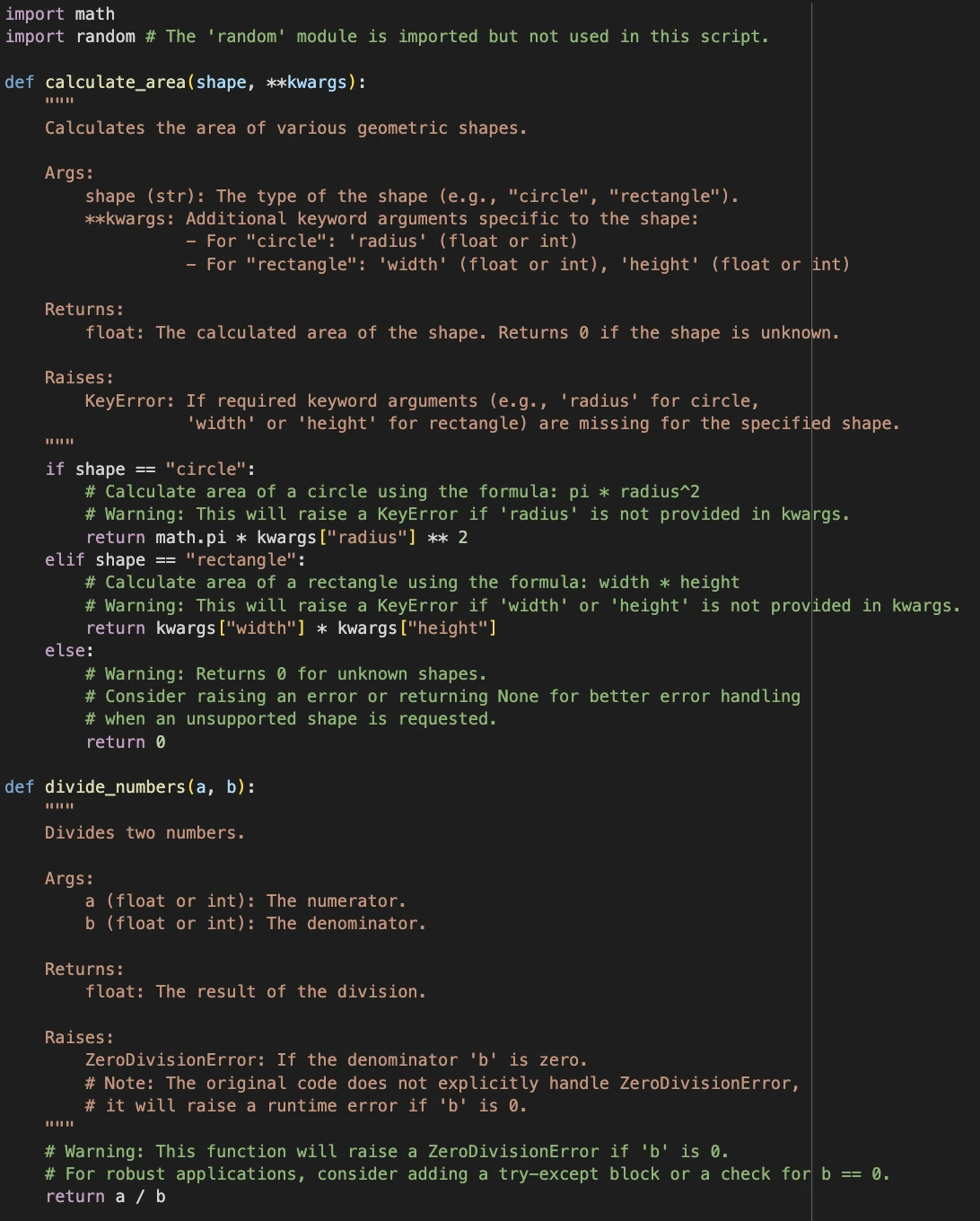
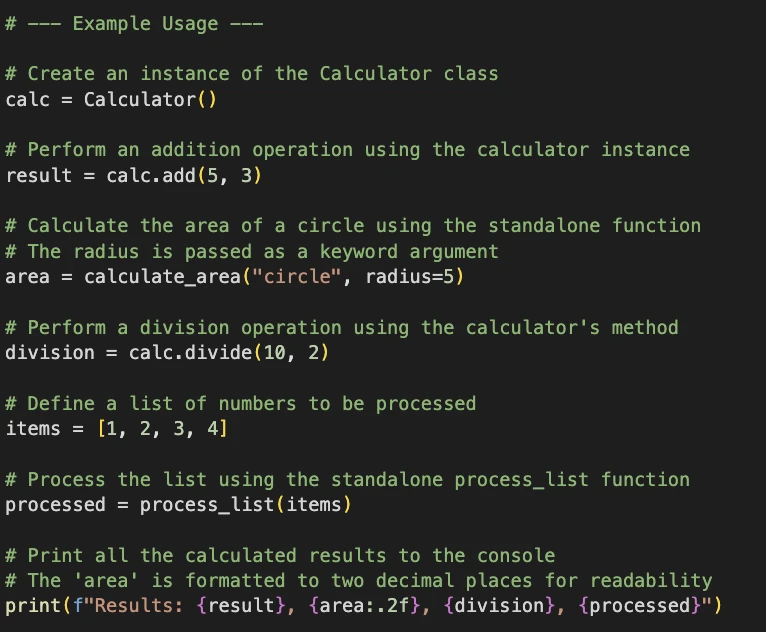
Notice how the system says the random module is imported but not used. The system adds docstrings, flags issues, and also adds comments in the code about how the functions are being used.
Conclusion
We built a simple agentic system with the use of LangGraph and understood the importance of state, tools, and agents. The above system can be improved with the use of additional nodes, tools, and refinements in the prompts. This system can be extended to building a debugging system or a repository builder as well, with the right nodes and tools. Also, remember that using multiple agents will also result in higher costs when using a paid model, so create and use agents that add value to your agentic systems and define the workflows well in advance.
Frequently Asked Questions
A. It’s how you mark a function so a LangGraph agent can call it as a tool inside workflows.
A. It’s the loop where agents reason step by step, act with tools, then observe results.
A. Yeah, you can plug it into audits, debugging, compliance, or even live knowledge bases. Code documentation is one of the use cases.

Passionate about technology and innovation, a graduate of Vellore Institute of Technology. Currently working as a Data Science Trainee, focusing on Data Science. Deeply interested in Deep Learning and Generative AI, eager to explore cutting-edge techniques to solve complex problems and create impactful solutions.
Login to continue reading and enjoy expert-curated content.