What comes to mind when you hear “ChatGPT”? A digital assistant for drafting emails, summarizing reports, or writing code, or an AI friend to discuss your day-to-day dilemmas? Launched in November 2022, the platform reached one million users in just five days. Now, by July 2025, it had grown to over 700 million weekly active users, a number that represents nearly 10% of the world’s entire adult population.
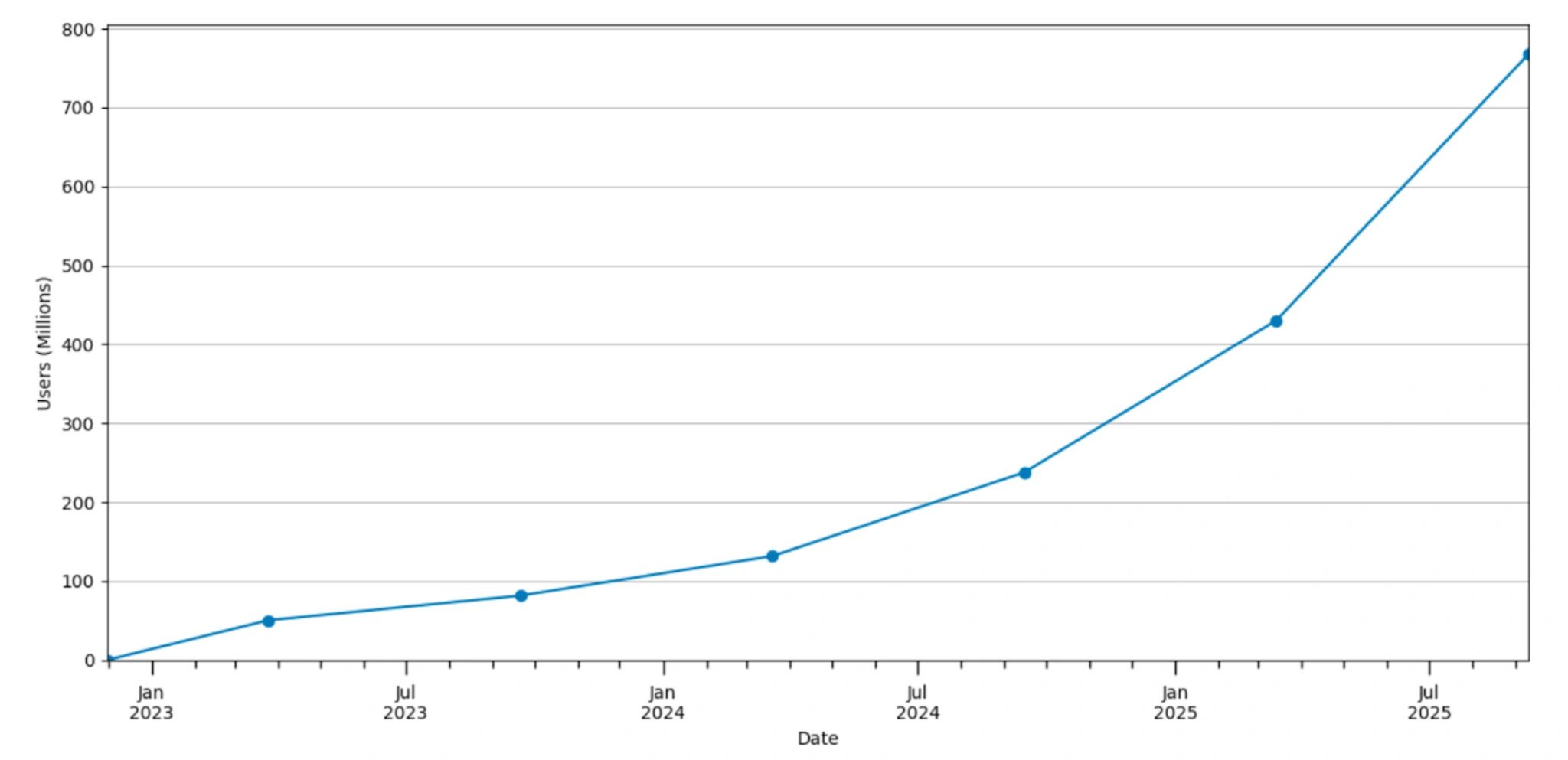
This growth isn’t just from a few tech-savvy countries. The research shows that ChatGPT’s user base is expanding faster in lower and middle-income countries than in higher-income ones.
A recent research paper by OpenAI, titled “How people are using ChatGPT,” has brought to attention the day-to-day usage of this conversational AI chatbot. The results of this report are surprising; the findings reveal that while ChatGPT is a professional sidekick, it is also an equally important everyday buddy. In this blog, we will look at the tasks that the majority of people are using ChatGPT for, some prompts that can help you leverage ChatGPT for those tasks, and finally, some insightful findings of this report and their repercussions.
What are people using ChatGPT for?
Up till last year, ChatGPT was almost equally used for work (47%) and non-work (53%) related tasks, but this year we see a major increase in ChatGPT prompts used for non-work (73%) related tasks compared to work (23%) related tasks.
In fact, if we look at the task bifurcation, we can clearly see that people are mainly using ChatGPT for guidance, information, writing, technical help, and more. Under these broader categories, there are tasks like tutoring, purchasing products, translation, etc, that are being done using ChatGPT.
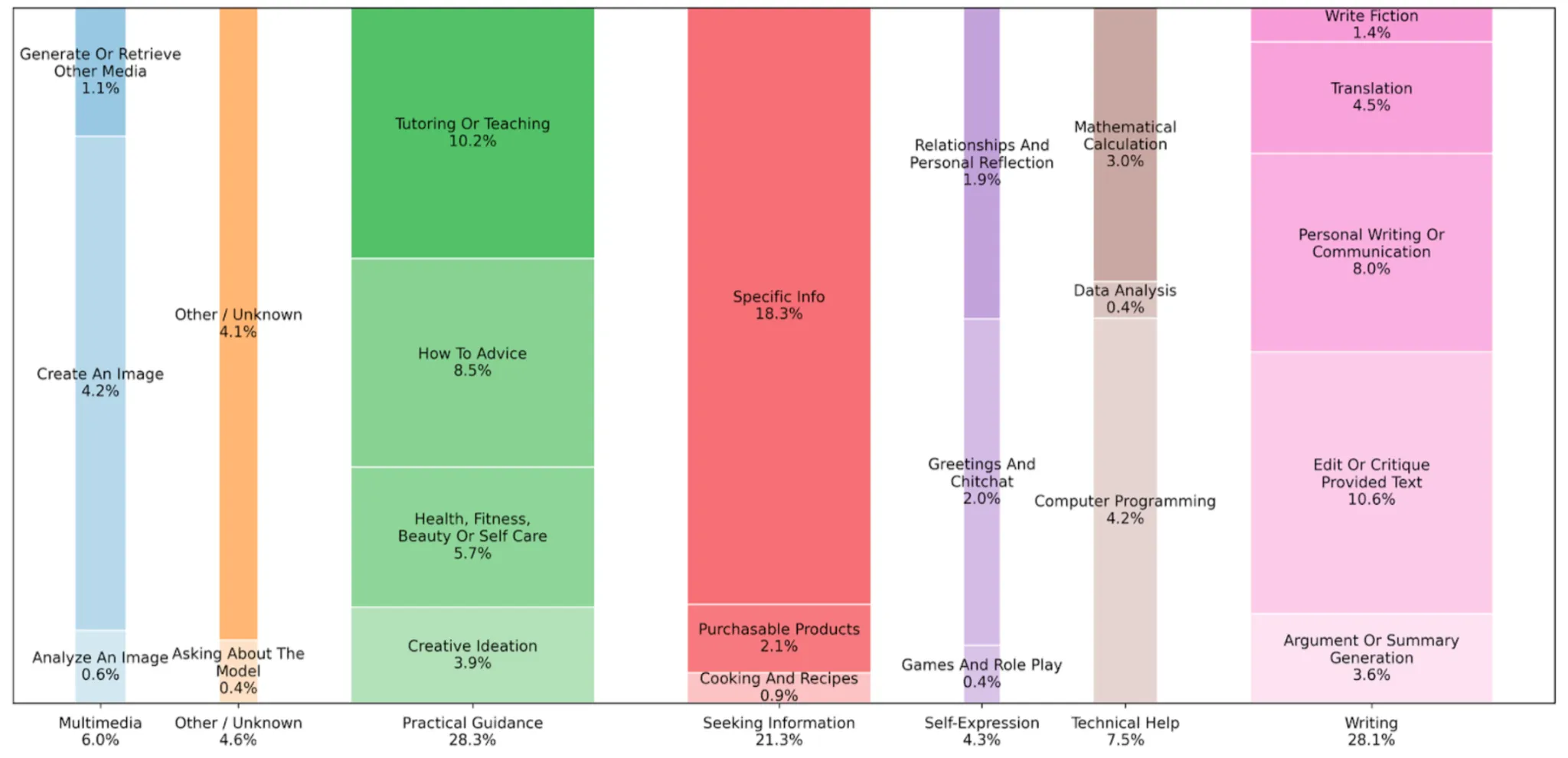
Here is a breakdown of this image:
| Category | Details / Subcategories | Share of Usage |
|---|---|---|
| Practical Guidance | Tutoring/teaching, how-to advice, creative ideation | ~29% |
| Seeking Information | Facts, current events, products, recipes | ~24% |
| Writing | Drafting, editing, summarizing, translating (⅔ are edits of user text) | ~24% of overall chats; ~40% of work chats |
| Technical Help | Programming (4.2%), Math (3%), Data Analysis (0.4%) | ~5% |
| Multimedia | Image generation, analysis, other media | ~7% |
| Self-Expression | Relationships/personal reflection (1.9%), Games/roleplay (0.4%) | ~2.4% |
Prompts for everyday tasks on ChatGPT
From the paper, we have identified the major areas where people are using ChatGPT. Under each of those categories, there are several tasks that are being covered. Here are the prompt templates for most of such tasks that fall under these categories.
1. Practical Guidance
This category includes tasks like Tutoring, How-to, and Creative Advice.
Task 1: Tutoring
Prompt template: “You are my tutor in [subject]. Explain [concept] to me as if I’m a [beginner/intermediate/advanced] learner. Use simple examples and give me 2 practice questions at the end.”
Task 2: How To
Prompt template: “Give me a step-by-step guide on how to [task]. Include common mistakes to avoid and one expert tip.”
Task 3: Creative Brainstorming
Prompt template: “Help me generate [X number] creative ideas for [project/purpose] to help me solve the [problem]. Make them practical and unique.”
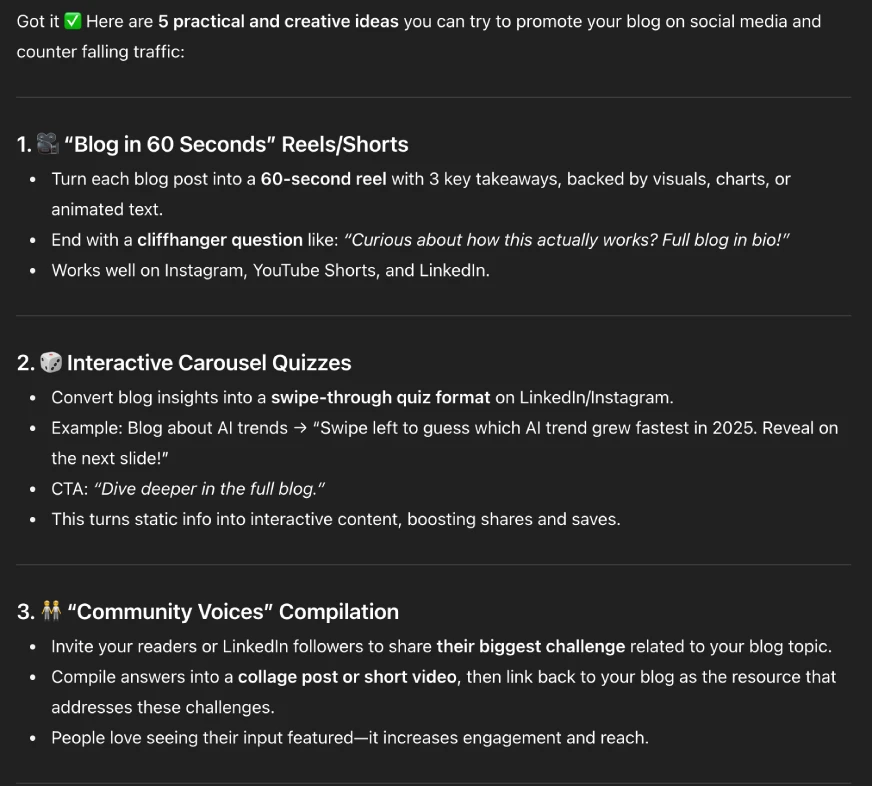
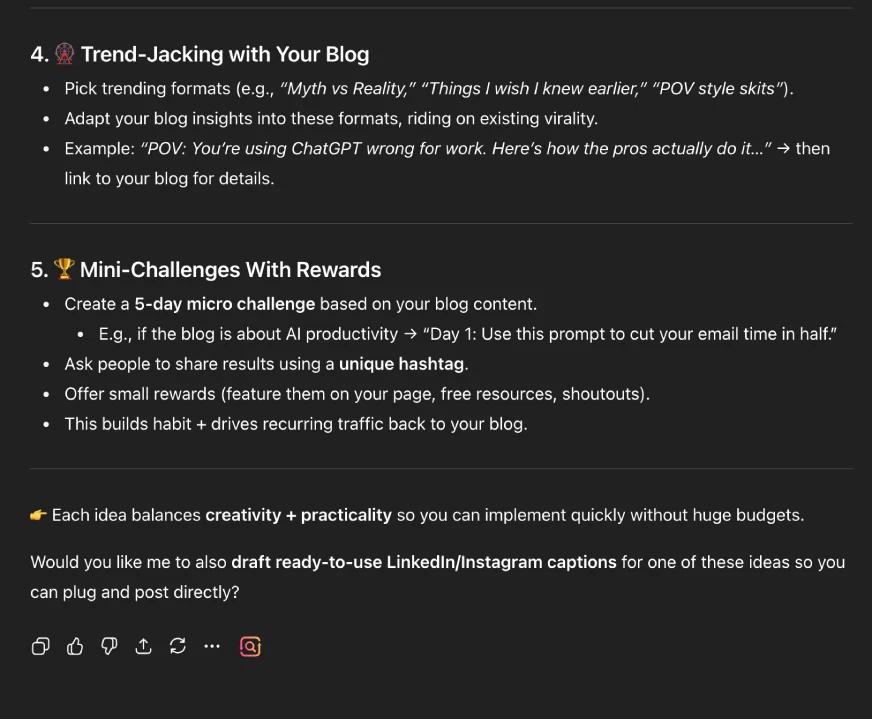
Example: Help me generate 5 creative ideas for promoting my blog on social media to help me solve the problem of falling traffic on my blog. Make them practical and unique.
Output:
2. Seeking Information
This category involves tasks that are used for fact-finding, summarising, and comparisons.
Task 1: Fact-Finding
Prompt Template: “Give me the latest information about [topic]. Present it in a short explainer with 3 takeaways I can act on. Make sure that the language is simple, and also provide all the sources of the information for fact-checking”.
Task 2: Summarization
Prompt Template: “Summarize the key points of [article/report/speech] in [x number] bullet points suitable for [audience type]”
Task 3: Comparison
Prompt Template: “Do a thorough comparison of [option A] with [option B] for [specific use case]. Find all the relevant differences between the two and present them in decreasing order of relevance based on the use case.”
Example: Do a thorough comparison of agentic AI with AI agents for industry-level adoption. Find all the relevant differences between the two and present them in decreasing order of relevance based on the use case.
Output:
3. Writing
This category includes ChatGPT uses like drafting, editing, or translating various texts or documents, and shares a few prompts around the same.
Task 1: Drafting Content
Prompt Template: Write a [email/report/blog intro] about [topic]. The content is aimed at the following [audience type]. Keep it [tone: professional/casual/creative], under [word limit], and include a call-to-action.
Task 2: Editing
Prompt Template: “Edit the following text to sound more [formal/friendly/persuasive/concise]: [paste text here]. Ensure that the edited content is suitable for [mention task] and for [audience type].”
Task 3: Translating
Prompt Template: “Translate the following into [language] while keeping it natural and context-appropriate: [paste text].”
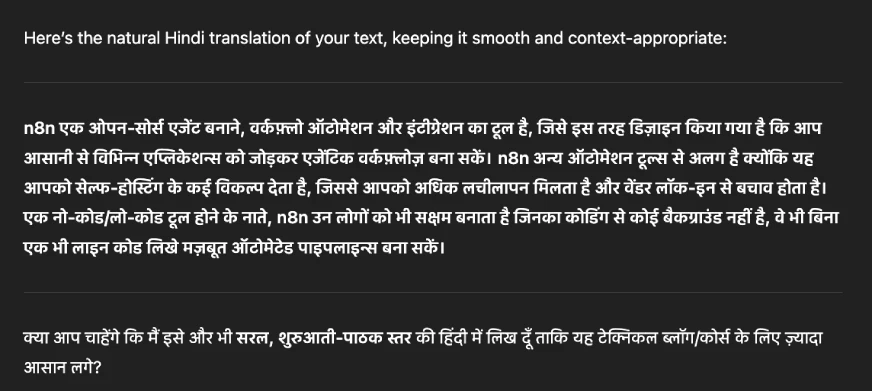
Example: Translate the following into Hindi while keeping it natural and context-appropriate: n8n is an open-source agent building, workflow automation, and integration tool designed to help you connect applications and build agentic workflows. n8n is different from other automation tools because you have a variety of options to self-host, which enables more flexibility and avoids vendor lock-in. As a no-code/low-code tool, n8n enables people with no coding backgrounds to build powerful automated pipelines without writing a single line of code.
Output:
Also read: My Writing Secret: How I Make ChatGPT Write like a Human [+1 Bonus Hack]
4. Technical Help
This category consists of tasks like debugging, programming, and data analysis.
Task 1: Debugging
Prompt template: “Here’s my code: [paste code]. It gives this error: [paste error]. Explain what’s wrong and suggest a corrected version with comments. Use the latest codes and commands to make the changes.”
Task 2: Programming
Prompt Template: I want to build [mention task] using the following [mention coding language] and these [mention all requirements]. Provide me a running code with the proper documentation.
Task 3: Data Analysis
Prompt Template: I have this dataset: [describe]. Show me how to analyze it to find [insight]. Provide the [ Python code/chart] for showing [mention task] with explanations.
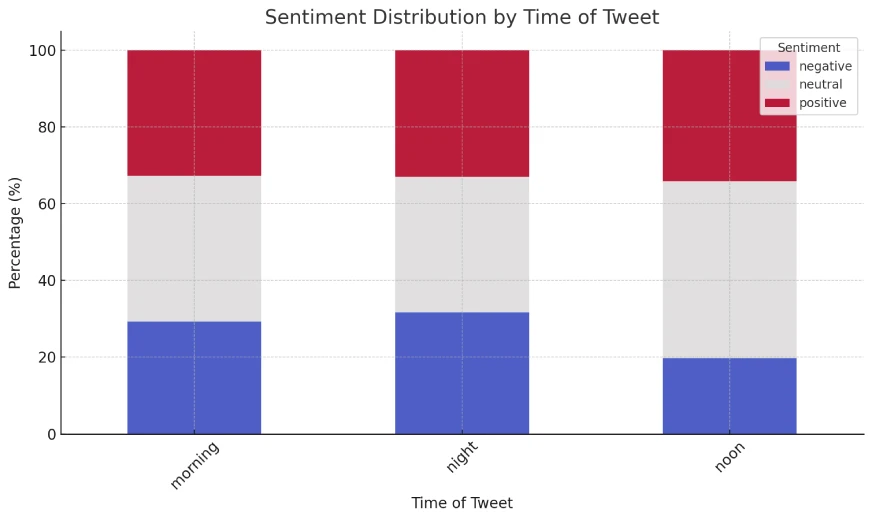
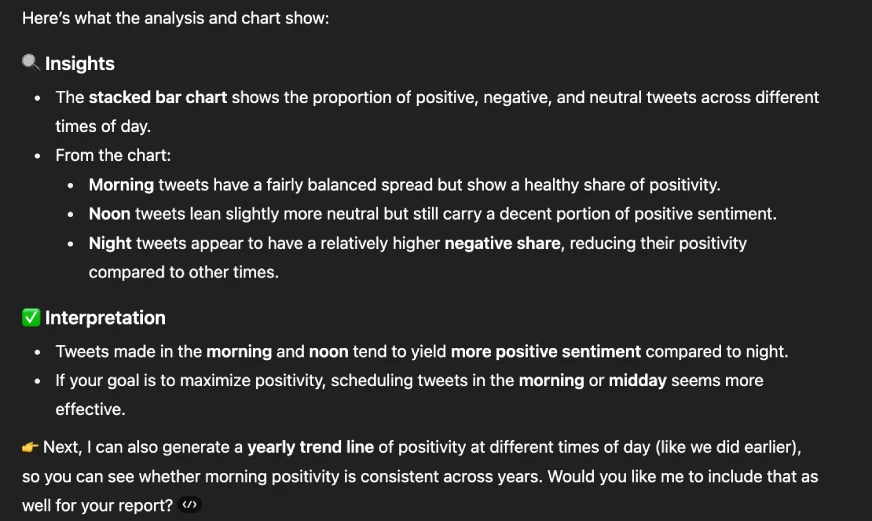
Example: I have this data set regarding sentiment analysis of various tweets. Show me how to analyse it to find insights into the time at which tweets yield a positive sentiment. Create suitable charts to showcase this.
Output:
Also read: How to do Data Analysis using ChatGPT?
5. Multimedia
This category involves generating images, editing existing images, and analysing images.
Task 1: Generating Images
Prompt Template: “Generate an image in [style: cartoon, realistic, infographic] showing [scene or concept]. The image should be [format, e.g., minimalistic/bright/detailed] with aspect ratio [mention the required ratio].”
Task 2: Editing Images
Prompt Template: “Edit this image [upload or describe image] by [describe the exact change you want — e.g., change background color to white, remove text, replace sky with sunset, add a logo in the top-right corner]. Keep the rest of the image unchanged.”
Task 3: Image Analysis
Prompt Template: Analyze this image [upload/reference]. Describe this image to me, find key insights, and help me use it for [mention your use case]
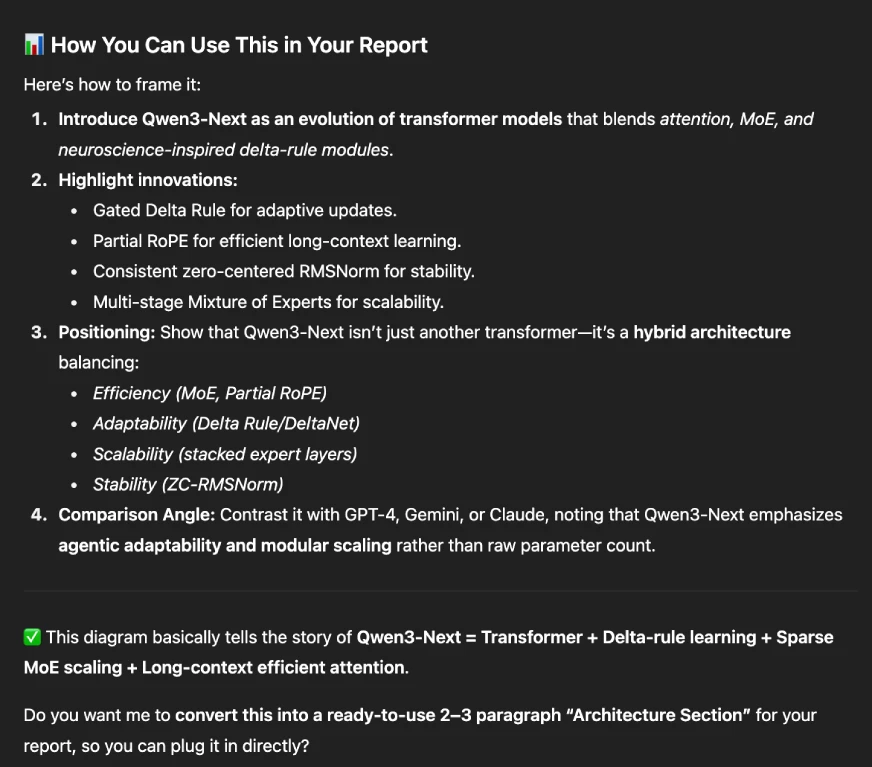
Example: Analyze this image. Describe this image to me, find key insights, and help me use it for my report on Qwen3-Next.
Output:
Also read: Is Nano Banana Better than GPT 5? Let’s Find Out!
6. Work-Related Tasks
Under this, there are tasks done on ChatGPT like decision support, report making, meeting markers, and more, and some prompts around them.
Task 1: Decision Support
Prompt Template: “I need to choose between [option A] and [option B] for [situation]. Create a decision matrix that includes costs, benefits, and risks. Recommend one option.”
Task 2: Meeting Markers
Prompt Template: “Here are my meeting notes: [paste notes]. Convert them into clear action items with owners, deadlines, and next steps.”
Task 3: Report Making
Prompt Template: “Draft a 1-page proposal for [project/idea]. Include: problem statement, proposed solution, expected benefits, and potential challenges. Share it in the form of [PDF/Word doc/PPT]”
Example: Draft a 1-page proposal for E20-based fuel: Solution or another Problem? Include: problem statement, proposed solution, expected benefits, and potential challenges. Share it in the form of a PDF.
Output:
E20-Based Fuel – Solution or Another Problem?
7. Self Expression
Another popular category that people use ChatGPT for is “Self Expression.” This involves indulging ChatGPT for relationship advice, reflection on thoughts/action, or for games or roleplay. While these tasks are equally important, the prompts for these are personal. So instead of a template, here are some tips you can use in general:
- Make sure not to follow ChatGPT’s suggestions blindly. It’s AI, it understands humans, but it isn’t one.
- Describe your asks in detail and prompt ChatGPT to call you out too.
- If you find something disturbing, share it with your friends/family.
- Avoid sharing confidential information.
These prompts can help you navigate through most of your day-to-day tasks with ChatGPT.
Also read: Master ChatGPT Prompts: Pro GPT-5 Hacks No One Tells You
Who all are using ChatGPT?
There were several insights in the report regarding the demographics of people who are using ChatGPT. Here is a summary:
- Most of the ChatGPT users lie within the age bracket of 20-30 years. Those over 30 years use ChatGPT mainly for work.
- Initially, ChatGPT usage was largely male-dominated (80%); now we see an almost equal proportion of males and females.
- Most high-income countries had an initial stronghold of ChatGPT use, but now it’s the low to mid-income countries that make up the biggest chunk of its users.
- The educated class mainly uses it for work-related tasks.
Interestingly, the number of “Good interactions” of people with ChatGPT has grown over 4 times this year compared to “bad interactions”.
Conclusion
No matter which age bracket you are in, there is so much you can do with ChatGPT. It might have been designed for work-related tasks, but the numbers state that ChatGPT is more of a personal friend, guide, or even a teacher at times. Its widespread use is proof that you define the limit of what you can do with ChatGPT, but the tech itself doesn’t.
It is time to leverage it smartly and efficiently to get your work done – both personal and professional. But remember, while this AI chatbot is getting better with each conversation that you have with it, it is not even close to perfect. Make sure to fact-check and review each output that you get from ChatGPT.

Anu Madan is an expert in instructional design, content writing, and B2B marketing, with a talent for transforming complex ideas into impactful narratives. With her focus on Generative AI, she crafts insightful, innovative content that educates, inspires, and drives meaningful engagement.
Login to continue reading and enjoy expert-curated content.