Making the switch from a traditional Node.js server to Cloudflare Workers will help streamline your deployment procedure and increase the scalability and efficiency of your application.
This guide takes you through the step-by-step process of migrating from Node.js to Cloudflare Workers so that you can use its fast, secure, and reliable edge network.
Whether you want to minimize server costs, improve response times for global users, or streamline your infrastructure, Cloudflare Workers provides an elegant solution.
You’ll also learn how to set up your environment, run your worker locally, and deploy it globally, all without having to worry about running your own server.
Why Use Cloudflare Workers Instead of Node.js?
Compared to traditional Node.js servers, Cloudflare Workers offers a robust option. Rather than hosting and maintaining your own server, Cloudflare gives you a platform to run lightweight JavaScript code directly at the edge (i.e., closer to your users) on a globally distributed network.
- Runs Only when needed: your code will only run when the user hits the api so it’s not like our own server which always needs to run.
- Faster Performance: Cloudflare will run the code in all data centers so you no need to worry about which place you’re in. It is always fast to every user no matter where he is.
- Scalable: It handles all the traffic without any crashes. We don’t need any infrastructure like in our own server.
In other words, Cloudflare Workers allow you to run JavaScript code across a network of servers around the world, even if you don’t have your own server. This makes it easy to deploy small services, such as APIs, that you can build very quickly and scale from zero.
Step-by-Step Guide to Cloudflare Worker Migration
Follow these simple steps to set up, test, and deploy your Cloudflare Worker as a replacement for your Node.js server.
Step 1: Create Your Cloudflare Worker
The first step is to use Cloudflare’s CLI tool, Wrangler, to create a Cloudflare Worker project.
- Run this command: npm install -g wrangler extension, which is a Cloudflare tool that allows you to create, test, and deploy the Cloudflare.
- Start a new project after installing Wrangler by using:
wrangler init my-worker
This creates a new folder named my-worker and also creates the necessary files to run Cloudflare.
Step 2: Configure the Project
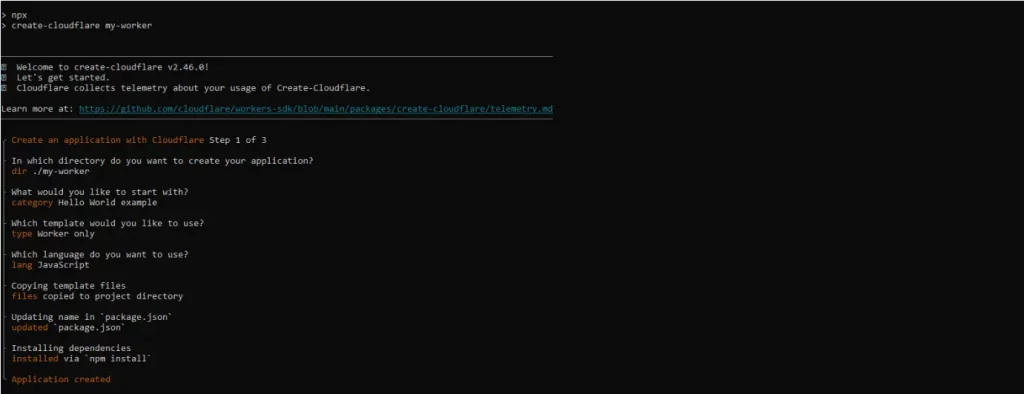
After running wrangler init, you’ll be guided through a series of terminal prompts. These prompts help configure key aspects of your Worker project, such as:
- Selecting a JavaScript or TypeScript template
- Deciding whether to use Git integration
- Choosing whether to deploy immediately or run locally
Your answers here will determine how your project is set up and whether it’s ready for local testing or deployment.
Terminal prompts:
Cloudflare Workers provide edge performance that Node.js can’t match. Your app will be faster, everywhere. Connect with Soft Suave’s team to implement it.

Step 3: Run the Cloudflare Worker Locally
To test your Worker before going live:
- Navigate to the newly created directory:
cd my-worker
- Start a local development server with:
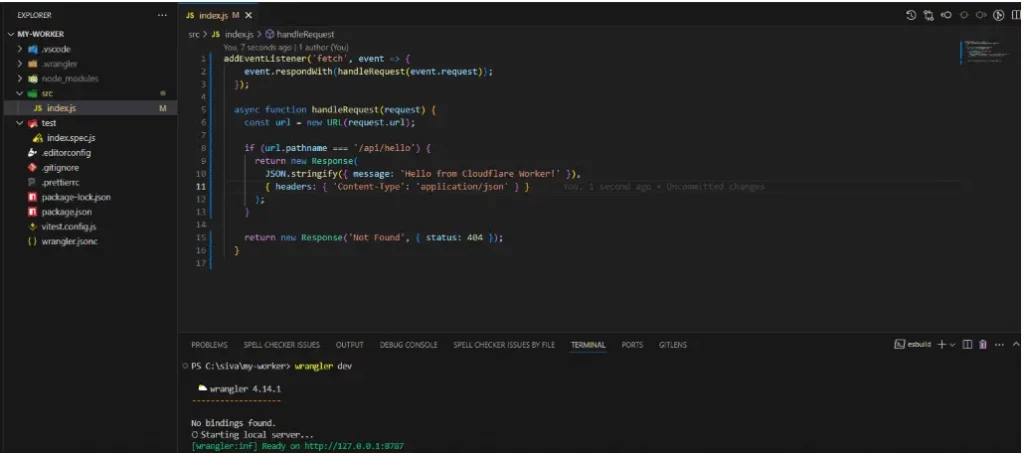
wrangler dev
This will launch your Worker in a local environment, allowing you to test and iterate on your code without deploying it publicly.
Step 4: Deploy the Cloudflare Worker Globally
Once you are satisfied with your local setup, you can deploy your Worker to the worldwide Cloudflare network.
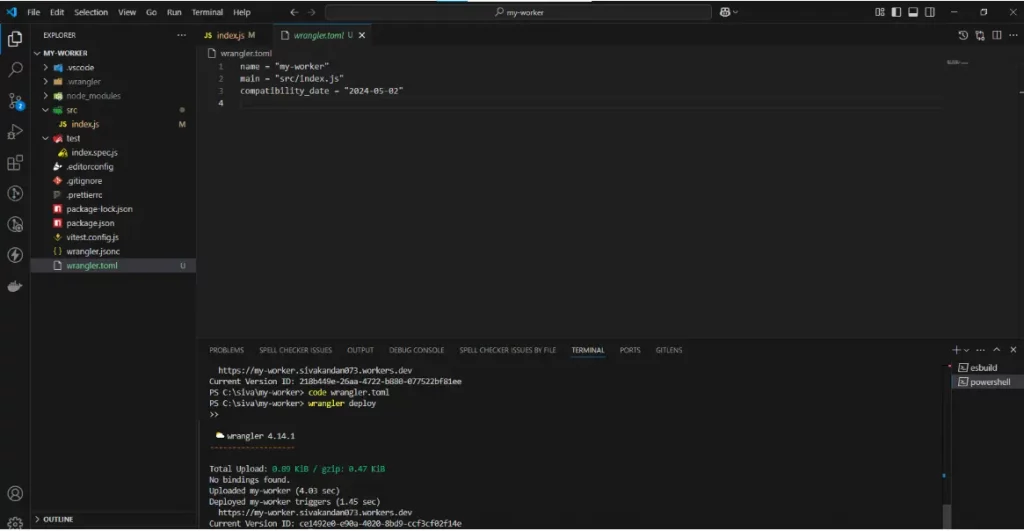
- First, ensure your project has a configuration file by opening or creating wrangler.toml. This file stores key project metadata such as the project name, entry point file, and compatibility date.
- Then deploy your Worker globally with the command:
wrangler deploy
This pushes your project live, making it accessible via a unique Cloudflare-provided URL. Your code is now running on the edge, accessible worldwide with all the benefits Cloudflare provides.
Local API Response
Once you’ve started the development server using wrangler dev, you can make a request to your local API endpoint. This allows you to see the output and confirm that your Worker logic behaves as expected.

Global API Response
After deploying your Worker using wrangler deploy, Cloudflare provides a public URL where your API can be accessed from anywhere in the world. Testing this endpoint confirms that the deployment was successful and your Worker is live.

Want your Node.js app to run seamlessly worldwide? Cloudflare’s edge network handles it all.
Conclusion
Migrating from Node.js to Cloudflare Workers reduces deployment overhead, improves performance, and removes the need to maintain your own server infrastructure.
By following the steps outlined in this guide, you’ve seen how easy it is to create, configure, and deploy a JavaScript-based Worker to Cloudflare’s global edge network.
Whether you’re creating APIs or lightweight web services, Cloudflare Workers are fast, scalable, and use less code.
As serverless computing is moving forward very rapidly with the likes of Cloudflare, future-proof your projects now by embracing such platforms. Begin small, test at home, and grow globally, with no server management overhead.