Looking to buy the best laptop to get into software development? You would’ve realized by now how hard it is to stay up to date with the latest hardware and the ever-increasing application requirements. This article is here to elucidate that for you, by listing the best laptops that the market has to offer for AI engineers. We’ll begin by outlining the metrics that differentiate a good laptop from a great laptop, to help you make your choice.
Here are the best AI laptops to buy in 2025:
1. Lenovo Legion 5 2024 13th Gen
A tank that keeps the RTX 4060 at 2.6 GHz base clock, with a boost clock up to 4.9Ghz, making it perfect for brute-force jobs.
- CPU: Intel i7-13650HX (14 Cores)
- GPU: RTX 4060 8 GB 140 W
- RAM: 24 GB DDR5
- Storage: 1 TB PCIe 4
- Price: ₹1,15,490
- Buy: Amazon
2. Acer Predator Helios Neo 16S
MUX lets you bypass iGPU for an extra 10% boost in performance. The 20-core Intel Ultra gives lightning compile times.
- CPU: Intel Ultra 7 (20 Cores)
- GPU: RTX 5050 8 GB 130W
- RAM: 16 GB DDR5
- Storage: 1 TB
- Price: ₹1,49,999
- Buy: Flipkart
3. MSI Katana 15
Under 22 mm thick yet holds a 100 W 4050; great for devs who commute but still want to pack a punch.
- CPU: i7-12650H
- GPU: RTX 4050 8 GB ~100 W
- RAM: 16 GB DDR5
- Storage: 1TB SSD + spare M.2
- Price: ₹91,990
- Buy: Flipkart
4. Lenovo LOQ 15IRX9
MUX + 95W RTX 3050 + 60Wh battery; weighs 2.4kg, acceptable in a backpack for college labs.
- CPU: i7-13650HX
- GPU: RTX 3050 6 GB 95W
- RAM: 16 GB DDR5
- Storage: 512 GB SSD
- Price: ₹85,190
- Buy: Flipkart
5. Acer Nitro V 15 ANV15-52
130W RTX 5050 8GB is the minimum VRAM that still trains 3B int-4 models; 16GB RAM bundle keeps it ready for development for under ₹1L.
- CPU: i5-13420H (8C)
- GPU: RTX 5050 8 GB 130 W
- RAM: 16 GB DDR5
- Storage: 512 GB PCIe 4
- Price: ₹94,990
- Buy: Amazon
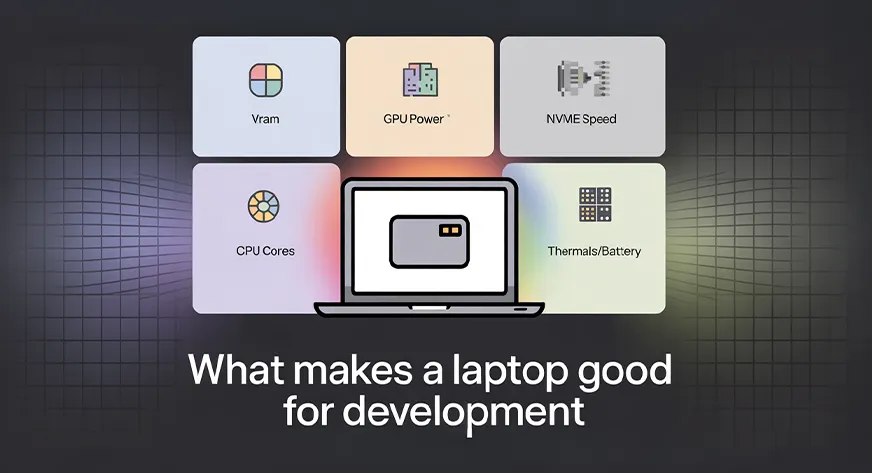
What Makes a Laptop Good for Development?
Here are a few things to keep in mind while selecting your laptop:
Plenty of video-memory headroom
AI frameworks store weights, gradients, and activation tensors on the GPU. Once VRAM is full, the runtime spills to system RAM, cutting speed by 5-10× and eating PCIe bandwidth. Aim for at least 50% more memory than your largest model+batch combo; int-4 quantisation halves the footprint but still needs scratch space for intermediate results.
Wide, fast system memory
Training scripts pre-fetch the next batch while the GPU crunches the current one. Dual-channel DDR5 (or unified Apple memory) feeds the CPU at ≥ 70 GB/s⁻¹; single-channel or slow DDR4 halves that rate and leaves CUDA cores idle. 16GB is today’s floor and works only if you shut every other app and accept smaller batches.
Sustained GPU power budget
Advertised “boost” clocks last seconds; long epochs run minutes. A card allowed to pull 90-110 W keeps 90 % of its peak frequency after the fans spin up; anything under 80 W drops to 60-70 % and adds hours to convergence. Check reviews that log thirty-minute stress, not three-minute benchmarks. This is the reason why the framerate reduces drastically once the power source changes to a battery from the mains.
NVMe storage with real throughput
Loading a 200 GB image set from a 500 MB/s SATA drive takes six minutes; from a 5 GB/s PCIe 4.0 drive it takes forty seconds. Faster storage also hides the swap penalty when you occasionally burst past RAM. Multiple M.2 slots let you add cheap bulk storage later without throwing away the original SSD.
CPU cores that outrun the data-loader
The loader decompresses, resizes, tokenises, and queues batches. Eight modern cores at ≥ 3 GHz can saturate four GPU workers; six older cores become the bottleneck, and GPU utilisation falls to 60-70 %. More cores also speed up multi-threaded compiles (CUDA, TensorFlow custom ops).
Thermals and battery realism
A hot GPU clocks down; a small battery dies in forty minutes. Vapour-chamber heat-pipes and 85 Wh cells keep you training through a long workshop or flight. Thin-and-light is fine for inference; training rigs need thickness for airflow.
Based on the above metrics, the previous list has been curated.
Things Not Taken into Consideration

Some of you might be thinking: But what about the display? There are some specifications, like the display/panel type, keyboard type, etc., that haven’t been covered due to their limited or no effect on development. The hardware components given emphasis here are the ones that have the most impact on performance. The remaining components may or may not have an impact on your experience, so please take note of the detailed descriptions of the products before the purchase.
Also, we didn’t go for flagship or upper-end models like Alienware, ROG, etc., as their cost far exceeds their utility. Therefore, the focus was on the laptops that provided the best value for money, while fulfilling the purpose.
Conclusion
So there you have it, 5 solid machines that will not blink when you feed them a chunky dataset, and will not cook themselves the second your training loop starts breathing. Pick the one that feels kind in your backpack and gentle on your bank account. Remember, the best AI laptop is not the shiniest spec sheet; it is the one that keeps your code alive while you sip cheap coffee at two in the morning, staring at a stubborn loss curve. Upgrade when you must, but do not wait for perfect. Perfect is whatever lets you ship the model tomorrow. Close this tab, hit buy, and go build something that scares you a little.
Frequently Asked Questions
A. Aim for 50% more than your model+batch footprint. 8 GB runs tiny or int4 models; 12–16 GB is comfortable for 7–13B; more VRAM prevents RAM spill and PCIe thrash. When VRAM fills, training can slow 5–10×.
A. Barely. 32 GB is the real floor for smooth work. Use dual-channel DDR5 to keep >70 GB/s memory bandwidth. With 16GB, you’ll close apps, shrink batches, and hit swap more often.
A. Sustained power, not peak clocks, sets throughput. A 90–110 W GPU holds near-peak frequency through long epochs. Under ~80 W, it sags to 60–70%, stretching training time and fan noise.
A. Yes. ~5 GB/s NVMe loads datasets in seconds and softens swap hits. Two M.2 slots let you add cheap bulk storage later without tossing the original drive.
A. Very. Your dataloader decompresses, augments, tokenizes, and queues batches. Eight modern cores at ~3 GHz can keep four GPU workers fed; weaker CPUs become the bottleneck, and GPU utilization falls.

I specialize in reviewing and refining AI-driven research, technical documentation, and content related to emerging AI technologies. My experience spans AI model training, data analysis, and information retrieval, allowing me to craft content that is both technically accurate and accessible.
Login to continue reading and enjoy expert-curated content.