Sora 2 feels like a bit of a filmmaking magic trick disguised as an app. OpenAI has made it seductively simple to make impressive videos, even ones that seem to make you the star. It’s even easier to share them with others thanks to the hugely popular Sora app. Sora 2 is a huge step beyond the previous iteration, but the realism and power come with more potential pitfalls.
You can get lucky with a lazy prompt, but a well-worded one can produce jaw-dropping results far more frequently. Here are five tips to keep in mind when you’re producing your own Sora 2 clips.
1. Think in micro-scenes
When I first started using Sora, I did what I think most people do: I wrote a prompt that described a vibe. Something like “a city street at night, neon everywhere, people walking through rain.”
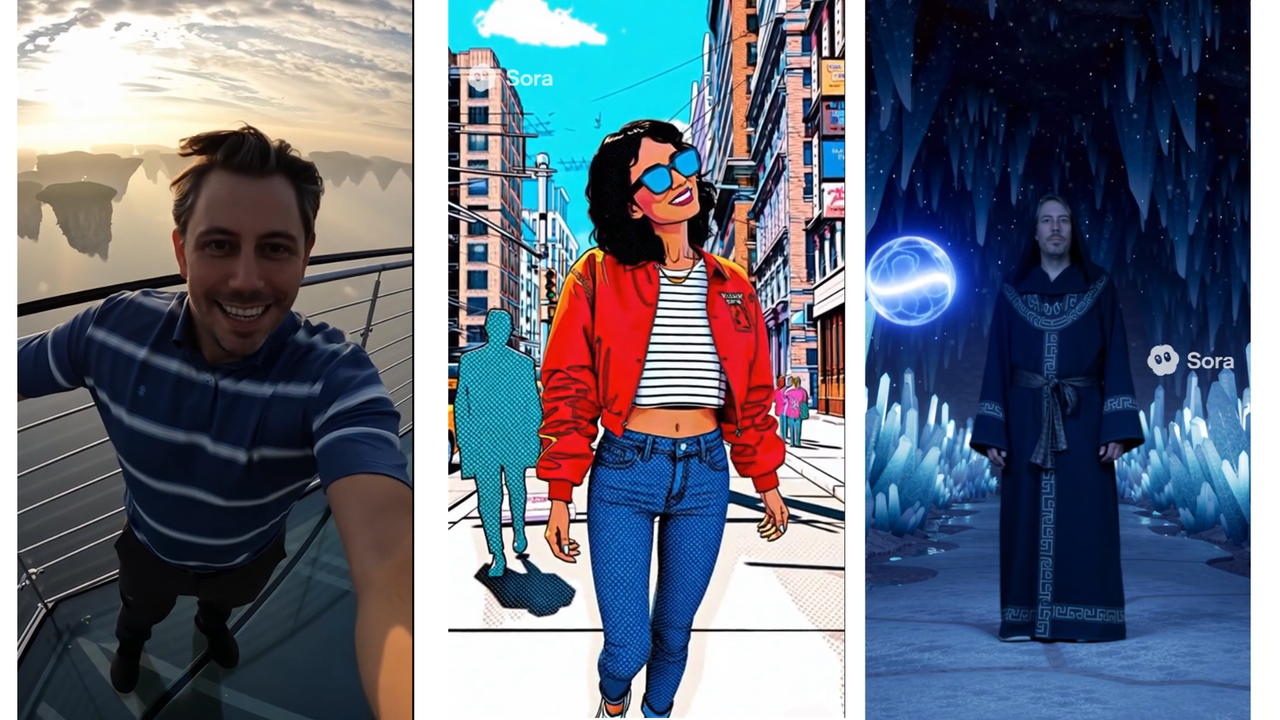
The results would be fine, but I soon found that thinking more like a film director or perhaps a choreographer led to much better results. It’s good to think about time, rhythm, and spatial logic. Imagining a short “micro-scene” before I ever started writing the prompt helped me come up with ways to describe the beginning and ending of actions, camera movement, and other details. I timed out my high-up avatar’s movements and speech, and how the camera would move around to simulate my holding it on a stick.
It’s also crucial to include frame safety prompts. Sora loves to zoom in too close, especially on faces. Tell it to “keep full subject in frame” or “allow 10% frame padding around character” and you’ll prevent those awkward half-head shots that feel like a mistake. Give Sora a tightly constructed mini-narrative with intentional framing, and you’ll be shocked at how cinematic the results can feel.
2. Get inspired from your favorite movie
Sometimes, the most useful prompt isn’t a description of what’s happening onscreen but a push toward a kind of style. You don’t say “a woman walks through a city.” You say “a woman walks through a city looking like a vivid comic-book, like a film in the Spider-verse animated trilogy.” Sora has rules against mimicking third-party content, but the right phrasing can find a way to earn the AI’s approval, as long as it’s about context rather than intellectual property theft.
You can also name-drop real filmmakers to see if the AI clues into the tone you want. If you give it both scene direction and aesthetic guidance, it tends to split the difference in interesting ways.
3. Cameo class
Let’s talk about Cameos, because creating one will absolutely go wrong if you don’t prep for it. Uploading a selfie and dropping yourself into a knight’s quest can be both great and, as seen above, make your own face look unrealistic.
There are some obvious rules around the uploaded clip. Make sure it’s well-lit with a neutral background, with whatever expressions you want to give it. Speak clearly and enunciate to get your voice right, too.
And then be sure to match yourself to the world of your video. Don’t just say “use @[my ChatGPT name] in this scene.” Say “stylize cameo to match the look” or “give the character long, flowing locks.”
Emotional direction matters too. Your facial expression should fit the mood. Use prompts like “cameo expression: awe” or “face conveys uncertainty” to get the right energy. If you don’t, you’ll end up grinning while supposedly on a grim, knightly quest.
4. Crank the contrast
Contrast is the unsung hero of most great Sora 2 videos. The human eye latches onto differences—between dark and light, between stillness and motion, between near and far. If everything in your shot is moving at the same speed, in the same brightness, and sitting at the same visual depth, the result will almost always be boring.
One of the most effective tricks I’ve learned is to deliberately contrast movement between foreground and background. You can see it at work here. The same goes for setting the lighting contrast. Backlighting, rim lighting, and pools of shadow are your friends. The right kind of sunlight, and where there are shadows, can be useful to fill in the gaps when Sora’s realism fails. And you’ll often find that even if Sora struggles with texture or detail, well-executed lighting will make the entire frame feel deliberate and cinematic.
5. Sound planning
Sora 2’s audio is crucial to making its videos stand out. Sound in Sora isn’t just background. And when used well, it can do heavy lifting that your visuals can’t. That’s why my magical self speaks as he does, and how he reacts to the sound of the orb sparking as much as the visual.
Or let’s say you have a moment where a door creaks open. If you don’t include a sound cue, it might just look like a generic motion. But if you specify “metal creak echoes, growing louder as the door opens,” the model often matches that timing, and suddenly the scene feels like something is about to happen. It’s the difference between an open door and a portal to dread.
This works even better when you pair it with the beats you established earlier. Think of the sound design as scaffolding. Ask for silence before a big event, distant thunder that gets closer, or music that shifts key as the camera pans. They’re signals to the viewer’s brain about where to feel.
Making a great Sora 2 video isn’t about having the most poetic prompt or the wildest idea. It’s about giving the model the structure and tone it needs to succeed. Micro-scenes instead of vibes. Contrast instead of chaos. Sound instead of silence.
These tips won’t guarantee a masterpiece every time. But they’ll stack the deck in your favor like you’ve hired a great, if erratic, cinematographer. The videos will stick in your head for days, even if sometimes it’s for all the wrong reasons.
Follow TechRadar on Google News and add us as a preferred source to get our expert news, reviews, and opinion in your feeds. Make sure to click the Follow button!
And of course you can also follow TechRadar on TikTok for news, reviews, unboxings in video form, and get regular updates from us on WhatsApp too.