Retrieval-Augmented Generation is changing the way LLMs tap into external knowledge. The problem is that a lot of developers misunderstand what RAG actually does. They focus on the document sitting in the vector store and assume the magic begins and ends with retrieving it. But indexing and retrieval aren’t the same thing at all.
Indexing is about how you choose to represent knowledge. Retrieval is about what parts of that knowledge the model gets to see. Once you recognize that gap, the whole picture shifts. You start to realize how much control you actually have over the model’s reasoning, speed, and grounding.
This guide breaks down what RAG indexing really means and walks through practical ways to design indexing strategies that actually help your system think better, not just fetch text.
What is RAG indexing?
RAG indexing is the basis of retrieval. It is the process of transforming raw knowledge into numerical data that can then be searched via similarity queries. This numerical data is called embeddings, and embeddings captures meaning, rather than just surface level text.

Consider this like building a searchable semantic map of your knowledge base. Each chunk, summary, or variant of a query becomes a point along the map. The more organized this map is, the better your retriever can identify relevant knowledge when a user asks a question.
If your indexing is off, such as if your chunks are too big, the embeddings are capturing noise, or your representation of the data does not represent user intent, then no LLM will help you very much. The quality of retrieval will always depend on how effectively the data is indexed, not how great your machine learning model is.
Why it Matters?
You aren’t constrained to retrieving only what you index. The power of your RAG system is how effectively your index reflects meaning and not text. Indexing articulates the frame through which your retriever sees the knowledge.
When you match your indexing strategy to your data and your user need, retrieval will get sharper, models will hallucinate less, and user will get accurate completions. A well-designed index turns RAG from a retrieval pipeline into a real semantic reasoning engine.
RAG Indexing Strategies That Actually Work
Suppose we have a document about Python programming:
Document = """ Python is a versatile programming language widely used in data science, machine learning, and web development. It supports multiple paradigms and has a rich ecosystem of libraries like NumPy, pandas, and TensorFlow. """ Now, let’s explore when to use each RAG indexing strategy effectively and how to implement it for such content to build a performant retrieval system.
1. Chunk Indexing
This is the starting point for most RAG pipelines. You split large documents into smaller, semantically coherent chunks and embed each one using some embedding model. These embeddings are then stored in a vector database.
Example Code:
# 1. Chunk Indexing
def chunk_indexing(document, chunk_size=100):
    words = document.split()
    chunks = []
    current_chunk = []
    current_len = 0

    for word in words:
        current_len += len(word) + 1  # +1 for space
        current_chunk.append(word)

        if current_len >= chunk_size:
            chunks.append(" ".join(current_chunk))
            current_chunk = []
            current_len = 0

    if current_chunk:
        chunks.append(" ".join(current_chunk))

    chunk_embeddings = [embed(chunk) for chunk in chunks]
    return chunks, chunk_embeddings

chunks, chunk_embeddings = chunk_indexing(doc_text, chunk_size=50)
print("Chunks:\n", chunks)
Best Practices:
- Always keep the chunks around 200-400 tokens for short form text or 500-800 for long form technical content.
- Make sure to avoid splitting mid sentences or mid paragraph, use logical, semantic breaking points for better chunking.
- Good to use overlapping windows (20-30%) so that context at boundaries isn’t lost.
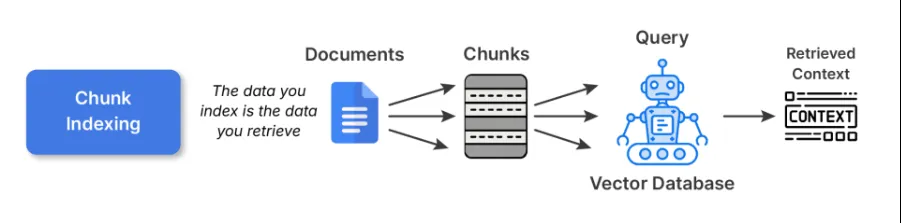
Trade-offs: Chunk indexing is simple and general-purpose indexing. However, bigger chunks can harm retrieval precision, while smaller chunks can fragment context and overwhelm the LLM with pieces that don’t fit together.
Read more: Build RAG Pipeline using LlamaIndex
2. Sub-chunk Indexing
Sub-chunk indexing serves as a layer of refinement on top of chunk indexing. When embedding the normal chunks, you further divide the chunk into smaller sub-chunks. When you are looking to retrieve, you compare the sub-chunks to the query, and once that sub-chunk matches your query, the full parent chunk is input into the LLM.
Why this works:
The sub-chunks afford you the ability to search in a more pinpointed, subtle, and exact way, while retaining the large context that you needed for reasoning. For example, you may have a long research article, and the sub-chunk on one piece of content in that article may be the explanation of one formula in one long paragraph, thus improving both precision and interpretability.
Example Code:
# 2. Sub-chunk Indexing

def sub_chunk_indexing(chunk, sub_chunk_size=25):
    words = chunk.split()
    sub_chunks = []
    current_sub_chunk = []
    current_len = 0

    for word in words:
        current_len += len(word) + 1
        current_sub_chunk.append(word)

        if current_len >= sub_chunk_size:
            sub_chunks.append(" ".join(current_sub_chunk))
            current_sub_chunk = []
            current_len = 0

    if current_sub_chunk:
        sub_chunks.append(" ".join(current_sub_chunk))

    return sub_chunks

# Sub-chunks for first chunk (as example)
sub_chunks = sub_chunk_indexing(chunks[0], sub_chunk_size=30)
sub_embeddings = [embed(sub_chunk) for sub_chunk in sub_chunks]

print("Sub-chunks:\n", sub_chunks)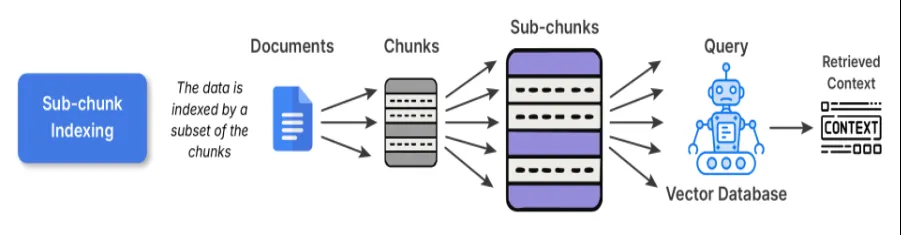
When to use: This would be advantageous for datasets that contain multiple distinct ideas in each paragraph; for example, if you consider knowledge bases-like textbooks, research articles, etc., this would be ideal.
Trade-off: The cost is slightly higher for preprocessing and storage due to the overlapping embeddings, but it has substantially better alignment between query and content.
3. Query Indexing
In the case of query indexing, the raw text is not directly embedded. Instead, we create several imagined questions that each chunk could answer, then embeds that text. This is partly done to bridge the semantic gap of how users ask and how your documents describe things.
For example, if your chunk says:
“LangChain has utilities for building RAG pipelines”
The model would generate queries like:
- How do I build a RAG pipeline in LangChain?
- What tools for retrieval does LangChain have?
Then, when any real user asks a similar question, the retrieval will hit one of those indexed queries directly.
Example Code:
# 3. Query Indexing - generate synthetic queries related to the chunk
def generate_queries(chunk):
    # Simple synthetic queries for demonstration
    queries = [
        "What is Python used for?",
        "Which libraries does Python support?",
        "What paradigms does Python support?"
    ]

    query_embeddings = [embed(q) for q in queries]
    return queries, query_embeddings

queries, query_embeddings = generate_queries(doc_text)
print("Synthetic Queries:\n", queries)
Best Practices:
- When writing index queries, I would suggest using LLMs to produce 3-5 queries per chunk.
- You can also deduplicate or cluster all questions that are like make the actual index smaller.

When to use:
- Q&A systems, or a chatbot where most user interactions are driven by natural language questions.
- Search experience where the user is likely to ask for what, how, or why type inquiries.
Trade-off: While synthetic expansion adds preprocessing time and space, it provides a meaningful boost in retrieval relevance for user facing systems.
4. Summary Indexing
Summary indexing allows you to reframe pieces of material into smaller summaries prior to embedding. You retain the complete content in another location, and then retrieval is done on the summarized versions.
Why this is beneficial:
Structures, dense or repetitive source materials (think spreadsheets, policy documents, technical manuals) in general are materials that embedding directly from the raw text version captures noise. Summarizing abstracts away the less relevant surface details and is more semantically meaningful to embeddings.
For Example:
The original text says: “Temperature readings from 2020 to 2025 ranged from 22 to 42 degree Celsius, with anomalies attributed to El Nino”
The summary would be: Annual temperature trends (2020-2025) with El Nino related anomalies.
The summary representation provides focus on the concept.
Example Code:
# 4. Summary Indexing

def summarize(text):
    # Simple summary for demonstration (replace with an actual summarizer for real use)
    if "Python" in text:
        return "Python: versatile language, used in data science and web development with many libraries."
    return text

summary = summarize(doc_text)
summary_embedding = embed(summary)

print("Summary:", summary)

When to use it:
- With structured data (tables, CSVs, log files)
- Technical or verbose content where embeddings will underperform using raw text embeddings.
Trade off: Summaries can risk losing nuance/factual accuracy if summaries become too abstract. For critical to domain research, particularly legal, finance, etc. link to the original text for grounding.
5. Hierarchical Indexing
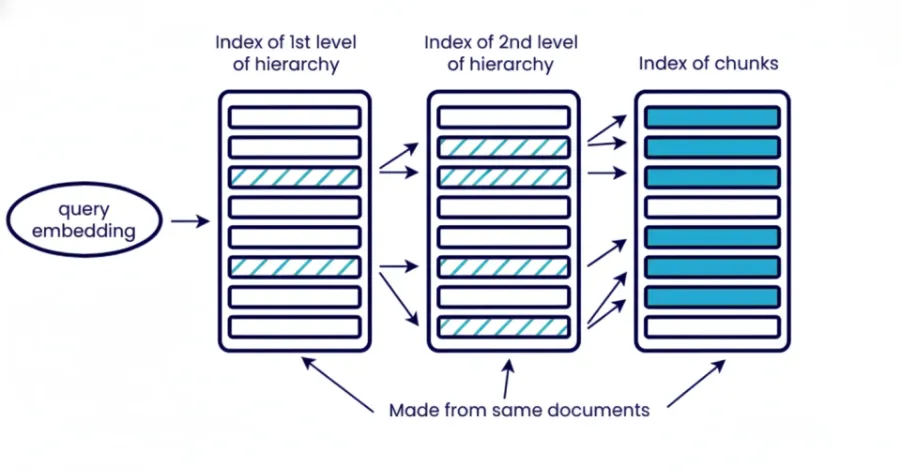
Hierarchical indexing organizes information into a number of different levels, documents, section, paragraph, sub-paragraph. You retrieve in stages starting with broad introduce to narrow down to specific context. The top level for component retrieves sections of relevant documents and the next layer retrieve paragraph or sub-paragraph on specific context within those retrieved section of last documents.
What does this mean?
Hierarchical retrieval reduces noise to the system and is useful if you need to control the context size. This is especially useful when working with a large corpus of documents and you can’t pull it all at once. It also improve interpretability for subsequent analysis as you can know which document with which section contributed to to the final answer.
Example Code:
# 5. Hierarchical Indexing

# Organize document into levels: document -> chunks -> sub-chunks

hierarchical_index = {

"document": doc_text,

"chunks": chunks,

"sub_chunks": {chunk: sub_chunk_indexing(chunk) for chunk in chunks}

}

print("Hierarchical index example:")

print(hierarchical_index)
Best Practices:
Use multiple embedding levels or combination of embedding and keywords search. For example, initially retrieve documents only with BM25 and then more precisely retrieve those relevant chunks or components with embedding.
When to use it:
- Enterprise scale RAG with thousands of documents.
- Retrieving from long form sources such as books, legal archives or technical pdf’s.
Trade off: Increased complexity due to multiple retrievals levels desired. Also requires additional storage and preprocessing for metadata/summaries. Increases query latency because of multi-step retrieval and not well suited for large unstructured data.
6. Hybrid Indexing (Multi-Modal)
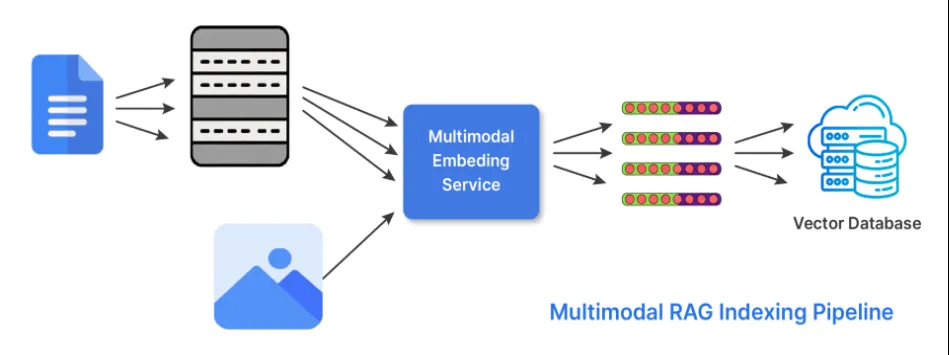
Knowledge isn’t just in text. In its hybrid indexing form, RAG does two things to be able to work with multiple forms of data or modality’s. The retriever uses embeddings it generates from different encoders specialized or tuned for each of the possible modalities. And the fetches results from each of the relevant embeddings and combines them to generate a response using scoring strategies or late-fusion approaches.
Here’s an example of its use:
- Use CLIP or BLIP for images and text captions.
- Use CodeBERT or StarCoder embeddings to process code.
Example Code:
# 6. Hybrid Indexing (example with text + image)

# Example text and dummy image embedding (replace embed_image with actual model)
def embed_image(image_data):
    # Dummy example: image data represented as length of string (replace with CLIP/BLIP encoder)
    return [len(image_data) / 1000]

text_embedding = embed(doc_text)
image_embedding = embed_image("image_bytes_or_path_here")

print("Text embedding size:", len(text_embedding))
print("Image embedding size:", len(image_embedding))
When to use hybrid indexing:
- When working with technical manuals or documentation that has images or charts.
- Multi-modal documentation or support articles.
- Product catalogues or e-commerce.
Trade-off: It is a more complicated logic and storage model for retrieval, but much richer contextual understanding in the response and higher flexibility in the domain.
Conclusion
Successful RAG systems depend on appropriate indexing strategies for the type of data and questions to be answered. Indexing guides what the retriever finds and what the language model will ground on, making it a critical foundation beyond retrieval. The type of indexing you would use may be chunk, sub-chunk, query, summary, hierarchical, or hybrid indexing, and that indexing should follow the structure present in your data, which will add to relevance, and eliminate noise. Well-designed indexing processes will lower hallucinations and provide an accurate, trustworthy system.
Frequently Asked Questions
A. Indexing encodes knowledge into embeddings, while retrieval selects which encoded pieces the model sees to answer a query.
A. They shape how precisely the system can match queries and how much context the model gets for reasoning.
A. Use it when your knowledge base mixes text, images, code, or other modalities and you need the retriever to handle all of them.

I am a Data Science Trainee at Analytics Vidhya, passionately working on the development of advanced AI solutions such as Generative AI applications, Large Language Models, and cutting-edge AI tools that push the boundaries of technology. My role also involves creating engaging educational content for Analytics Vidhya’s YouTube channels, developing comprehensive courses that cover the full spectrum of machine learning to generative AI, and authoring technical blogs that connect foundational concepts with the latest innovations in AI. Through this, I aim to contribute to building intelligent systems and share knowledge that inspires and empowers the AI community.
Login to continue reading and enjoy expert-curated content.