There wasn’t exactly anything wrong with online shopping, to be honest. Right from the global lockdown during the Covid-19 pandemic, the world got (a little too much) used to ordering their favourite things right from the comfort of their homes. But with the advent of AI, in just about everything, it was only a matter of time before AI made its appearance in the online shopping segment. And lo and behold, ChatGPT is now out with Shopping Research – a whole new way of shopping online.
Why, you ask? Well, we are all too familiar with the usual process of online shopping – total chaos. Ten tabs open, fifty reviews read, hundreds of confusing specifications. And after all this, often, still uncertainty.
OpenAI now wants to fix this with the ChatGPT Shopping Research – a new experience meant to simplify buying decisions with intelligent guidance. How? Read on to find out.
ChatGPT Shopping Research is a new feature inside ChatGPT designed to help users make smarter buying decisions without drowning in information overload. Instead of scrolling endlessly and switching between tabs, you simply tell ChatGPT what you are looking for. It understands your needs, asks a few clarifying questions, and then researches the best available options across the internet, sifting through hundreds and thousands of websites in seconds.
Think of it as a personal assistant focused purely on product research. You share your requirements, and ChatGPT Shopping Research digs deep into reviews, specifications, expert opinions, availability, pricing and performance factors. It then returns a personalized buying guide tailored to your exact situation.
For example, ask:
“Recommend the quietest cordless vacuum under Rs 30,000.”
ChatGPT Shopping Research will follow up with questions such as:
- What type of flooring do you have?
- Do you need support for pet hair?
- How important is battery life for you?
Once it understands your use case, it delivers options that actually make sense for you, rather than a random list pulled from a search results page. How exactly? Here is your answer:
In technical terms, the process goes something like this –
- Guided conversation around your query
- Online research (products and reviews)
- Highlights presented
- Sale made/ Process repeated
In simpler words, you start with a natural question, something like “Find the best Android phone under Rs 40,000 for gaming.” ChatGPT Shopping Research then begins a guided conversation and asks short, focused questions to understand your needs better. Like – ‘Battery life or camera?’ ‘Display size or weight?’ ‘Performance or price priority?’
Once it has a clear picture, ChatGPT Shopping Research searches across the internet. It reads expert reviews, detailed specifications, long-term performance tests, price trends, and availability data. It studies real user feedback across trusted sources. Then it compiles all that information into a structured and easy-to-read guide.
The final output highlights the best picks, alternatives, pros, cons, price ranges, and reasons why each product fits or does not fit your requirements. If you want to refine the list, you simply respond in a normal conversation. Say “show lighter models” or “remove premium options,” and it adjusts instantly.
Think of it as skipping the entire messy research phase and jumping straight to solid recommendations.
And yes, it works on the web and mobile apps for ChatGPT.
Now here is where things get interesting. OpenAI says that the ChatGPT Shopping Research runs on a specialized version of GPT-5 mini that OpenAI trained with reinforcement learning, built specifically for shopping tasks. In simple words, the model knows how to deal with real-world buying chaos. It knows how to juggle price, specs, colour, material, performance, and every tiny detail that usually drives buyers wild.
Under the hood, this system is a mini-model post-trained on GPT-5-Thinking-mini, fine-tuned with tough product discovery test cases. OpenAI even created a special benchmark to score something called product accuracy. This basically checks whether each recommended product actually meets every requirement you asked for. No filler results or useless suggestions.
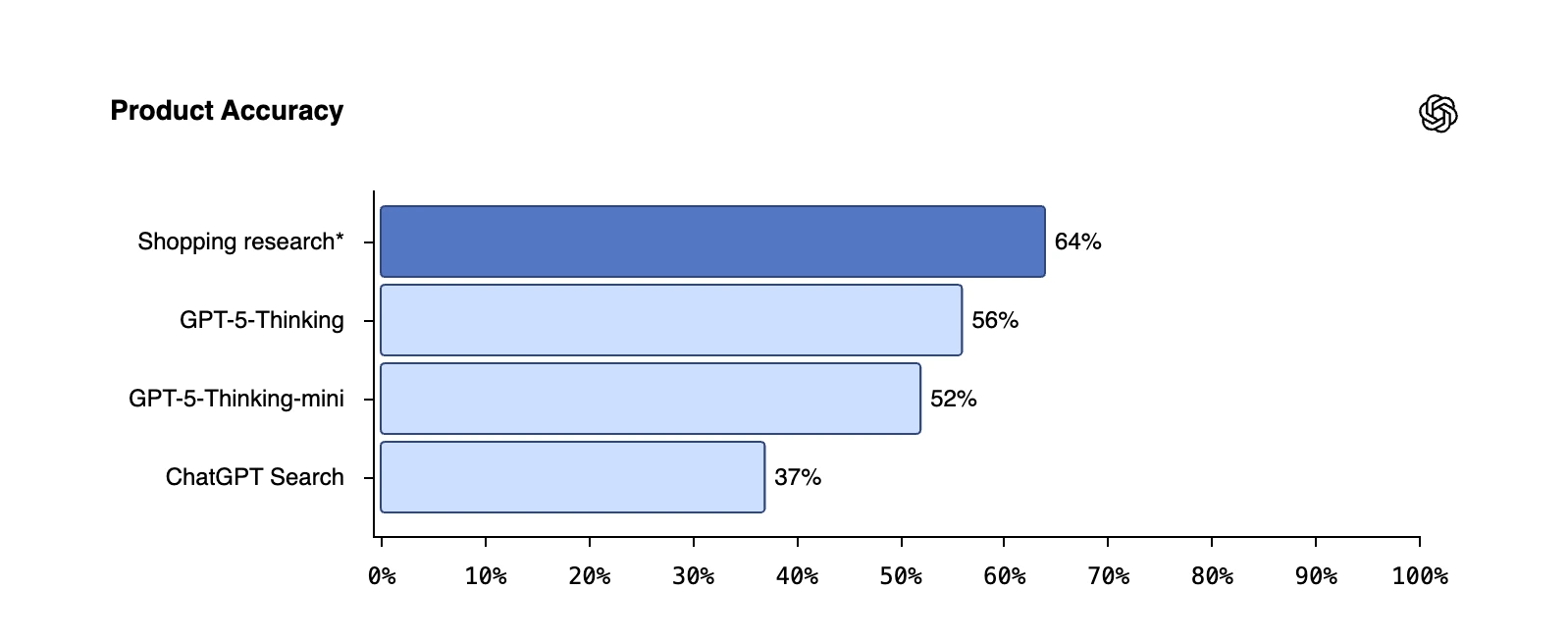
And yes, transparency remains a priority. ChatGPT Shopping Research does not share your chats with retailers. It does not include paid placements. It uses only publicly available information, cites real sources, and avoids spammy sites or low-quality data. Retailers can request to appear through an allow-listing process, but they cannot buy their way into your results. Which is refreshing, honestly.
ChatGPT Shopping Research is available across Free, Go, Plus, and Pro plans, with the rollout already in motion. Simply open the ChatGPT app or website, and you will find Shopping Research listed as an option in the drop-down list accessible from the ‘+’ icon within the chat bar.
Note: You will have to log in as a user (even if free) to access the ChatGPT Shopping Research.
Now that we know how the new ChatGPT feature works and how to access it, let’s dive right in and put it to the test.
To test the new ChatGPT Shopping Research, I used the following prompt:
Prompt: I want to buy a premium Android smartphone around the price range of Rs 1 Lakh
Here are the various stages in which ChatGPT came out with the output –
1. Permission to get started
Pretty basic, ChatGPT first asked me for a few minutes to get started with the research and find the ideal product for you. You simply have to click “Get Started” at this stage.
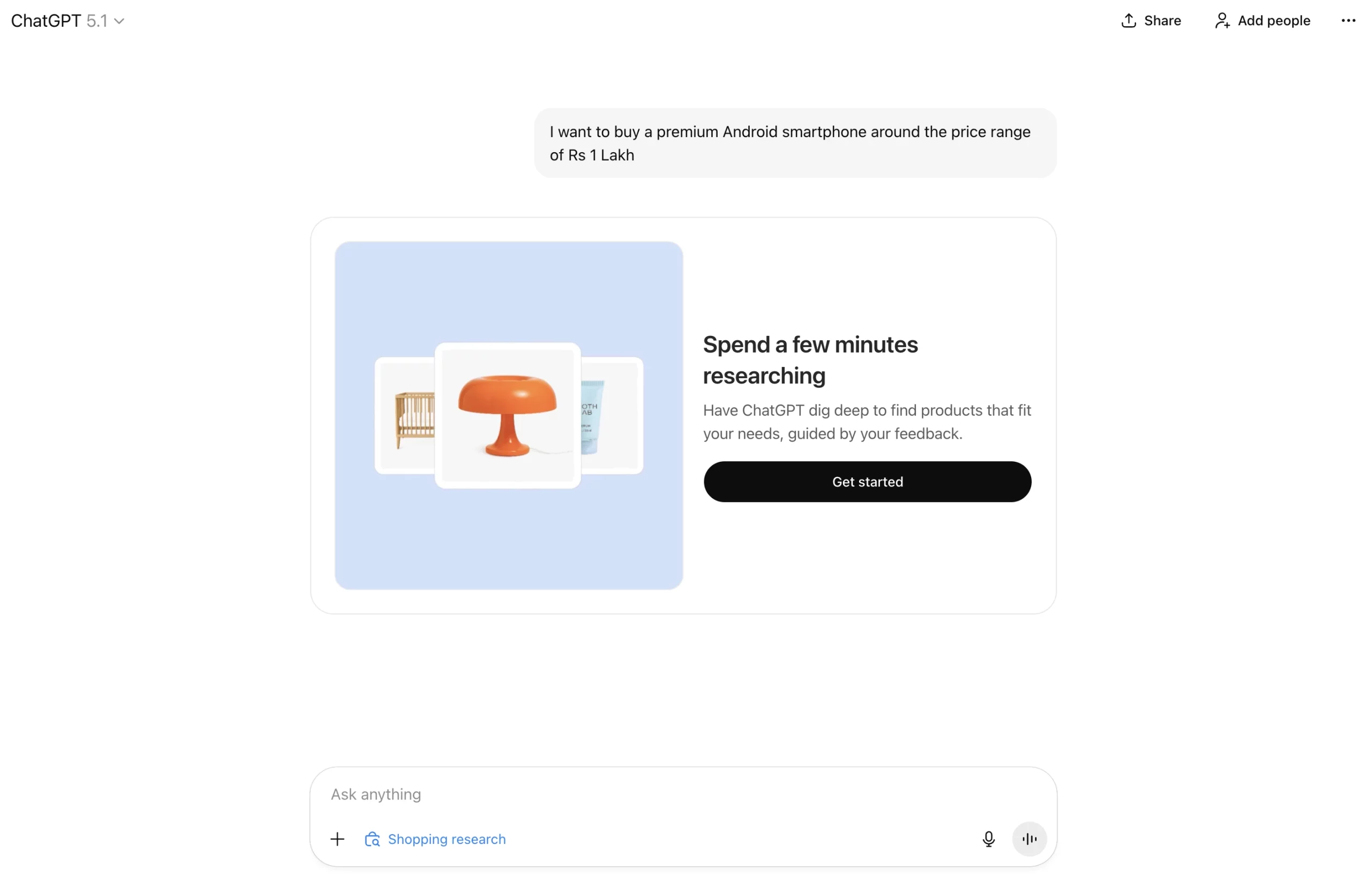
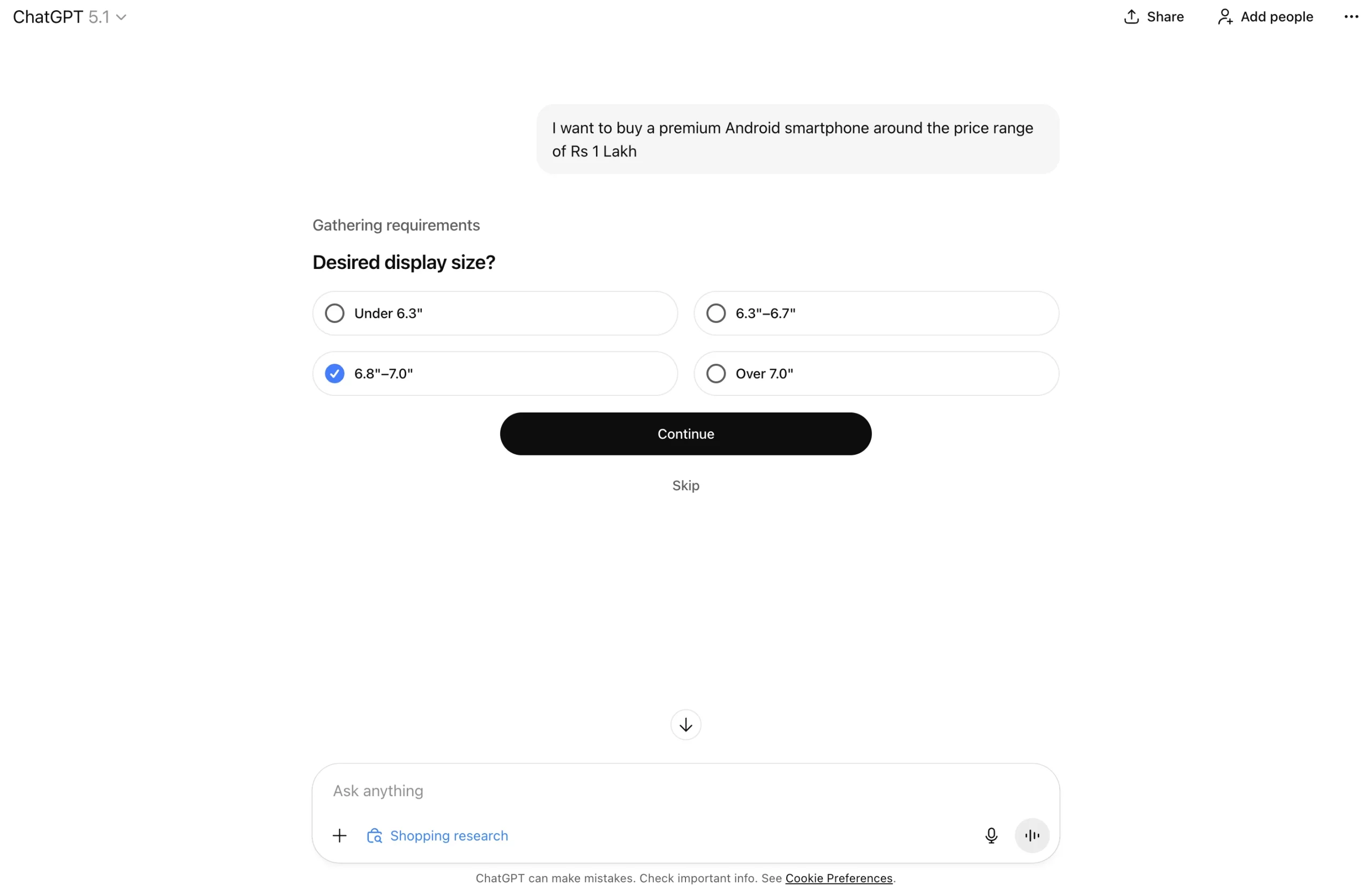
2. Gathering Requirements
It then proceeded to ask a series of questions – display size, preferred brands, etc. This is meant to close down on your ideal choice.
Simply click on an option among multiple choices.
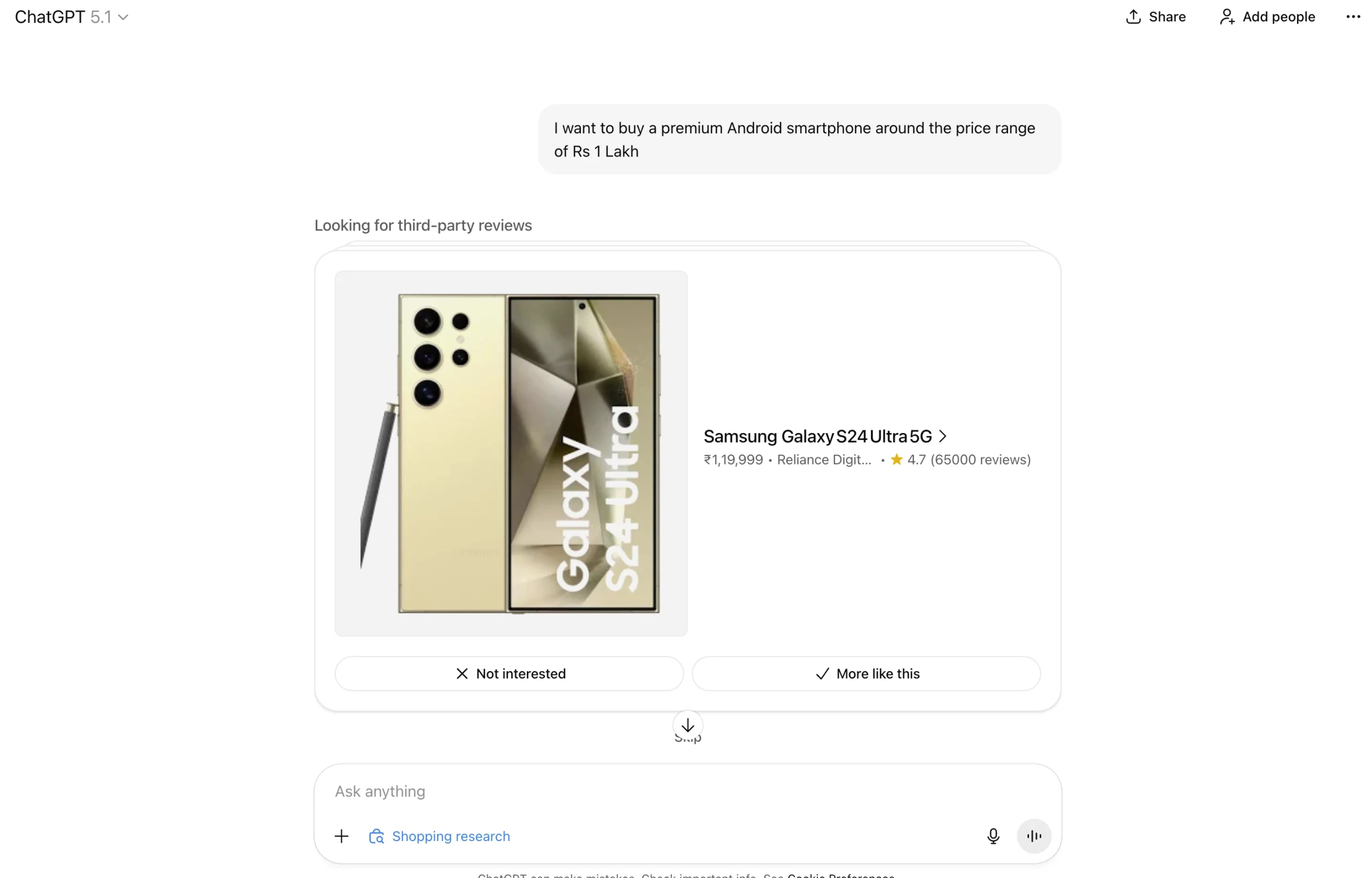
3. Preferred Choices
After the MCQs, ChatGPT asks you to pick your preferences from a card format. After showing you some options, it asks whether you like them or not, and the reasons for the same.
You can simply click on “More Like This” or “Not Interested” and pick the reasons for your choice from the follow-up card.
4. Final Output
ChatGPT comes back with a super detailed output on the few possible options that exactly match your preferences for shopping. It even shares a notification for the completed search on your device where you are logged in.
The final output contains clickable links to the options presented. You can simply click on your preference, get redirected to the sales platform and complete your purchase, or follow-up with more tweaks or questions to continue the chat.
Best part: ChatGPT presents a “Best overall” option, a comparison table, and a “How to choose among these” list that shares pointers on how you can make your final decision. Now that’s the entire research and decision-making for shopping cut down for you.
You can also check out all the options in a card format by simply clicking on the ‘View Products’ tab at the end. Check out all this in the slideshow above.
Conclusion
Online shopping was never the real problem. The real problem was the research chaos that came before hitting “Buy Now.” With ChatGPT Shopping Research, that headache finally disappears. No more endless scrolling, spreadsheets comparing specs like a confused engineer, or fifty-review deep dives at 2 AM, wondering if the battery actually lasts 10 hours or not.
ChatGPT Shopping Research turns the whole process into a clean, guided conversation that actually feels human. It understands what you want, adapts when you change your mind, and brings back results that make sense instead of adding to the chaos. And if this is just the starting point, imagine what the future of shopping is going to look like. Shopping might finally become fun again.
Now go ahead – ask ChatGPT what to buy next. And enjoy the silence of zero open tabs.
Login to continue reading and enjoy expert-curated content.