In today’s fast-moving digital world, every extra second your app takes to load means lost users and lost revenue. For startups, a one-second delay in mobile app load time can reduce conversions by 7%. More than 50% of users abandon apps that take longer than 3 seconds to load. And here’s the hard truth that your investors, customers, and competitors are all watching.
Building your app in React Native is a smart choice. It’s flexible, cost-effective, and allows startups to reach both iOS and Android users more quickly. But what many founders, CTOs, and product managers underestimate is that a React Native app is only as good as its optimization. A sleek UI with poor performance won’t retain users. And a fast app with UI glitches won’t win investor confidence.
In this comprehensive guide, we will break down how startups and enterprise leaders can treat React Native optimization as a growth engine. You’ll learn the challenges dragging your app down, the fixes that can make it run like lightning, and how this directly translates into user retention, revenue growth, and long-term scalability. So, stay tuned till the end for some useful insights :
The True Cost of a Slow App: What Startups Often Overlook
In today’s competitive era, every startup wants growth. However, few realize that performance is a key factor in startup app growth. A slow app faces a lot of challenges in more ways than one:
User retention drops: Users delete laggy apps faster than you can acquire new ones. Therefore, it reduces user retention to a great extent.
- App ratings plummet: Performance complaints dominate reviews, lowering discoverability.
- Higher acquisition costs: Poor retention forces startups to spend more on ads and re-engagement.
- Investor red flags: Scalability issues make investors hesitant about funding.
In fact, 79% of users say they won’t retry an app that failed the first time. That’s not a small mistake; that can be one of the major reasons for your business failure. You can reach out to a top-notch react native app development company in USA to ensure your app’s success in the long run.
The Most Common React Native Performance Traps for Startups
Startups often rush to launch, overlooking performance bottlenecks that grow worse with scale. The biggest challenges are:
- Heavy bundle size: Larger apps take longer to load and update.
- UI lag during high activity: Scrolling, animations, and gestures don’t feel smooth.
- API overload: Multiple inefficient API calls slow data delivery.
- Unoptimized images and assets: Large or uncompressed images slow down the app.
These issues may feel “technical,” but they are direct business problems because every slowdown means lower engagement and lower revenue. This is where choosing the right cross platform app development company becomes critical, as they bring expertise in performance-first design and scalability. Along with this comprehensive React Native optimization guide, working with such experts can help startups achieve faster, smoother, and more profitable apps.
Optimizing Tips for React Native Speed: Startup-Friendly Fixes
Speed isn’t just about a faster app. It’s about retaining users, keeping your ratings high, and reducing churn. For startups, small tweaks in React Native performance optimization can create a big business impact without burning the budget. Here are the most practical React Native performance best practices or fixes you should focus on:
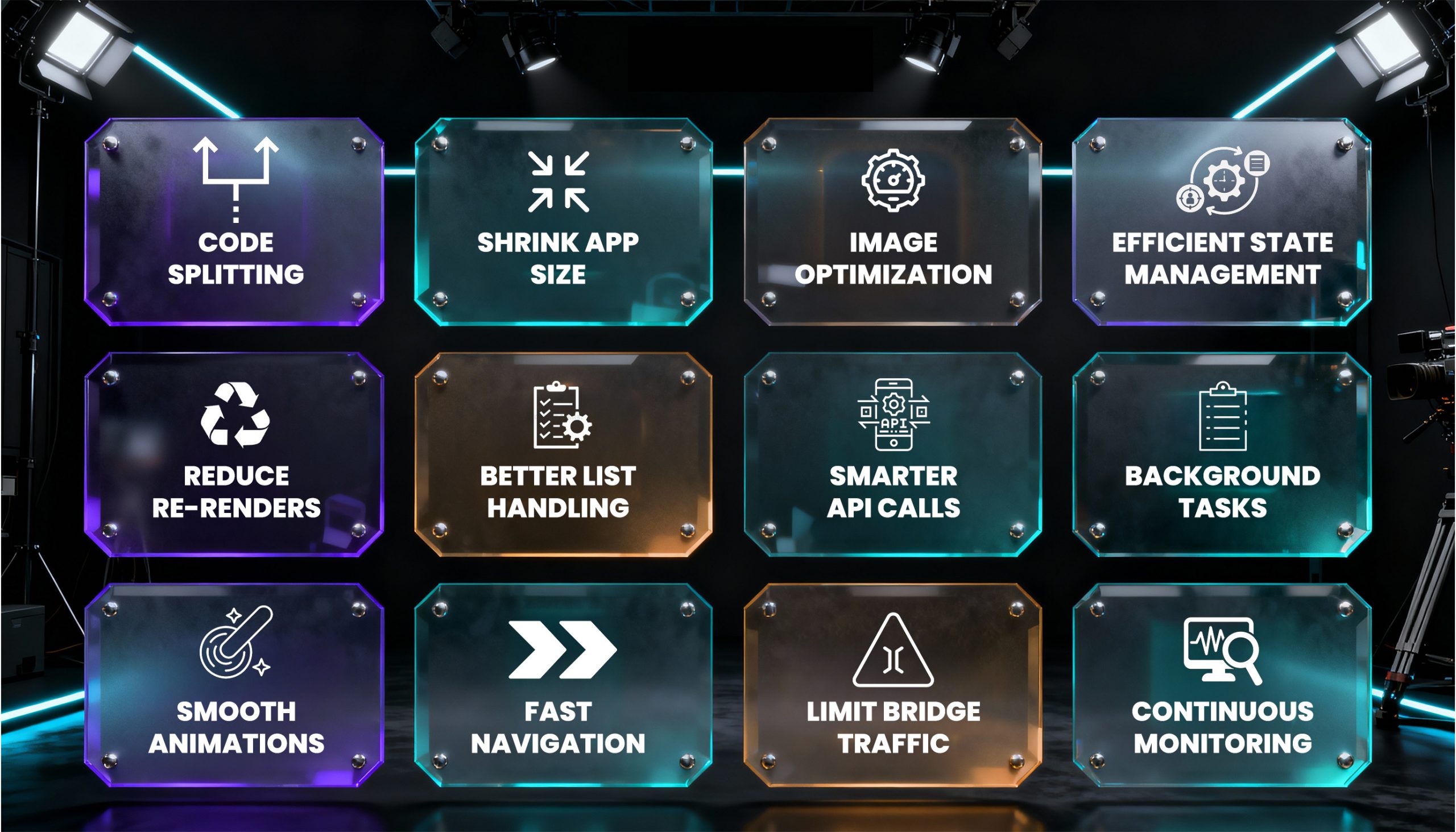
1. Code Splitting & Lazy Loading
Instead of forcing users to download the entire app upfront, break your code into smaller chunks. Load only what’s needed when the user opens a screen. This reduces initial load times and gives a smoother first impression. Startups that implement slow loading often experience a significant drop in bounce rates.
2. Minimize App Size With Hermes & ProGuard
Large apps frustrate users. By enabling Hermes (React Native’s JavaScript engine) and tools like ProGuard, you shrink your app size. Smaller apps download faster, update seamlessly, and consume less device storage. That translates to fewer uninstallations. You can seek help from top-notch React Native app development companies to minimize your app size properly.
3. Optimize Images & Media Assets
High-quality visuals are necessary, but unoptimized images slow everything down. Use formats like WebP, compress files without losing clarity, and serve images based on device resolution. No doubt that a lighter app means faster interactions.
4. Smarter State Management
When using React Native for mobile app development, managing app data can get messy and slow things down. Use tools like Redux Toolkit, Recoil, or Context API for lightweight handling. Keep your states local wherever possible. Efficient state management reduces lag when users interact with features.
5. Avoid Unnecessary Re-renders
Re-rendering is one of the hidden killers of React Native performance. Use React. Memo, PureComponent, and useCallback to prevent unnecessary re-renders of components. This helps your app run smoothly, especially on mid-range devices that your users might rely on.
6. Leverage FlatList for Large Data Sets
Displaying large lists (e.g., feeds, catalogs) can choke your app. Instead of ScrollView, use FlatList or SectionList, which render items only when they appear on screen. This cuts memory use and improves scrolling performance. If you are a non-tech founder, you can avail yourself of top-notch mobile app development services to get a complete roadmap.
7. Batch & Optimize API Calls
Poor API handling creates delays. Switch to GraphQL to fetch only what’s needed, batch requests together, and prefetch data where possible. Also, add caching to prevent hitting the server for repetitive data. This ensures your app runs fast even with a growing user base.
8. Background Processing for Heavy Tasks
Don’t block the user interface with heavy operations like syncing or data fetching. Push these into background threads. Libraries like react-native-background-fetch help ensure smooth UI while heavy work runs behind the scenes.
9. Use Interaction Manager for Complex Animations
Animations and gestures are critical for user experience. Use InteractionManager to delay heavy tasks until animations finish. Pair this with tools like react-native-reanimated to ensure buttery-smooth transitions.
10. Optimize Navigation
Navigation speed is often overlooked when you develop React Native app solutions. Tools like React Navigation allow you to enable lazy loading of screens, preload assets, and reduce transition lag. A faster navigation flow makes the app feel instantly responsive.
11. Reduce Bridge Traffic (JS to Native)
React Native apps often slow down because of constant communication between JavaScript and Native threads. Reduce unnecessary bridging by batching operations and minimizing calls. This is especially important in apps with heavy device interactions like cameras or sensors.
12. Profile & Monitor Regularly
React Native Performance optimization isn’t a one-time setup. You can use tools like Flipper, React DevTools, and Firebase Performance Monitoring to track and improve react native performance. You must identify bottlenecks early before they scale into major problems. Startups can also avail React Native app development services to regularly monitor their app performance.
APIs: The Silent Performance Killer You Can’t Ignore
Most startups underestimate how APIs slow down apps. If every user action calls multiple APIs, your app becomes slow.
Smarter API Management for Startups:
- GraphQL Batching: Fetch only what’s needed, reducing data overload.
- Caching & Prefetching: Store frequent requests locally to save bandwidth.
- Background Sync: Handle updates in the background, so users never wait.
Think of APIs as your app’s oxygen supply. Managethem poorly, and your app suffocates. Manage them smartly, and your app runs effortlessly.

When Design Meets Performance: Making UI/UX Better
Your app doesn’t just need to be fast. It needs to feel fast. Even a technically optimized app can feel clunky if UI interactions aren’t smooth. Using the top React Native components for stunning and functional app development ensures that your design not only looks polished but also delivers fluid, responsive experiences that users love.
- Maintain 60 FPS animations to avoid laggy experiences.
- Use FlatList or VirtualizedList for large data rendering without slowing the scroll.
- Optimize navigation transitions so users don’t feel friction.
A fluid UI creates subconscious trust. Users feel your app is “professional,” which directly impacts whether they’ll pay, subscribe, or recommend it.
Read Also: Top React Native IDEs and Editors in 2025
Security Without the Performance Penalty
Prioritizing security is one of the best practices for React Native performance. Startups often fear that adding security layers will slow performance. But with modern tools and innovations like Artificial Intelligence with React Native, you can enable lightweight encryption, secure storage, and token-based authentication without heavy drag.
Why this matters: Investors and enterprise clients expect both security and scalability. If your app isn’t optimized on both fronts, growth opportunities are lost.
How Optimization Directly Impacts Startup Revenue
Now, let’s connect the dots between performance and revenue:
- Faster load times → Higher conversions: Amazon found that every 100ms of latency costs them 1% in sales.
- Better UI → More in-app purchases: Smooth checkout flows reduce drop-offs.
- Improved performance → Higher ratings: A 0.1 improvement in star rating increases downloads by 3-5%.
- Retention = Lower costs: Keeping users is cheaper than acquiring new ones.
Especially for startups, these are not abstract numbers; they’re survival statistics. If they are keeping track of these metrics, it can help them to have an edge over their competitors. Along with that, you must discuss the accurate estimate of React Native app development cost to ensure the highest returns.
Wrapping Up:
If you’re a startup leader, ask yourself: Is your React Native app fast enough to win users and investors? If not, every second you delay optimization, you’re losing revenue, retention, and reputation. React Native optimization is not just technical; it directly impacts user satisfaction, app ratings, conversions, and investor confidence.
Therefore, startups must treat app performance as a growth driver, not a cost center, ensuring long-term scalability and competitiveness. And if you don’t have in-house expertise, you can work with a globally-recognized mobile app development company that specializes in React Native optimization for startups. Because in today’s market, speed isn’t just an advantage; it has become a survival for every startup out there.
FAQs
Q1. Why does React Native app performance matter for startups?
React Native app performance matters because speed = user trust. A slow app frustrates users, drives down ratings, and hurts retention. For startups, every second of lag means lost revenue and investor doubts.
Q2. How can startups reduce React Native app load time?
Using code splitting, lazy loading, and optimizing bundles helps apps launch faster. Lightweight assets and caching further cut initial load times.
Q3. Can React Native apps run as smoothly as native apps?
Yes, React Native apps can run as native apps when optimized properly. In the React Native vs Native Apps debate, the gap closes with smart optimization. With proper memory management, reduced bridge usage, and clean code practices, React Native apps can match native performance.
Q4. How does app performance impact revenue?
Faster apps increase session time, improve conversions, and boost app store ratings. Startups see better ROI because happy users are paying users.
Q5. Who should startups partner with for React Native optimization?
Startups can work closely with an experienced React Native app development company to ensure your app is tuned for speed, scalability, and long-term growth.