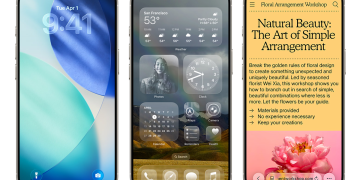
Have you updated your iPhone to the new iOS 26 yet or are you holding off? It’s been available to download since September 15 — here’s how to install it if you haven’t yet. The new OS was released alongside iPadOS 26 and Apple’s other operating system updates. Since then, the first beta of iOS 26.1 has already been released with some newer features.
If your phone is compatible with the latest OS, you’ll notice substantial changes when you install the new update. You may have already heard about “Liquid Glass,” which (intentional or not) is sort of like Apple’s take on the old Windows Vista design language. That’s the most notable change, but we spent two weeks test-driving many of the other features included in the update — you can check out our hands-on iOS 26 preview for more impressions.
Not sure if you have an eligible smartphone or tablet but also don’t want to upgrade? No worries, we’ll help you find out if your devices will be able to run iOS 26.
While Apple didn’t nix any iPhones from its eligibility list last year, that’s not the case for 2025, as a few models got axed this time around. All iPhone 8 models and the iPhone X were the last to receive the boot in 2023, and this year, iPhones released in 2018 will be left behind.
You can find a full list of iPhones and iPads that support iOS 26 and iPadOS 26 below. To see everything you get with the latest OS updates, you can check out our big rundown of what to expect from iOS 26. Additionally, here’s everything Apple revealed at the iPhone 17 launch event, including the all-new iPhone Air. (Check out Engadget’s liveblog of the event for full details.)
These three iOS 18 iPhones aren’t compatible with iOS 26
Unlike last year, a trio of iPhones won’t be eligible to download the newest iOS. These three models that were first released in 2018 won’t be coming to the iOS 26 party:
iPhones compatible with iOS 26
Per Apple’s site, the devices listed below will be compatible with iOS 26. In short, if you have an iPhone that was announced in 2019 or later, you’re in the clear:
-
iPhone SE (second generation or later)
iPads compatible with iPadOS 26
Meanwhile, the iPads listed below are eligible to download iPadOS 26:
-
iPad Pro 12.9‑inch (3rd generation and later)
-
iPad Pro 11‑inch (1st generation and later)
-
iPad Air (3rd generation and later, including M2 and M3)
-
iPad (8th generation and later, including A16)
-
iPad mini (5th generation and later, including A17 Pro)
What if I don’t want to buy a new iPhone?
If you want to continue using your older iPhone that isn’t supported by iOS 26, that’s fine. However, you’ll eventually miss out on security updates which could potentially put your phone at risk for malware and other threats. Additionally, some apps may stop working if they require a certain version of iOS or later. And, of course, you won’t be able to access the latest features iOS 26 offers.
Should I upgrade to iOS 18.7 or iOS 26?
When you first open Software Update in Settings, you’ll notice two different upgrade options: iOS 18.7 and iOS 26. Apple released the former to address security issues, so you can at least download that one if you’re unsure about all the big changes on iOS 26. It also gives you more time to wait for Apple to take care of any bugs on the new OS.
However, if you’re excited to finally have the Liquid Glass aesthetic on your phone and use all the new features iOS 26 has to offer, go ahead and install that one. After all, Apple had all summer to weed through the most problematic bugs during its beta phase and usually releases a new update shortly after the initial launch.
iOS 26 features to try out first
Liquid Glass design: Your home screen is getting revamped with new app icons, including dark mode and all-clear options. You’ll also notice buttons with a new floating design. Liquid Glass, in Apple’s terms, was designed to make all of the company’s operating systems more visually cohesive.
Phone app redesign: You can finally scroll through contacts, recent calls and voicemail messages all on one screen. It also comes with a new feature called Hold Assist that’ll notify you when an agent comes to the phone so you can avoid the elevator music.
Live Translate: iOS 26 brings the ability to have a conversation via phone call or text message with someone who speaks another language. Live Translate will translate your conversation in real time.
Polls feature: Coming to group messages in the Messages app, chat members can now create polls. This can help prevent the unwanted 30+ messages when it comes to deciding which restaurant you’re meeting at this weekend.
New lock screen options: More customizable iPhone lock screen options are available with iOS 26, including a cooler clock, 3D wallpaper effects, more widgets and better focus mode options.
Snooze longer (or shorter): Say goodbye to the 9-minute snooze setting in your alarms (if you want). You now have the option to change your snooze time from one to 15 minutes.
Fresh Camera app design: You’ll find the Camera app is simpler to navigate in iOS 26, with all the buttons and menus located in convenient spots. That means less swiping, more photo taking. Plus, there’s a new feature that tells you if your lens is too dirty.
Screenshot revamps: When you take a screenshot, you now have the option to search for the image on Google (maybe you’re looking for a sweater you saw on a celeb) and you can ask ChatGPT questions about the photo — all from the edit screen. It’s like a reverse image search but without all the hard work.