Rita El Khoury / Android Authority
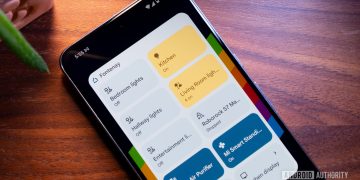
Google is working on a brand new Home app with Gemini integration. My colleague AssembleDebug was able to trigger that new interface and showed off the spiffy redesign with streamlined tabs that merge favorites and devices under a new Home tab, and push settings up to the account switcher. There’s a permanent new “Ask Home” text box at the top to talk to your smart home via Gemini, ask about security camera activity and device statuses, execute actions, or even demand help when building automations.
All of this sounds great, and I can’t wait to test it out, but I can’t help but feel like Google is still missing out on more important and overdue updates to the Home app. Talking to Gemini is cool, but it doesn’t check all the boxes of what I expect from my smart home app. Instead, I wish Google would work on these six features.
What feature do you want Google to add to the Home app?
0 votes
Give me customizable tiles and dashboards

Rita El Khoury / Android Authority
Home Assistant has built a name for itself for many reasons, one of which is all the crazy dashboards people have been building to tailor their smart home to their needs. Meanwhile, Google Home’s dashboard hasn’t changed in years. Even the new app doesn’t bode well for this, as it seems like all you can control are favorites and the order they appear in.
I want the option to hide devices from my Google Home view. For example, all my Hue motion sensors showed up because I synced my Hue account with Google Home, but I don’t care to see if there’s motion detected or not. At most, I want to use them in routines, but not permanently in my device list.
I also wish I could resize tiles to half or double their size. Some, like the washer and dryer, don’t need to be this big. Some, like my Google Nest Audio, should be larger when something is playing and smaller when they’re not doing anything. I’d go as far as saying that I’d like more control over what I see in each tile (I’d like to see the CO2 level of my air quality monitor without opening it, for example) and what tapping it does, but that feels a bit too demanding.
And finally, and most importantly, I just want the option to organize all my devices. It makes no sense that the only sorting order for rooms and device names is alphabetical, with no way to sort by priority or frequency of use, unless I completely re-create my dashboard in Favorites.
Google Home needs an easier way to build powerful routines
The YAML code editor for routines is nice, but not everyone wants to dabble with that just to be able to change the mode of their thermostat or set their fan’s speed. Google Home already sees all the attributes and actions available on a device; it should simply let us control them all in automations, too.
Although the new automation builder has improved things a bit, it still lacks a lot of essential features like scene control, light color pickers, support for several device types (washers, dryers, thermostats, vacuums), more powerful Home and Away modes, and smarter automation logic.
Rooms aren’t enough; let me group my devices

Today’s homes are more complex than a simple set of rooms, but Google Home forces us to set them up like that. If you have an open kitchen, like I do, you might have a kitchen, dining room, and living area all connected together. There are times when I want to control all of these, and times when I only want to turn on the kitchen lights, but Google doesn’t allow me to have separate groups. Similarly, in my office, I have overhead lights that I use all the time and ambiance lights that I only turn on when I’m shooting photos for Android Authority. Google doesn’t let me separate those, either. We also have floor heating across both my husband’s and my offices, but there’s no way to tell Google that this single thermostat controls both rooms.
I just want Google Home to get out of its basic room configuration and allow more flexibility in how devices are grouped or separated. Grouping solves that. I could have two distinct groups of lights in my office instead of creating a separate room for “office photography,” or separate my open floor into three groups for kitchen, dining, and living, while leaving some shared devices (like the thermostat, air purifier, and vacuum) in the main room. This is a basic feature of any smart home app and configuration, and I can’t believe Google has yet to implement it.
More camera brands should be supported
I’m tired of Google playing favorites with its own Nest cameras and a few very select models or brands of security cams. I’ve bought and tried a bunch of cams, and none of them showed up correctly in my Google Home app, nor did they work properly on my Nest Hub, Pixel Watch, or Google TV. That feels very elitist and unnecessarily locked up. My current favorite Nest cam alternative, the excellent TP-Link Tapo C225, can be connected to Google Home, but it’s slow as hell to load, doesn’t show thumbnails in the Favorites tab, and doesn’t send updates and notifications through the Activity tab. And it’s not Tapo’s fault.
When Google provides a proper API for every other smart home device type, I don’t understand why cameras get treated differently, and why there’s favoritism towards a few camera models and brands. Just open this up so we can buy whatever cam suits us, exactly like we can buy any brand of thermostats and aren’t limited to Nest’s.
Make my scenes more visible and easily accessible
Scenes are an integral part of any smart home platform, and Google Home supports them, but until now, they’ve been more or less invisible. I can’t see which scenes are available or manually trigger them — the only way is to speak the voice command into Google Assistant or Gemini and let it execute the scene. Plus, scenes used to sporadically show up when creating a new routine, but they’re not part of the new automation builder yet.
Any smart home platform I use must support these; otherwise, it’s very useless to me. I don’t want to waste my time arguing with Google over the exact color of the living room lights when I’ve already set that up as a scene in my Hue app, nor do I want to speak three or more commands to control different devices when I can simply tie them together into a scene. I want Google Home to surface scenes to me in a separate menu, and show scenes associated to devices in the device’s page. So if I have a scene that controls the kitchen light, it should appear under the light’s toggle and brightness/color picker.
I need proper logs and history
Maybe I’m a bit manic, but if devices are doing things on their own in my home, then I need to see what they did and when. Did my garden light turn on because someone pressed a button, or did the motion sensor trigger it? Did my cooking automation turn on all my air purifiers or did one of them fail? What’s the history of my CO2 levels in my office? All of these are questions Google Home could answer, but it doesn’t yet because it doesn’t keep visible logs of everything that happens.
Today, the Activity tab in my Home app only shows security devices (locks, cameras, security systems) as well as Google Home devices. It doesn’t track lights, thermostats, appliances, air conditioners, fans, and other supported devices, nor does it save the historical data from my temperature and humidity sensor, air quality monitor, or motion sensor. I like to see all of these, maybe not all the time, but I need to know they’re accessible when I have to consult them.
This and every other feature I mentioned earlier are available in Home Assistant, the platform I’m slowly moving to. Despite the extra steep learning curve, the more I use it, the more I realize how much I was missing by restricting myself to Google Home for the better part of a decade. Having a smart home is more than just having a few voice commands and toggles; it’s about building a system that reacts and responds exactly like I want, without me pressing buttons or asking for things. It’s about controlling everything but also letting go, and my issue with Google Home in its current state is that I can do neither this nor that.
I doubt Gemini integration in the new Google Home app design would fix any of that. It’s a bit like putting icing on a crumb cake. Yes, some actions should be a bit simpler and more straightforward with Gemini, especially for those who aren’t experts at using Google Home. But it’s not enough for any slightly advanced smart home user. Google can and should do better if it wants to stop more people from migrating away to different ecosystems and more powerful platforms.
Thank you for being part of our community. Read our Comment Policy before posting.