TradingView and ThinkOrSwim (ToS) are both “serious trader” platforms—but they come from different worlds. TradingView is a global, broker-agnostic charting and trading ecosystem with a huge social community. ThinkOrSwim is a professional-grade platform from Charles Schwab, featuring deep options tools, advanced order routing, and desktop-first execution.
Ratings
In my testing, TradingView scores 4.8/5.0 because it excels in charting, screening, and backtesting globally, whereas ThinkOrSwim scores 4.3/5.0 due to its limited community, inferior charting features, and clunky interface.
☆ 60% Discount ☆
Deal Ends In:
TradingView Screenshots
🏅 Verdict
TradingView is the better all-rounder for most traders thanks to superior charting, screening, backtesting, international market coverage, and community. ThinkOrSwim is the better choice for active US options traders who want complex order types, analytics, and brokerage-grade execution on a desktop.
In one line: TradingView is the universal research engine; ThinkOrSwim is the options workstation.
Features
TradingView is a global, broker-agnostic research and strategy platform: elite charts, vast screeners, code-and-click strategy testing, and an active social layer that accelerates learning.
| Features | TradingView | ThinkOrSwim |
⚡ Features |
Charts, News, Watchlists, Screening | Screening, Heatmaps, Charts |
| 🏆 Unique Features
|
Trading, Backtesting, Community | Options Trading, Trader TV |
| 🎯 Best for | Stock, FX & Crypto Traders | Schwab Clients |
| ♲ Subscription | Monthly, Yearly | Monthly, Yearly |
| 💰 Price | Free | $14/m | $28/m | $56/m annually | Free for Schwab Clients |
| 🆓 Free Plan | ✔ | ✔ |
| 💻 OS | Web & Desktop | Web & Desktop |
| 🎮 Trial | Free 30-Day Premium | ✘ |
| 🌎 Region | Global Stocks, Crypto, FX, Futures | US Stocks / FX |
| ✂ Discount | $15 Discount + 30-Day Pro Trial | ✘ |
| 🏢 Visit | Try TradingView Free | Try ThinkOrSwim |
ThinkOrSwim is an execution and options powerhouse: multi-leg strategies, probability analysis, risk profiles, conditional orders, and desktop-first control within the Schwab ecosystem.
ThinkOrSwim Screenshots
Below, I announce the winner for each category, then delve into what matters and how it works in real trading.
Charting & Analysis Tools — Winner: TradingView
The call: Both platforms chart beautifully, but TradingView is faster, more elegant in the browser, and offers more specialty chart types (Renko, Kagi, Line Break, Point & Figure) with a seamless annotation workflow that’s easy to share. ToS is excellent on desktop with deep indicator coverage and control; it’s just heavier.
Deeper Dive: What great charts actually mean
- Speed to insight: Lightning-fast zoom, pan, multi-layout, and object snapping keep you in flow.
- Precision: Magnet modes, anchored VWAPs, multi-timeframe drawings, and quick style presets reduce setup time.
- Repeatability: Save chart layouts and reuse across tickers without re-drawing.
- Collaboration: Publish annotated charts or share private links to get feedback from other traders.
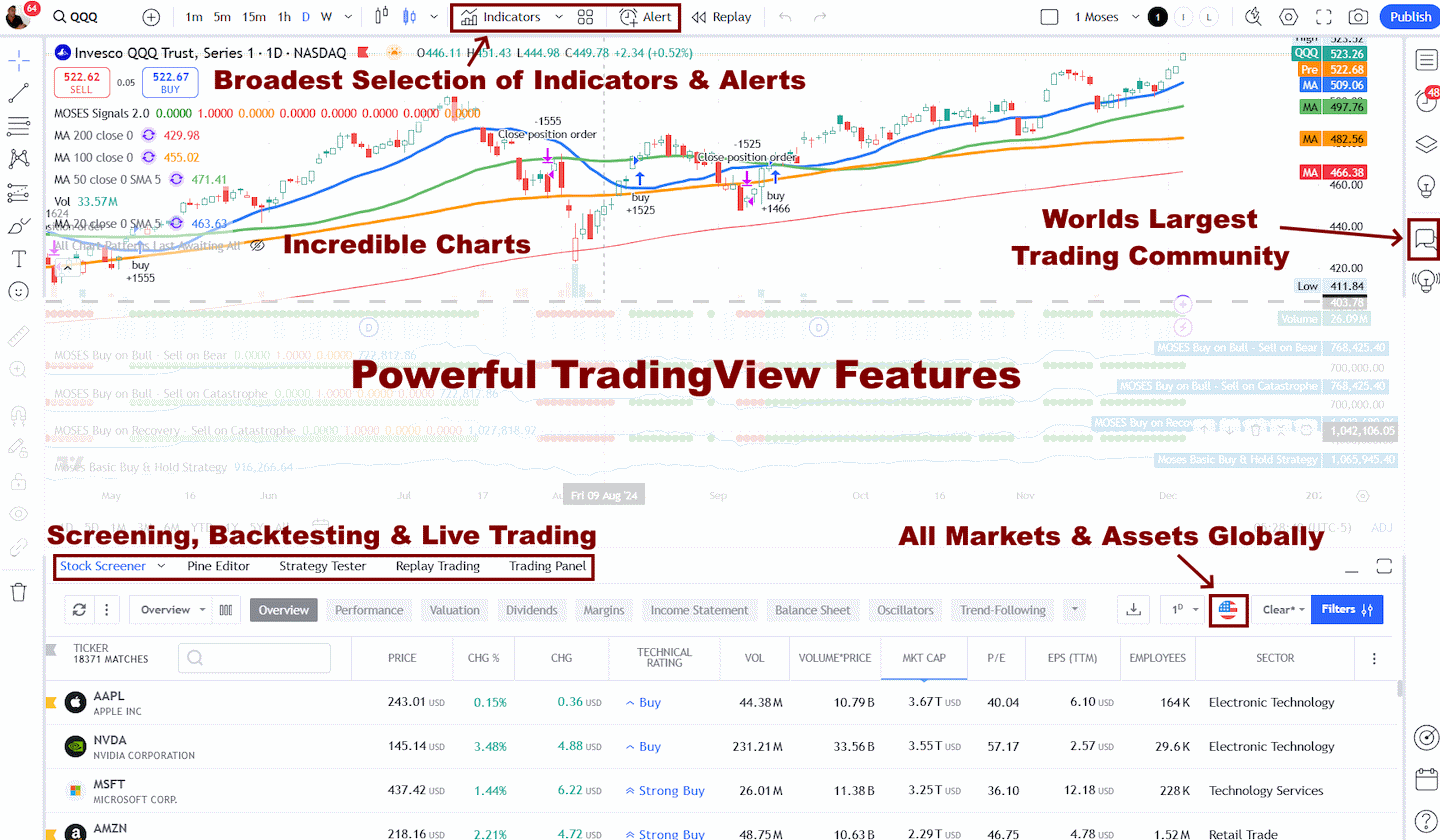
Self-test: Load five core tickers, add your drawings (trendlines, zones, fibs), jump timeframes (1m → D → W), and see which platform lets you work faster.
Indicators & Scripting — Winner: TradingView
The call: Both languages are capable. Pine Script is simpler to learn and ties directly to TradingView’s strategy objects (not just indicators), so you can code signals and immediately test them. thinkScript is powerful, but common retail workflows require more effort to reach the same “idea-to-test” loop.
Deeper Dive: From idea to coded signal
- TradingView: Start with a public script, tweak parameters, convert to a strategy, and see entry/exit marks plus equity curve in minutes.
- ToS: Build thinkScript studies and strategy objects that simulate orders on charts; great for tinkerers, but less streamlined for full performance summaries out of the box.
Tip: New to scripting? Pine’s gentle curve and giant public library lower the barrier to custom signals.
Backtesting — Winner: TradingView
The call: TradingView integrates a visual Strategy Tester with performance metrics, equity curves, drawdowns, and trade lists. ToS can simulate strategy entries on charts and shines in risk analysis, but it doesn’t match TradingView’s quick, iterative backtest workflow for retail users.
Deeper Dive: What a useful backtest includes
- Iteration speed: Test variants (e.g., RSI(2) vs. RSI(3), different stops) quickly to gauge robustness.
- Execution realism: Incorporate slippage/commissions in scripts to avoid fantasy results.
- Transferability: Turn a profitable script into alerts or broker-connected orders when you’re ready.
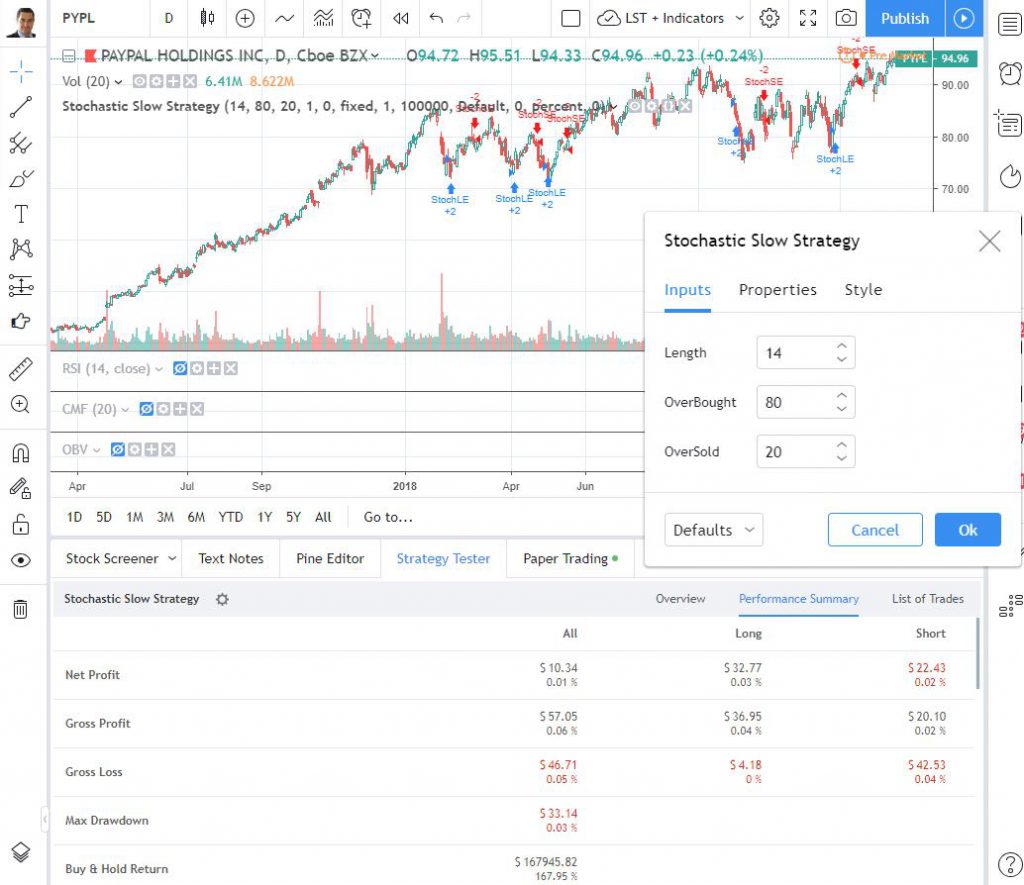
Reality check: Backtesting is not a profit guarantee; it’s a research accelerator. The platform that shortens your test cycle wins.
Screening & Scanning — Winner: TradingView
The call: TradingView offers fast, global stock/ETF/crypto screening with fundamental and technical filters and a polished UI. ToS provides serious equity + options scanning tied to its desktop engine. If you’re equity-focused across global markets, TradingView feels broader; if you hunt options structures or unusual activity, ToS is excellent.

Deeper Dive: Scanner power moves
- Cross-market breadth (TradingView): Scan US, EU, and APAC stocks in one place, align with watchlists, and jump straight to annotated charts.
- Options-oriented scans (ToS): Filter by delta, open interest, probability OTM/ITM, and build candidates for multi-leg strategies directly.
- Workflow: Save scans, link to alerts, and review signals at set times daily.
Personal rule: The best scanner is the one that reliably puts the right five charts on your screen every morning.
Options Trading — Winner: ThinkOrSwim
The call: This is ToS territory. You get multi-leg strategy builders, Greeks, probability analysis, risk profiles, and paperMoney/OnDemand for practice. TradingView lacks a native US equity options modeling suite. If options are central to your trading, pick ThinkOrSwim without hesitation.

Deeper Dive: The Analyze tab advantage
- Risk curves & what-ifs: Plot P/L vs. price with volatility and time changes to understand exposure before sending the order.
- Probability tools: Estimate the chance of touching/expiring at a strike to size positions intelligently.
- Multi-leg construction: Iron condors, butterflies, calendars; stage, analyze, and send with linked orders.
Execution rule of thumb: If you manage risk primarily through structure (Greeks/time/volatility), ToS is built for you.
Execution, Order Types & Routing — Winner: ThinkOrSwim
The call: TradingView executes via supported brokers with trade-from-chart, alerts, and solid order control. ToS delivers advanced order types (OCO/OTO/conditional), nuanced routing, and a professional desktop ticket with rich controls—especially valuable for active day traders and options specialists.

Deeper Dive: What the ticket should do for you
- Conditional logic: Attach stops/targets, time-in-force, and contingent events to reduce manual errors.
- Linked orders: Build bracketed exits so your risk is defined at entry.
- Speed vs. safety: ToS lets you design tickets that respect your risk plan even when you’re moving fast.
Pro tip: Pre-build order templates for common setups (e.g., 1R stop/2R target). One click, consistent risk.
Markets & Data Coverage — Winner: TradingView
The call: TradingView is truly global across stocks, ETFs, indices, forex, futures, and crypto, which makes it ideal if you trade multiple asset classes or international markets. ToS covers US stocks/ETFs/options and offers futures/forex within the Schwab stack, but the overall footprint is more US-centric.
Deeper Dive: Why breadth matters
- Diversification: When US sessions are quiet, non-US equities or FX may offer better structure; TradingView keeps all of it in one workspace.
- Consistency: The same tools, templates, and alerts across assets reduce context switching and mistakes.
Bottom line: If your watchlist spans continents and asset classes, TradingView simplifies your life.
Community, Social & Education — Winner: TradingView
The call: TradingView hosts one of the largest trading communities—ideas, scripts, and live commentary help you discover and refine setups quickly. ThinkOrSwim counters with excellent official education: tutorials, webinars, and in-platform guidance, but the social layer is lighter.
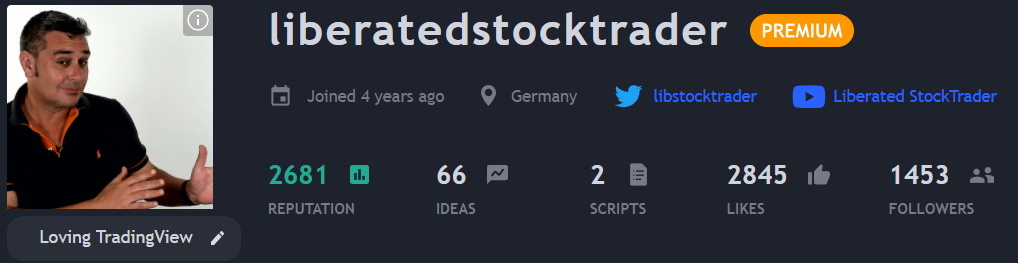
Chart, Scan, Trade & Join Me On TradingView for Free
Join me and 20 million traders on TradingView for free. TradingView is a great platform for connecting with other investors, sharing ideas, creating charts, and engaging in live chat.
Deeper Dive: Learning loops
- TradingView (peer learning): Explore public scripts for new edges, follow top analysts, and reverse-engineer ideas in Pine.
- ToS (structured curriculum): Learn platform tools deeply—especially the Analyze tab and options workflows—through guided lessons.
How to use this: Pair both strengths: source ideas on TradingView, then validate structure and risk in ToS if you’re options-heavy.
Pricing & Value — Tie
The call: TradingView has a generous free tier and paid plans that scale indicators, alerts, and historical depth—excellent value per dollar. ToS is included with a Schwab brokerage account; you pay standard trading/contract costs and any data/exchange fees. If you’re already with Schwab and trade options, ToS is effectively “no platform fee.” If you want a broker-agnostic research hub, TradingView’s paid plans are worth it.
Deeper Dive: Which model fits you?
- Active options trader at Schwab: ToS’s zero platform fee + pro tools is hard to beat.
- Research-first, multi-asset trader: TradingView’s feature density per plan tier wins, and you can still connect to supported brokers.
TradingView pricing starts at $0 for the Basic, ad-supported plan, which includes ad-supported screening, charting, trading, scripting, backtesting, and three indicators per chart. The Free plan is a great way to test the service.
TradingView Essential costs $13.99/mo on an annual plan and is ad-free. It includes two charts per layout, five indicators per chart, and 20 alerts. It is ideal for beginners, and also enables access to the full social network.
The Plus Plan at $28/mo adds four charts per tab, 100 alerts, and advanced Renko, Kagi, Point & Figure, and Line Break charts.
I personally use TradingView Premium at $56/mo, it offers the optimal balance of price and key functionality: 25 indicators per chart, 400 alerts, and, most importantly, automated chart pattern recognition.
It is designed for intermediate to advanced traders who seek the optimal balance of functionality and price.
Tip: Audit your real needs (alerts, indicators per chart, saved layouts). Pay only for what changes outcomes.
Ease of Use — Winner: TradingView
The call: TradingView is easy on day one and scales to pro features without friction. ToS is powerful but dense—expect a learning period to unlock scanners, thinkScript, advanced tickets, and the full Analyze tab.
Deeper Dive: Onboarding that sticks
- TradingView: Start with a clean layout, add your tools, then layer Pine/strategies when you’re ready.
- ToS: Set aside a weekend to map hotkeys, configure grids, build order templates, and learn Analyze. The payoff is serious control.
Rule: If you value day-one productivity, pick TradingView. If you enjoy mastering deep toolsets, ToS rewards the investment.
Pick TradingView if you:
- Trade global markets or multiple asset classes and need one research workspace.
- Want code-and-test iteration with a visual Strategy Tester and easy alerting.
- Value a huge social layer for idea discovery and script sharing.
Pick ThinkOrSwim if you:
- Are an options-first trader who relies on Greeks, probability, and multi-leg structures.
- Need advanced order control and desktop execution tied to Schwab.
- Prefer running what-if scenarios in Analyze and practicing in paperMoney/OnDemand before committing capital.
A strong hybrid: Use TradingView for global discovery, backtesting, and alerts; route complex options structures and manage risk in ThinkOrSwim.
| Feature | TradingView | ThinkOrSwim | Edge |
|---|---|---|---|
| Web-first UI | Yes (best-in-class) | Web + full desktop | TradingView |
| Specialty charts (Renko, Kagi, P&F, Line Break) | Yes | Yes (varies by setup) | TradingView |
| Drawing/annotations | Deep, fast, shareable | Deep, desktop-oriented | TradingView |
| Scripting | Pine Script (indicators + strategies) | thinkScript (studies + strategy objects) | Depends |
| Backtesting (visual) | Integrated strategy tester | Limited out-of-box (strong risk tools) | TradingView |
| Screeners | Global, technical + fundamentals, crypto | Equity + options scanners | Tie |
| Options analytics | Basic only | Full suite (Greeks, probability, risk) | ToS |
| Order types/routing | Good via connected brokers | Advanced, desktop-grade | ToS |
| Markets & coverage | Global, multi-asset | US-centric via Schwab | TradingView |
| Community | Massive social network | Structured education | TradingView |
- TradingView (4.8/5): The best all-round research and strategy platform for most traders—elite charting, fast global screeners, integrated backtesting, and a powerful social layer. It grows with you from the first chart to custom strategies.
- ThinkOrSwim (4.3/5): The workstation for options specialists and active US traders—multi-leg analytics, risk/probability tools, and advanced execution, all tightly integrated with Schwab. If your edge is structure and order control, ToS delivers.