Tech Wavo
  • Home
  • Technology
  • Computers
  • Gadgets
  • Mobile
  • Apps
  • News
  • Financial
  • Stock
Tech Wavo
No Result
View All Result

ChatGPT Introduces Parental Controls: How Parents Can Manage Kids’ AI Use Safely

Tech Wavo by Tech Wavo
October 2, 2025
in Gadgets
0


OpenAI has introduced parental controls in ChatGPT, a new feature designed to improve safety for children and teenagers using the platform. Available since September 29, this tool allows parents and guardians to set restrictions and monitor interactions, helping reduce risks tied to unrestricted access to AI.
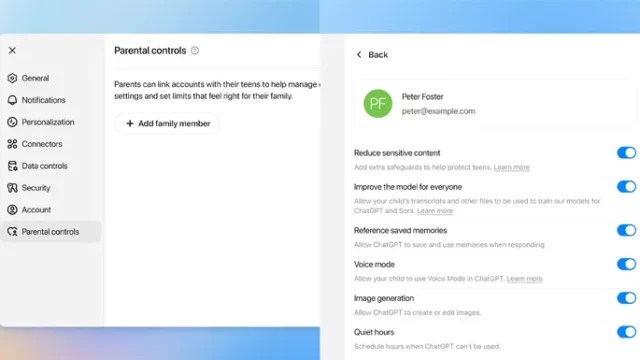
To enable the feature, the parent or guardian must send an invitation to the child’s account. Once accepted, settings can be managed directly from the parent’s account. The steps are:

  1. Open ChatGPT and click on the profile name and picture.

  2. Go to “Settings” and select “Parental Controls.”

  3. Click on “+ Add family member.”

  4. Enter the email address or phone number linked to the child’s account.

  5. Indicate whether the contact belongs to a parent/guardian or a child.

The invitation will be sent via email or SMS and must be accepted to complete the link.

Features available

Once accounts are connected, parents gain access to several control options. They can:

  • Set usage schedules, limiting daily access time.

  • Disable voice mode, restricting spoken interaction.

  • Turn off memory, preventing the saving of preferences for personalized responses.

  • Block image creation or editing, limiting access to multimedia functions.

  • Stop conversations from being used to train AI models, protecting the child’s data.

These features aim to balance safe, educational, and recreational use of ChatGPT with privacy protection.

Risk alerts

A notable feature is the ability to send risk alerts to parents. The system can issue notifications via email or SMS if it detects potential warning signs, such as mental health concerns or other risk behaviors. OpenAI notes that these alerts are not always perfectly accurate and may occasionally generate false alarms. However, the priority is to ensure parents are informed promptly, giving them the chance to intervene when necessary.

Filed in Robots. Read more about AI (Artificial Intelligence), ChatGPT, Kids, OpenAI and Safety.

Previous Post

How to Access GitHub Copilot CLI? 

Next Post

Game Pass Ultimate is still $20 a month if you buy pre-paid codes

Next Post
How to cancel or downgrade your Xbox Game Pass subscription

Game Pass Ultimate is still $20 a month if you buy pre-paid codes

Leave a Reply Cancel reply

Your email address will not be published. Required fields are marked *

Game Pass Ultimate is still $20 a month if you buy pre-paid codes

by Tech Wavo
October 2, 2025
0
How to cancel or downgrade your Xbox Game Pass subscription
Computers

Microsoft may have made the unfortunate decision to raise the price of a Xbox Game Pass Ultimate subscription to $30...

Read more

ChatGPT Introduces Parental Controls: How Parents Can Manage Kids’ AI Use Safely

by Tech Wavo
October 2, 2025
0
OpenAI To Add Age Verification For Safer ChatGPT Experience
Gadgets

OpenAI has introduced parental controls in ChatGPT, a new feature designed to improve safety for children and teenagers using the...

Read more

How to Access GitHub Copilot CLI? 

by Tech Wavo
October 2, 2025
0
How to Access GitHub Copilot CLI? 
News

GitHub Copilot CLI is now in public preview, bringing AI-powered terminal assistance to developers. This agentic tool enables building, debugging,...

Read more

Hades 2 review: a faithful yet boldly reinventive sequel that somehow improves on perfection

by Tech Wavo
October 2, 2025
0
Hades 2 review: a faithful yet boldly reinventive sequel that somehow improves on perfection
Computers

Why you can trust TechRadar We spend hours testing every product or service we review, so you can be sure...

Read more

Site links

  • Home
  • About Us
  • Contact Us
  • Privacy Policy
  • Terms of use
  • Home
  • About Us
  • Contact Us
  • Privacy Policy
  • Terms of use

No Result
View All Result
  • Home
  • Technology
  • Computers
  • Gadgets
  • Mobile
  • Apps
  • News
  • Financial
  • Stock