Data is essential for modern business decisions. Many employees, however, are unfamiliar with SQL. This creates a bottleneck between questions and answers. A Text-to-SQL system solves this problem directly. It translates simple questions into database queries. This article shows you how to build a SQL generator. We will follow the ideas from Pinterest’s Text-to-SQL engineering team. You will learn how to convert natural language to SQL. We will also use advanced techniques like RAG for table selection.
Understanding Pinterest’s Approach
Pinterest wanted to make data accessible to everyone. Their employees needed insights from vast datasets. Most of them were not SQL experts. This challenge led to the creation of Pinterest’s Text-to-SQL platform. Their journey provides a great roadmap for building similar tools.
The First Version
Their first system was straightforward. A user would ask a question and also list the database tables they thought were relevant. The system would then generate a SQL query.
Let’s take a closer look at its architecture:
The user asks an analytical question, choosing the tables to be used.
- The relevant table schemas are retrieved from the table metadata store.
- The question, selected SQL dialect, and table schemas are compiled into a Text-to-SQL prompt.
- The prompt is fed into the LLM.
- A streaming response is generated and displayed to the user.
This approach worked, but it had a major flaw. Users often had no idea which tables contained their answers.
The Second Version
To solve this, their team built a smarter system. It used a technique called Retrieval-Augmented Generation (RAG). Instead of asking the user for tables, the system found them automatically. It searched a collection of table descriptions to find the most relevant ones for the question. This use of RAG for table selection made the tool much more user-friendly.
- An offline job is employed to generate a vector index of tables’ summaries and historical queries against them.
- Suppose the user does not specify any tables. In that case, their question is transformed into embeddings, and a similarity search is conducted against the vector index to infer the top N suitable tables.
- The top N tables, along with the table schema and analytical question, are compiled into a prompt for LLM to select the top K most relevant tables.
- The top K tables are returned to the user for validation or alteration.
- The standard Text-to-SQL process is resumed with the user-confirmed tables.
We will replicate this powerful two-step approach.
Our Plan: A Simplified Replication
This guide will help you build a SQL generator in two parts. First, we will create the core engine that converts natural language to SQL. Second, we will add the intelligent table-finding feature.
- The Core System: We will build a basic chain. It takes a question and a list of table names to create a SQL query.
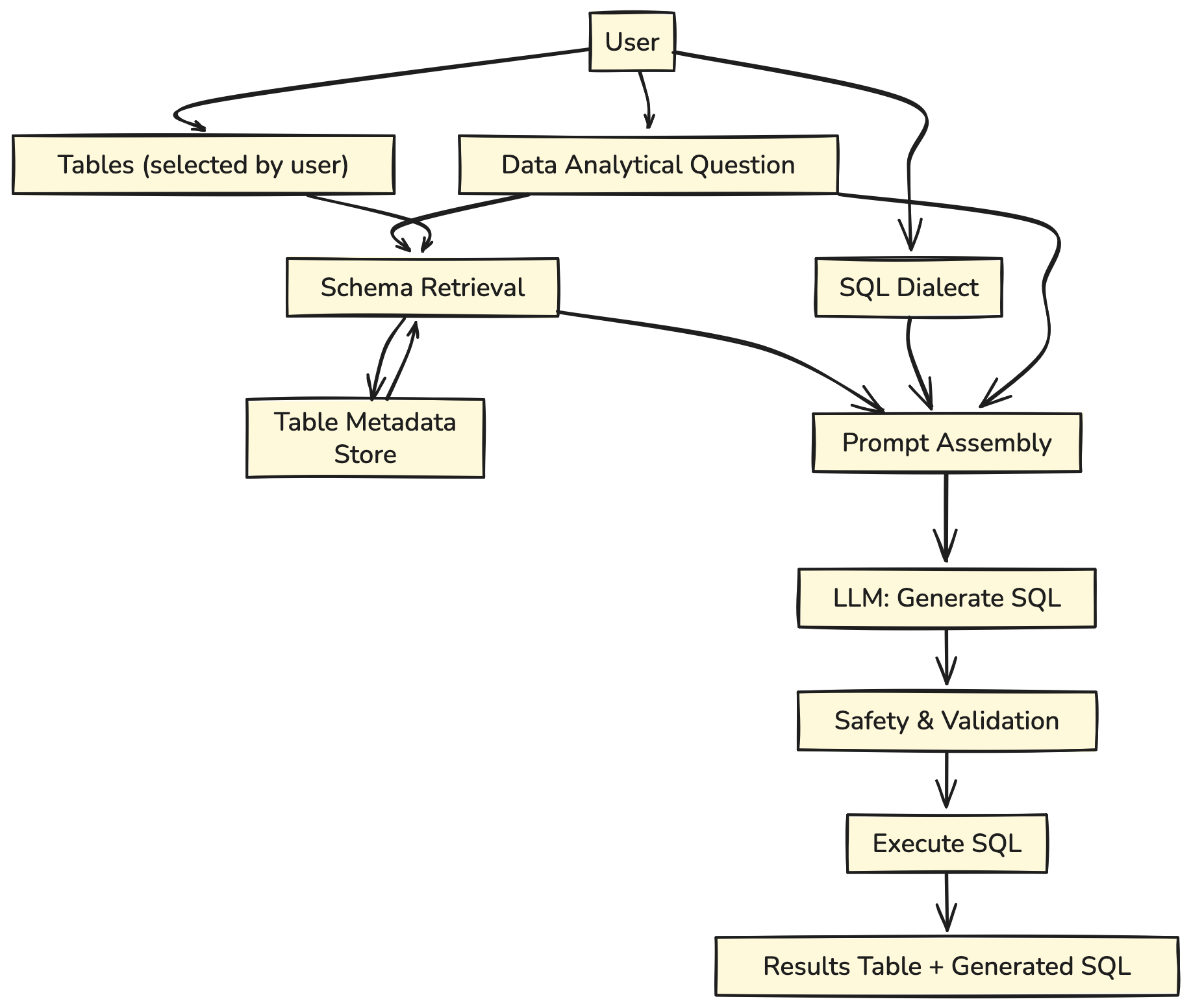
- User input: Provides an analytical question, selected tables, and SQL dialect.
- Schema Retrieval: The system fetches relevant table schemas from the metadata store.
- Prompt Assembly: Combines question, schemas, and dialect into a prompt.
- LLM Generation: Model outputs the SQL query.
- Validation & Execution: Query is checked for safety, executed, and results are returned.
- The RAG-Enhanced System: We will add a retriever. This component automatically suggests the correct tables for any question.
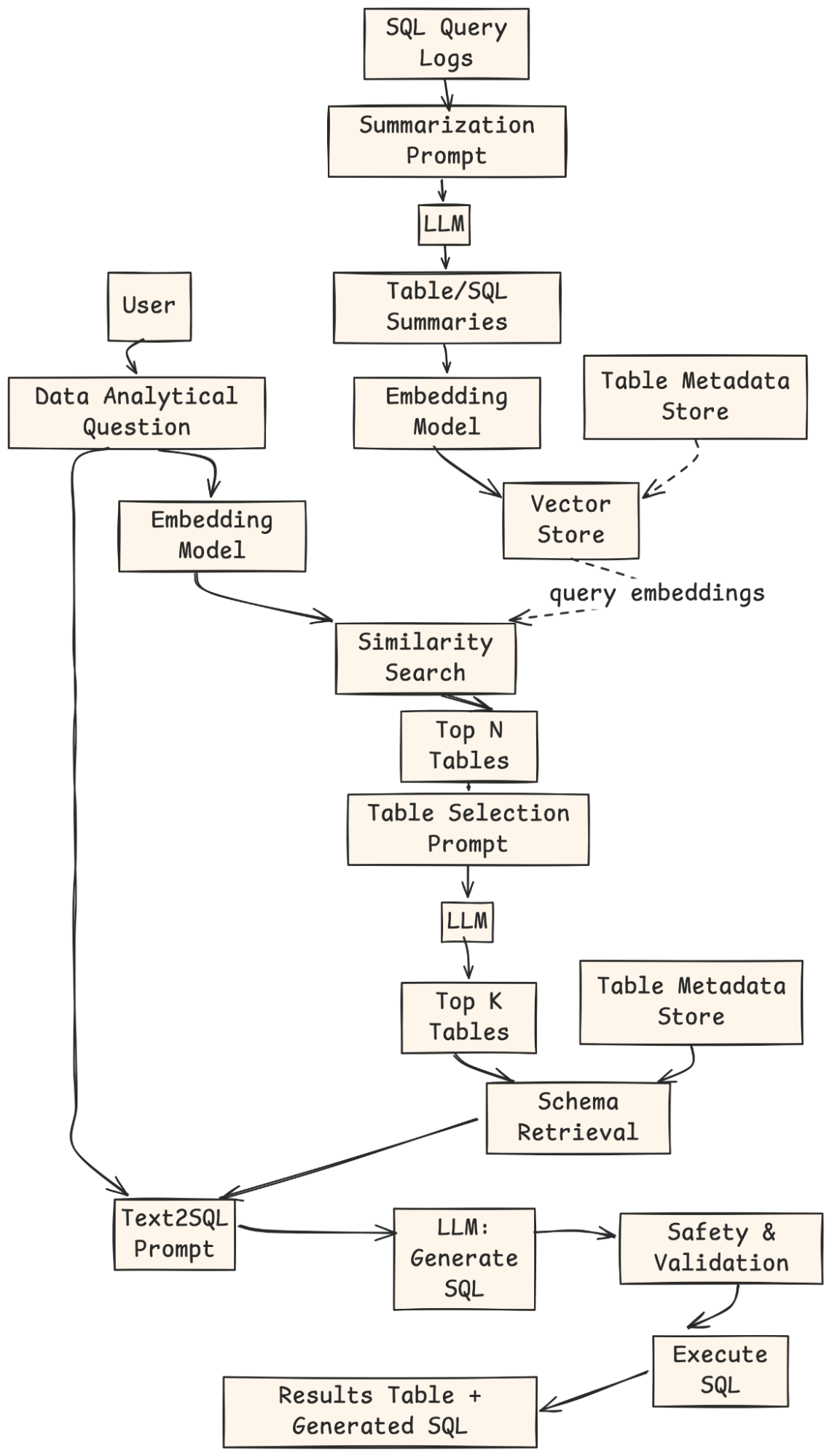
- Offline Indexing: SQL query logs are summarized by an LLM, embedded, and stored in a vector index with metadata.
- User Query: The user provides a natural-language analytical question.
- Retrieval: The question is embedded, matched against the vector store, and Top-N candidate tables are returned.
- Table Selection: An LLM ranks and selects the Top-K most relevant tables.
- Schema Retrieval & Prompting: The system fetches schemas for those tables and builds a Text-to-SQL prompt.
- SQL Generation: An LLM generates the SQL query.
- Validation & Execution: The query is checked, executed, and the results + SQL are returned to the user.
We will use Python, LangChain, and OpenAI to build this Text-to-SQL system. An in-memory SQLite database will act as our data source.
Hands-on Guide: Building Your Own SQL Generator
Let’s begin building our system. Follow these steps to create a working prototype.
Step 1: Setting Up Your Environment
First, we install the necessary Python libraries. LangChain helps us connect components. Langchain-openai provides the connection to the LLM. FAISS helps create our retriever, and Pandas displays data nicely.
!pip install -qU langchain langchain-openai faiss-cpu pandas langchain_communityNext, you must configure your OpenAI API key. This key allows our application to use OpenAI’s models.
import os

from getpass import getpass

OPENAI_API_KEY = getpass("Enter your OpenAI API key: ")

os.environ["OPENAI_API_KEY"] = OPENAI_API_KEY
Step 2: Simulating the Database
A Text-to-SQL system needs a database to query. For this demo, we create a simple, in-memory SQLite database. It will contain three tables: users, pins, and boards. This setup mimics a basic version of Pinterest’s data structure.
import sqlite3

import pandas as pd

# Create a connection to an in-memory SQLite database

conn = sqlite3.connect(':memory:')

cursor = conn.cursor()

# Create tables

cursor.execute('''

CREATE TABLE users (

   user_id INTEGER PRIMARY KEY,

   username TEXT NOT NULL,

   join_date DATE NOT NULL,

   country TEXT

)

''')

cursor.execute('''

CREATE TABLE pins (

   pin_id INTEGER PRIMARY KEY,

   user_id INTEGER,

   board_id INTEGER,

   image_url TEXT,

   description TEXT,

   created_at DATETIME,

   FOREIGN KEY(user_id) REFERENCES users(user_id),

   FOREIGN KEY(board_id) REFERENCES boards(board_id)

)

''')

cursor.execute('''

CREATE TABLE boards (

   board_id INTEGER PRIMARY KEY,

   user_id INTEGER,

   board_name TEXT NOT NULL,

   category TEXT,

   FOREIGN KEY(user_id) REFERENCES users(user_id)

)

''')

# Insert sample data

cursor.execute("INSERT INTO users (user_id, username, join_date, country) VALUES (1, 'alice', '2023-01-15', 'USA')")

cursor.execute("INSERT INTO users (user_id, username, join_date, country) VALUES (2, 'bob', '2023-02-20', 'Canada')")

cursor.execute("INSERT INTO boards (board_id, user_id, board_name, category) VALUES (101, 1, 'DIY Crafts', 'DIY')")

cursor.execute("INSERT INTO boards (board_id, user_id, board_name, category) VALUES (102, 1, 'Travel Dreams', 'Travel')")

cursor.execute("INSERT INTO pins (pin_id, user_id, board_id, description, created_at) VALUES (1001, 1, 101, 'Handmade birthday card', '2024-03-10 10:00:00')")

cursor.execute("INSERT INTO pins (pin_id, user_id, board_id, description, created_at) VALUES (1002, 2, 102, 'Eiffel Tower at night', '2024-05-15 18:30:00')")

cursor.execute("INSERT INTO pins (pin_id, user_id, board_id, description, created_at) VALUES (1003, 1, 101, 'Knitted scarf pattern', '2024-06-01 12:00:00')")

conn.commit()

print("Database created and populated successfully.")Output:

Step 3: Building the Core Text-to-SQL Chain
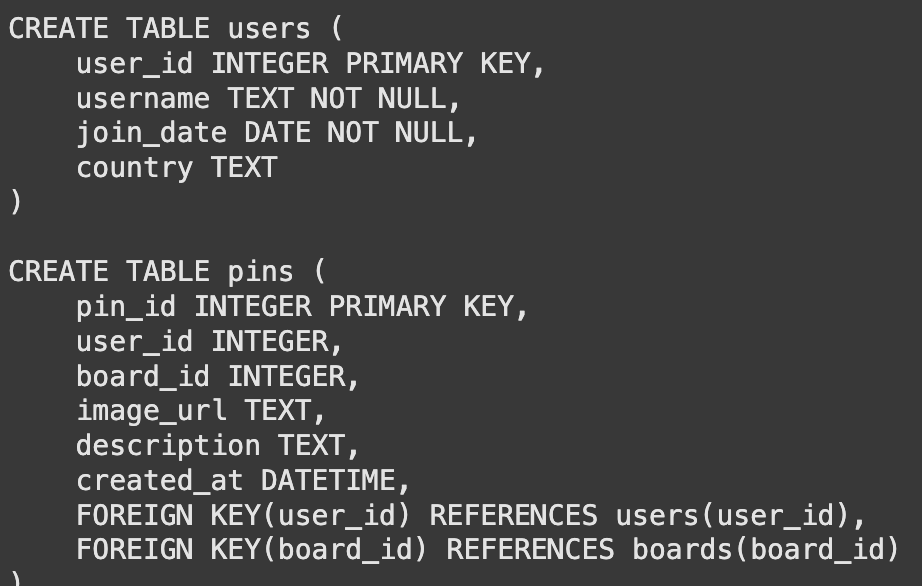
The language model cannot see our database directly. It needs to know the table structures, or schemas. We create a function to get the CREATE TABLE statements. This information tells the model about columns, data types, and keys.
def get_table_schemas(conn, table_names):

   """Fetches the CREATE TABLE statement for a list of tables."""

   schemas = []

   cursor = conn.cursor() # Get cursor from the passed connection

   for table_name in table_names:

       query = f"SELECT sql FROM sqlite_master WHERE type="table" AND name="{table_name}";"

       cursor.execute(query)

       result = cursor.fetchone()

       if result:

           schemas.append(result[0])

   return "\n\n".join(schemas)

# Example usage

sample_schemas = get_table_schemas(conn, ['users', 'pins'])

print(sample_schemas)
Output:
With the schema function ready, we build our first chain. A prompt template instructs the model on its task. It combines the schemas and the user’s question. We then connect this prompt to the model.
from langchain_core.prompts import ChatPromptTemplate

from langchain_openai import ChatOpenAI

from langchain_core.output_parsers import StrOutputParser

from langchain_core.runnables import RunnablePassthrough, RunnableLambda

import sqlite3 # Import sqlite3

template = """

You are a master SQL expert. Based on the provided table schema and a user's question, write a syntactically correct SQLite SQL query.

Only return the SQL query and nothing else.

Here is the database schema:

{schema}

Here is the user's question:

{question}

"""

prompt = ChatPromptTemplate.from_template(template)

llm = ChatOpenAI(model="gpt-4.1-mini", temperature=0)

sql_chain = prompt | llm | StrOutputParser()

Let's test our chain with a question where we explicitly provide the table names.

user_question = "How many pins has alice created?"

table_names_provided = ["users", "pins"]

# Retrieve the schema in the main thread before invoking the chain

schema = get_table_schemas(conn, table_names_provided)

# Pass the schema directly to the chain

generated_sql = sql_chain.invoke({"schema": schema, "table_names": table_names_provided, "question": user_question})

print("User Question:", user_question)

print("Generated SQL:", generated_sql)

# Clean the generated SQL by removing markdown code block syntax

cleaned_sql = generated_sql.strip()

if cleaned_sql.startswith("```sql"):

   cleaned_sql = cleaned_sql[len("```sql"):].strip()

if cleaned_sql.endswith("```"):

   cleaned_sql = cleaned_sql[:-len("```")].strip()

print("Cleaned SQL:", cleaned_sql)

# Let's run the generated SQL to verify it works

try:

   result_df = pd.read_sql_query(cleaned_sql, conn)

   display(result_df)

except Exception as e:

   print(f"Error executing SQL query: {e}")
Output:
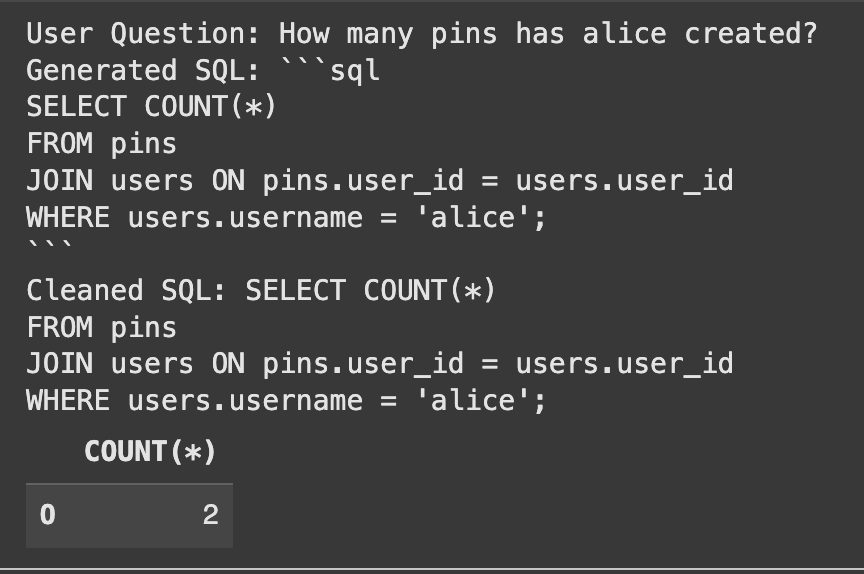
The system correctly generated the SQL and found the right answer.
Step 4: Enhancing with RAG for Table Selection
Our core system works well, but requires users to know table names. This is the exact problem Pinterest’s Text-to-SQL team solved. We will now implement RAG for table selection. We start by writing simple, natural language summaries for each table. These summaries capture the meaning of each table’s content.
table_summaries = {

   "users": "Contains information about individual users, including their username, join date, and country of origin.",

   "pins": "Contains data about individual pins, linking to the user who created them and the board they belong to. Includes descriptions and creation timestamps.",

   "boards": "Stores information about user-created boards, including the board's name, category, and the user who owns it."

}
Next, we create a vector store. This tool converts our summaries into numerical representations (embeddings). It allows us to find the most relevant table summaries for a user’s question through a similarity search.
from langchain_openai import OpenAIEmbeddings

from langchain_community.vectorstores import FAISS

from langchain.schema import Document

# Create LangChain Document objects for each summary

summary_docs = [

   Document(page_content=summary, metadata={"table_name": table_name})

   for table_name, summary in table_summaries.items()

]

embeddings = OpenAIEmbeddings()

vector_store = FAISS.from_documents(summary_docs, embeddings)

retriever = vector_store.as_retriever()

print("Vector store created successfully.")
Step 5: Combining Everything into a RAG-Powered Chain
We now construct the final, intelligent chain. This chain automates the entire process. It takes a question, uses the retriever to find relevant tables, fetches their schemas, and then passes everything to our sql_chain.
def get_table_names_from_docs(docs):

   """Extracts table names from the metadata of retrieved documents."""

   return [doc.metadata['table_name'] for doc in docs]

# We need a way to get schema using table names and the connection within the chain

# Use the thread-safe function that recreates the database for each call

def get_schema_for_rag(x):

   table_names = get_table_names_from_docs(x['table_docs'])

   # Call the thread-safe function to get schemas

   schema = get_table_schemas(conn, table_names)

   return {"question": x['question'], "table_names": table_names, "schema": schema}

full_rag_chain = (

   RunnablePassthrough.assign(

       table_docs=lambda x: retriever.invoke(x['question'])

   )

   | RunnableLambda(get_schema_for_rag) # Use RunnableLambda to call the schema fetching function

   | sql_chain # Pass the dictionary with question, table_names, and schema to sql_chain

)

Let's test the complete system. We ask a question without mentioning any tables. The system should handle everything.

user_question_no_tables = "Show me all the boards created by users from the USA."

# Pass the user question within a dictionary

final_sql = full_rag_chain.invoke({"question": user_question_no_tables})

print("User Question:", user_question_no_tables)

print("Generated SQL:", final_sql)

# Clean the generated SQL by removing markdown code block syntax, being more robust

cleaned_sql = final_sql.strip()

if cleaned_sql.startswith("```sql"):

   cleaned_sql = cleaned_sql[len("```sql"):].strip()

if cleaned_sql.endswith("```"):

   cleaned_sql = cleaned_sql[:-len("```")].strip()

# Also handle cases where there might be leading/trailing newlines after cleaning

cleaned_sql = cleaned_sql.strip()

print("Cleaned SQL:", cleaned_sql)

# Verify the generated SQL

try:

   result_df = pd.read_sql_query(cleaned_sql, conn)

   display(result_df)

except Exception as e:

   print(f"Error executing SQL query: {e}")
Output:
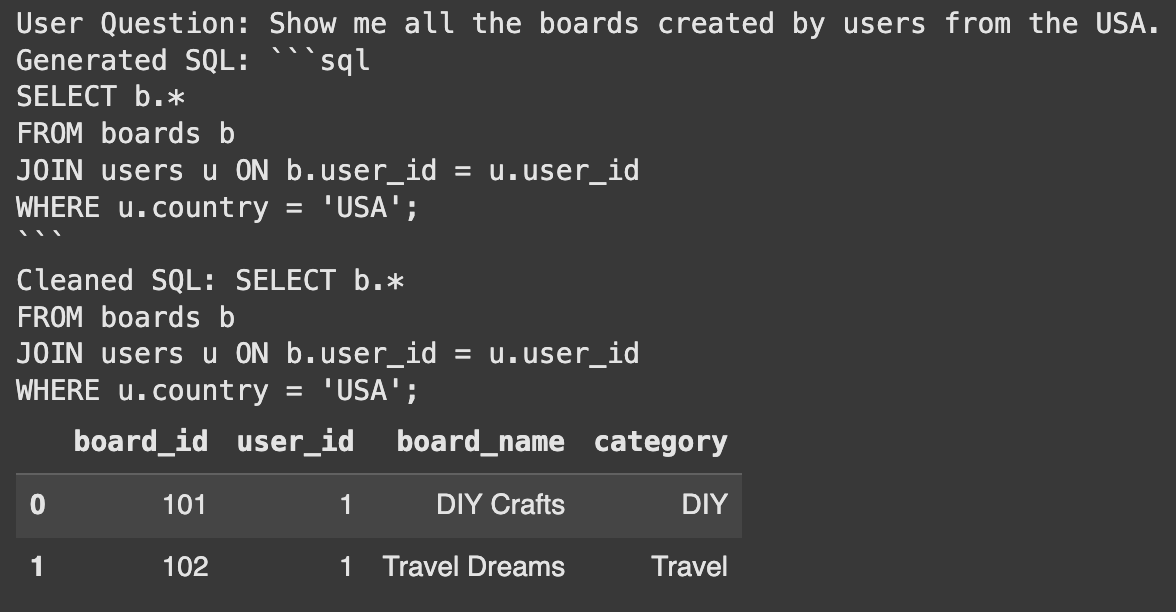
Success! The system automatically identified the users and board tables. It then generated the correct query to answer the question. This shows the power of using RAG for table selection.
Conclusion
We have successfully built a prototype that shows how to build an SQL generator. Moving this to a production environment requires more steps. You could automate the table summarization process. You could also include historical queries in the vector store to improve accuracy. This follows the path taken by Pinterest’s Text-to-SQL team. This foundation provides a clear path to creating a powerful data tool.
Frequently Asked Questions
A. Text-to-SQL system translates questions written in plain language (like English) into SQL database queries. This allows non-technical users to get data without writing code.
A. RAG helps the system automatically find the most relevant database tables for a user’s question. This removes the need for users to know the database structure.
A. LangChain is a framework for developing applications powered by language models. It helps connect different components like prompts, models, and retrievers into a single chain.

Harsh Mishra is an AI/ML Engineer who spends more time talking to Large Language Models than actual humans. Passionate about GenAI, NLP, and making machines smarter (so they don’t replace him just yet). When not optimizing models, he’s probably optimizing his coffee intake. 🚀☕
Login to continue reading and enjoy expert-curated content.