Imagine it’s Black Friday morning, and your flagship store is sold out of the hottest item of the season by 10 AM, while your warehouse is filled with items that nobody wants. Sound familiar? In today’s retail market, producing accurate demand forecasts is not only desirable; it is what separates profit from loss. Simple moving averages or “gut feel” methods won’t work in the complex modern retail deals with seasonality, promotional activities, weather impacts, and rapidly shifting consumer preferences.
In this comprehensive guide, we will guide you through the process of building a demand forecasting system that is ready to be put into production and is able to forecast demand on millions of SKUs across hundreds of locations, enabling you to provide what your business needs more than anything: accuracy.
Why Does This Matter?
With modern retailers, the challenges they combat are unique constructions:
- Scale: Thousands of products × Hundreds of locations = Millions of forecasts every day
- Complexity: Weather, holidays, promotions, and trends all impact demand, but in different ways
- Speed: Inventory decisions cannot wait for manual analysis
- Cost: Poor forecasts directly affect the bottom line through excess inventory or stockouts
Let’s create a system to withstand these challenges.
Part 1: Building the Data Foundation
Before we dive into complex algorithms, let’s build a solid data foundation, as demand forecasts start with a great data structure.
Database Schema Design
First, let’s create tables that capture all the information we need for forecasting:
- Core sales transaction table
CREATE TABLE sales_transactions (

    transaction_id BIGINT PRIMARY KEY,

    store_id INT NOT NULL,

    product_id INT NOT NULL,

    transaction_date DATE NOT NULL,

    quantity_sold DECIMAL(10,2) NOT NULL,

    unit_price DECIMAL(10,2) NOT NULL,

    discount_percent DECIMAL(5,2) DEFAULT 0,

    promotion_id INT,

    created_at TIMESTAMP DEFAULT CURRENT_TIMESTAMP

);- Product master data
CREATE TABLE products (

    product_id INT PRIMARY KEY,

    product_name VARCHAR(255) NOT NULL,

    category_id INT NOT NULL,

    brand_id INT,

    unit_cost DECIMAL(10,2),

    product_lifecycle_stage VARCHAR(50), -- 'new', 'growth', 'mature', 'decline'

    seasonality_pattern VARCHAR(50), -- 'spring', 'summer', 'fall', 'winter', 'none'

    created_at TIMESTAMP DEFAULT CURRENT_TIMESTAMP

);
Why this structure?
It’s not only capturing sales data, but also taking into account context related to the demand: product life-cycle, seasonality patterns, and pricing information. The context is of great importance when providing an accurate forecast.
External Factors Table
Demand does not exist in a vacuum. External factors often drive significant demand change:
- External factors that influence demand
CREATE TABLE external_factors (

    factor_date DATE PRIMARY KEY,

    region VARCHAR(100),

    weather_temp_avg DECIMAL(5,2),

    weather_precipitation DECIMAL(5,2),

    is_holiday BOOLEAN DEFAULT FALSE,

    holiday_name VARCHAR(100),

    economic_index DECIMAL(10,4),

    competitor_promotion_intensity DECIMAL(3,2), -- 0-1 scale

    created_at TIMESTAMP DEFAULT CURRENT_TIMESTAMP

);
Output:
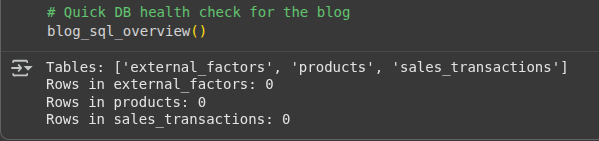
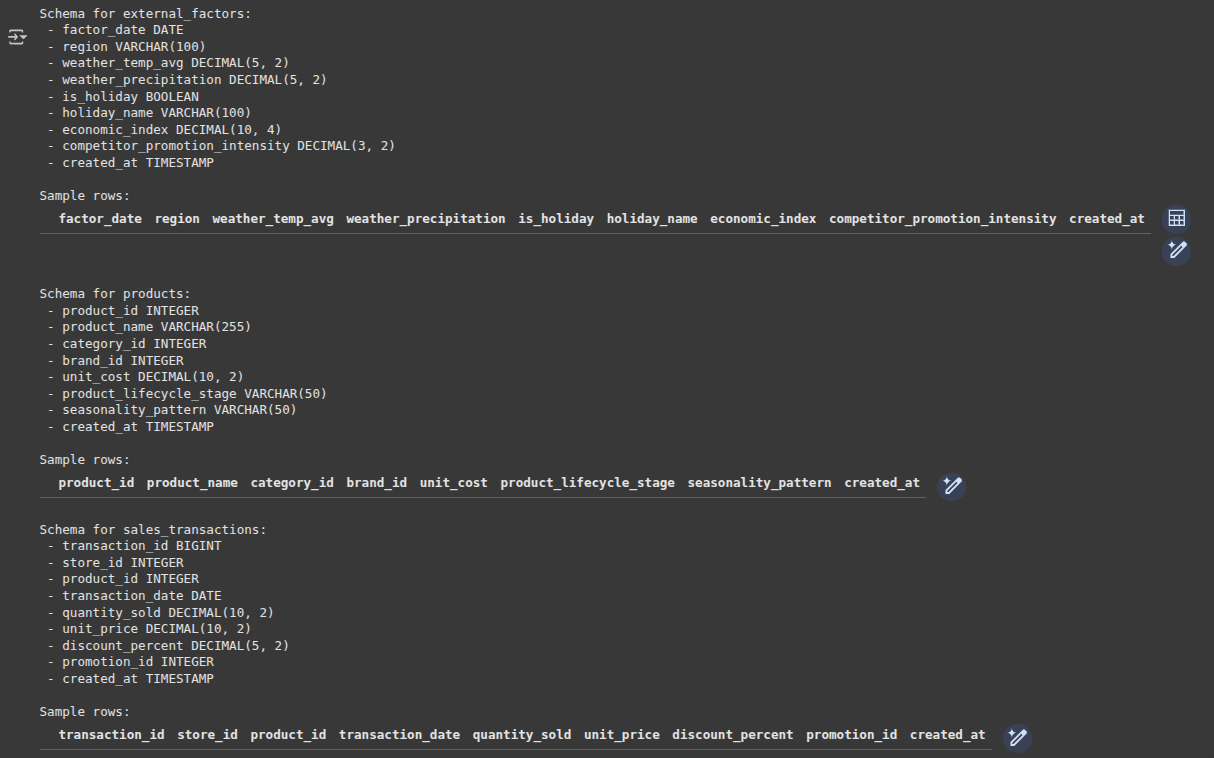
Pro tip: Start collecting external data even if you’re not using it yet. Weather data for last year is impossible to get, but it could be crucial for forecasting seasonal products.
Part 2: Advanced Feature Engineering in SQL
This is the key point in this process. Here we will take some sales data and create features that machine-learning algorithms can use to identify patterns.
Temporal-Based Features: The Foundation
Temporal patterns are the backbone of demand prediction. Let’s extract some meaningful time features:
- Extract comprehensive time-based features
WITH time_features AS (

    SELECT

        store_id,

        product_id,

        transaction_date,

        SUM(quantity_sold) as total_quantity,

        -- Basic time components

        EXTRACT(YEAR FROM transaction_date) as year,

        EXTRACT(MONTH FROM transaction_date) as month,

        EXTRACT(DOW FROM transaction_date) as day_of_week, -- 0=Sunday

        EXTRACT(WEEK FROM transaction_date) as week_of_year,

        -- Weekend indicator

        CASE

            WHEN EXTRACT(DOW FROM transaction_date) IN (0, 6) THEN 1

            ELSE 0

        END as is_weekend,

        -- Cyclical encoding for seasonality (key insight!)

        SIN(2 * PI() * EXTRACT(DOY FROM transaction_date) / 365.25) as day_of_year_sin,

        COS(2 * PI() * EXTRACT(DOY FROM transaction_date) / 365.25) as day_of_year_cos

    FROM sales_transactions

    GROUP BY store_id, product_id, transaction_date

)

SELECT * FROM time_features;
Output:
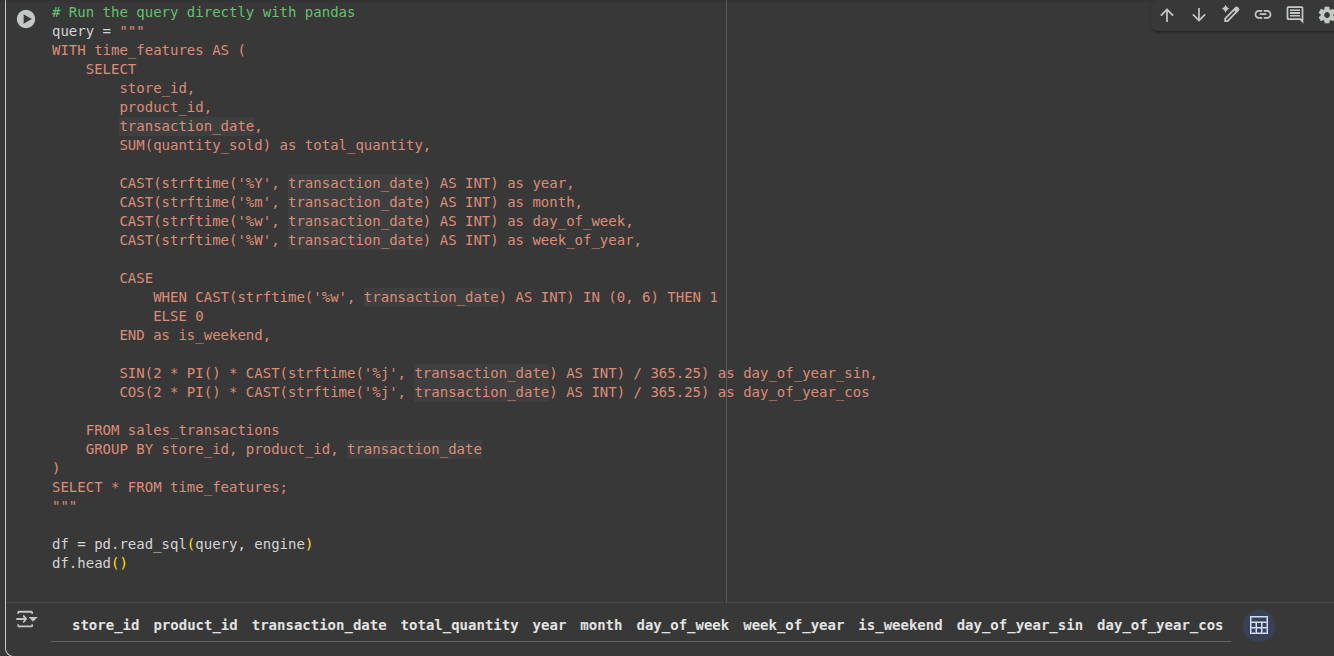

Why use cyclical encoding?
Conventional approaches consider December 31 and January 1 completely unrelated (365 vs 1). Cyclical encoding with sine/cosine shows that, although numerically different, those values are adjacent in the seasonal cycle.
Lag Features: Learning from the Past
Often, historical performance is predictive of future performance. This leads us to creating features that look back at history:
- Create lag and rolling window features
WITH lag_features AS (

    SELECT

        *,

        -- Previous day, week, month, and year values

        LAG(total_quantity, 1) OVER (

            PARTITION BY store_id, product_id

            ORDER BY transaction_date

        ) as quantity_lag_1d,

        LAG(total_quantity, 7) OVER (

            PARTITION BY store_id, product_id

            ORDER BY transaction_date

        ) as quantity_lag_7d,

        LAG(total_quantity, 365) OVER (

            PARTITION BY store_id, product_id

            ORDER BY transaction_date

        ) as quantity_lag_365d,

        -- 7-day moving average

        AVG(total_quantity) OVER (

            PARTITION BY store_id, product_id

            ORDER BY transaction_date

            ROWS BETWEEN 6 PRECEDING AND CURRENT ROW

        ) as quantity_ma_7d

    FROM time_features

)

SELECT * FROM lag_features;
Business insight: The full-year delay captures year-over-year comparables automatically. If you sold 100 winter coats on the same day last year, that provides valuable context for this year’s forecast.
Seasonal and Trend Analysis
Let’s identify underlying patterns in the data via a query:
- Advanced seasonal and trend features
WITH seasonal_features AS (

    SELECT

        *,

        -- Year-over-year growth rate

        CASE

            WHEN quantity_lag_365d > 0 THEN

                (total_quantity - quantity_lag_365d) / quantity_lag_365d

            ELSE NULL

        END as yoy_growth_rate,

        -- Seasonal strength (how does today compare to historical average for this month?)

        total_quantity / NULLIF(

            AVG(total_quantity) OVER (

                PARTITION BY store_id, product_id, month

            ), 0

        ) as seasonal_index_monthly,

        -- Volatility measure

        STDDEV(total_quantity) OVER (

            PARTITION BY store_id, product_id

            ORDER BY transaction_date

            ROWS BETWEEN 29 PRECEDING AND CURRENT ROW

        ) / NULLIF(quantity_ma_7d, 0) as coefficient_of_variation

    FROM lag_features

)

SELECT * FROM seasonal_features;
Key insight: The seasonal index tells us if today’s sales are above or below a normal pattern for the time of year. A value of 1.5 means sales are 50% above the seasonal average.
Part 3: Python Machine Learning Pipeline
Now, let’s build a machine learning pipeline that will help us turn these features into accurate forecasts.
Core Forecasting Class
Here’s the basic foundational class of our demand forecasts system:
import pandas as pd

import numpy as np

from datetime import datetime, timedelta

from sklearn.ensemble import RandomForestRegressor

from sklearn.model_selection import TimeSeriesSplit

import xgboost as xgb

import warnings

warnings.filterwarnings('ignore')

class RetailDemandForecaster:

    def __init__(self, connection_string):

        self.connection_string = connection_string

        self.models = {}

        self.feature_columns = []

        self.trained = False

    def load_and_prepare_data(self, start_date, end_date):

        """Load data with all our engineered features"""

        # In practice, this would execute our SQL feature engineering

        # For now, let's simulate prepared data

        print(f"Loading data from {start_date} to {end_date}")

        # This would contain the result of our SQL queries above

        # with all the time-based, lag, and seasonal features

        return self._simulate_prepared_data()

    def _simulate_prepared_data(self):

        """Simulate prepared data for demo purposes"""

        dates = pd.date_range('2022-01-01', '2024-01-01', freq='D')

        np.random.seed(42)

        data = []

        for store_id in [1, 2, 3]:

            for product_id in [101, 102, 103]:

                for date in dates:

                    # Simulate seasonal pattern

                    seasonal_factor = 1 + 0.3 * np.sin(2 * np.pi * date.dayofyear / 365)

                    base_demand = 50 + np.random.normal(0, 10)

                    data.append({

                        'store_id': store_id,

                        'product_id': product_id,

                        'date': date,

                        'total_quantity': max(0, base_demand * seasonal_factor),

                        'day_of_week': date.dayofweek,

                        'month': date.month,

                        'is_weekend': 1 if date.dayofweek >= 5 else 0,

                        'day_of_year_sin': np.sin(2 * np.pi * date.dayofyear / 365),

                        'day_of_year_cos': np.cos(2 * np.pi * date.dayofyear / 365)

                    })

        return pd.DataFrame(data)
What is the reasoning behind this arrangement?
We’re constructing a class that is easy to extend and easy to maintain. The separation of data loading from model training makes it easier to explore different approaches.
Feature Engineering Pipeline
Let’s add some advanced feature engineering capabilities:
def create_advanced_features(self, df):

    """Create advanced features that are hard to do in SQL"""

    df_copy = df.copy().sort_values(['store_id', 'product_id', 'date'])

    # Create lag features efficiently

    for store_prod, group in df_copy.groupby(['store_id', 'product_id']):

        mask = (df_copy['store_id'] == store_prod[0]) & (df_copy['product_id'] == store_prod[1])

        # Multiple lag periods

        for lag_days in [1, 7, 14, 30]:

            df_copy.loc[mask, f'quantity_lag_{lag_days}d'] = group['total_quantity'].shift(lag_days)

        # Rolling statistics

        df_copy.loc[mask, 'quantity_rolling_mean_7d'] = group['total_quantity'].rolling(7, min_periods=1).mean()

        df_copy.loc[mask, 'quantity_rolling_std_7d'] = group['total_quantity'].rolling(7, min_periods=1).std()

        # Trend features (velocity and acceleration)

        df_copy.loc[mask, 'quantity_velocity'] = group['total_quantity'].diff()

        df_copy.loc[mask, 'quantity_acceleration'] = group['total_quantity'].diff().diff()

    # Fill NaN values

    numeric_columns = df_copy.select_dtypes(include=[np.number]).columns

    df_copy[numeric_columns] = df_copy[numeric_columns].fillna(method='ffill').fillna(0)

    return df_copy

# Add this method to the RetailDemandForecaster class

RetailDemandForecaster.create_advanced_features = create_advanced_features
Helpful Tip: We’re calculating features by the store-product pairing so that we do not leak information between products or locations.
Training the Model with an Ensemble Approach
At this point in our project, we will now train various models and fuse them to gain superior accuracy:
def train_models(self, df, target_column='total_quantity', forecast_horizons=[1, 7, 14]):

    """Train ensemble of models for multiple forecast horizons"""

    # Prepare features and targets

    feature_cols = [col for col in df.columns

                   if col not in ['date', 'store_id', 'product_id', target_column]]

    X = df[feature_cols]

    self.feature_columns = feature_cols

    # Train separate models for each forecast horizon

    for horizon in forecast_horizons:

        print(f"Training models for {horizon}-day forecast...")

        # Create target variable (future values)

        y = df.groupby(['store_id', 'product_id'])[target_column].shift(-horizon)

        # Remove rows where target is NaN

        valid_rows = ~y.isna()

        X_clean = X[valid_rows]

        y_clean = y[valid_rows]

        if len(X_clean) == 0:

            continue

        # Initialize models

        models = {

            'random_forest': RandomForestRegressor(n_estimators=100, random_state=42, n_jobs=-1),

            'xgboost': xgb.XGBRegressor(n_estimators=100, random_state=42, n_jobs=-1)

        }

        self.models[f'horizon_{horizon}'] = {}

        # Train each model with time series cross-validation

        tscv = TimeSeriesSplit(n_splits=5)

        for model_name, model in models.items():

            print(f"  Training {model_name}...")

            # Cross-validation scores

            cv_scores = []

            for train_idx, val_idx in tscv.split(X_clean):

                X_train, X_val = X_clean.iloc[train_idx], X_clean.iloc[val_idx]

                y_train, y_val = y_clean.iloc[train_idx], y_clean.iloc[val_idx]

                model.fit(X_train, y_train)

                y_pred = model.predict(X_val)

                # Calculate MAPE (Mean Absolute Percentage Error)

                mape = np.mean(np.abs((y_val - y_pred) / y_val)) * 100

                cv_scores.append(mape)

            avg_mape = np.mean(cv_scores)

            print(f"    Cross-validation MAPE: {avg_mape:.2f}%")

            # Train final model on all data

            model.fit(X_clean, y_clean)

            self.models[f'horizon_{horizon}'][model_name] = model

    self.trained = True

    print("Model training completed!")

# Add this method to the RetailDemandForecaster class

RetailDemandForecaster.train_models = train_models
Why ensemble models?
Different algorithms capture different patterns. Random Forest does an excellent job of handling nonlinear relationships, and XGBoost captures subtle interactions between features very well.
Making the Predictions:
Now we will add the ability to predict:
def predict(self, df, forecast_horizons=[1, 7, 14]):

    """Generate forecasts for multiple horizons"""

    if not self.trained:

        raise ValueError("Models must be trained before making predictions")

    X = df[self.feature_columns]

    predictions = {}

    for horizon in forecast_horizons:

        horizon_key = f'horizon_{horizon}'

        if horizon_key not in self.models:

            continue

        horizon_predictions = []

        # Get predictions from each model

        for model_name, model in self.models[horizon_key].items():

            pred = model.predict(X)

            horizon_predictions.append(pred)

        # Ensemble: simple average (can be made more sophisticated)

        ensemble_pred = np.mean(horizon_predictions, axis=0)

        predictions[f'forecast_{horizon}d'] = np.maximum(0, ensemble_pred)  # Ensure non-negative

    return pd.DataFrame(predictions, index=df.index)

# Add this method to the RetailDemandForecaster class

RetailDemandForecaster.predict = predict
Part 4: Model Evaluation and Insights
Let’s implement business-relevant evaluation metrics:
def evaluate_performance(self, actual, predicted):

    """Calculate comprehensive performance metrics"""

    metrics = {}

    for col in predicted.columns:

        if col in actual.columns:

            y_true = actual[col].values

            y_pred = predicted[col].values

            # Remove any NaN values

            valid_mask = ~(np.isnan(y_true) | np.isnan(y_pred))

            y_true_clean = y_true[valid_mask]

            y_pred_clean = y_pred[valid_mask]

            if len(y_true_clean) == 0:

                continue

            # Business-relevant metrics

            mae = np.mean(np.abs(y_true_clean - y_pred_clean))

            mape = np.mean(np.abs((y_true_clean - y_pred_clean) / np.maximum(y_true_clean, 1))) * 100

            bias = np.mean(y_pred_clean - y_true_clean)

            # Forecast accuracy (complement of MAPE)

            accuracy = 100 - mape

            metrics[col] = {

                'MAE': mae,

                'MAPE': mape,

                'Bias': bias,

                'Accuracy': accuracy

            }

    return metrics

# Add this method to the RetailDemandForecaster class

RetailDemandForecaster.evaluate_performance = evaluate_performance
Why these metrics?
- MAE (Mean Absolute Error): unobtrusive to read in business language
- MAPE (Mean Absolute Percentage Error): We can compare products
- Bias: to show whether we are systematically over- or under-forecasting
- Accuracy: simple % that business stakeholders understand
Feature Importance Analysis
Understanding what drives demand is as important as predicting it:
def analyze_feature_importance(self, top_n=10):

    """Analyze what features are most important for forecasting"""

    if not self.trained:

        return {}

    importance_analysis = {}

    for horizon_key, horizon_models in self.models.items():

        importance_analysis[horizon_key] = {}

        for model_name, model in horizon_models.items():

            if hasattr(model, 'feature_importances_'):

                # Get feature importance

                importance_df = pd.DataFrame({

                    'feature': self.feature_columns,

                    'importance': model.feature_importances_

                }).sort_values('importance', ascending=False)

                importance_analysis[horizon_key][model_name] = importance_df.head(top_n)

    return importance_analysis

# Add this method to the RetailDemandForecaster class

RetailDemandForecaster.analyze_feature_importance = analyze_feature_importance
Part 5: Production Deployment
Let’s build a simple Flask API for serving predictions:
from flask import Flask, request, jsonify

import joblib

from datetime import datetime

app = Flask(__name__)

# Load trained model (in production, this would be done at startup)

try:

    forecaster = joblib.load('models/retail_forecaster.pkl')

    print("Model loaded successfully")

except:

    forecaster = None

    print("Warning: Could not load model")

@app.route('/health', methods=['GET'])

def health_check():

    """Simple health check endpoint"""

    status="healthy" if forecaster is not None else 'unhealthy'

    return jsonify({

        'status': status,

        'timestamp': datetime.now().isoformat(),

        'model_loaded': forecaster is not None

    })

@app.route('/forecast', methods=['POST'])

def get_forecast():

    """Main forecasting endpoint"""

    if forecaster is None:

        return jsonify({'error': 'Model not available'}), 503

    try:

        # Parse request

        data = request.json

        store_id = data.get('store_id')

        product_id = data.get('product_id')

        if not store_id or not product_id:

            return jsonify({'error': 'store_id and product_id are required'}), 400

        # In production, you'd fetch recent data and generate features

        # For demo, we'll simulate this

        recent_data = simulate_recent_data(store_id, product_id)

        # Generate forecast

        forecast = forecaster.predict(recent_data)

        return jsonify({

            'store_id': store_id,

            'product_id': product_id,

            'forecasts': forecast.iloc[0].to_dict(),

            'generated_at': datetime.now().isoformat()

        })

    except Exception as e:

        return jsonify({'error': str(e)}), 500

def simulate_recent_data(store_id, product_id):

    """Simulate recent data for forecasting (replace with real data loading)"""

    # This would typically load the last 30-60 days of data

    # and apply the same feature engineering pipeline

    import pandas as pd

    import numpy as np

    # Create dummy data with required features

    data = pd.DataFrame({

        'store_id': [store_id],

        'product_id': [product_id],

        'day_of_week': [datetime.now().dayofweek],

        'month': [datetime.now().month],

        'is_weekend': [1 if datetime.now().dayofweek >= 5 else 0],

        'day_of_year_sin': [np.sin(2 * np.pi * datetime.now().dayofyear / 365)],

        'day_of_year_cos': [np.cos(2 * np.pi * datetime.now().dayofyear / 365)],

        'quantity_lag_1d': [45.0],

        'quantity_lag_7d': [50.0],

        'quantity_rolling_mean_7d': [48.0],

        'quantity_velocity': [2.0]

    })

    return data

if __name__ == '__main__':

    app.run(host="0.0.0.0", port=5000, debug=False)
Model Monitoring and Alerting
class ModelMonitor:

    """Simple model monitoring class"""

    def __init__(self):

        self.performance_history = []

        self.alert_threshold = 25.0  # MAPE > 25% triggers alert

    def log_prediction(self, actual_value, predicted_value, timestamp):

        """Log a prediction for monitoring"""

        if actual_value > 0:  # Avoid division by zero

            error = abs(actual_value - predicted_value) / actual_value * 100

            self.performance_history.append({

                'timestamp': timestamp,

                'actual': actual_value,

                'predicted': predicted_value,

                'error_percent': error

            })

            # Keep only recent history (last 1000 predictions)

            if len(self.performance_history) > 1000:

                self.performance_history.pop(0)

    def check_model_health(self):

        """Check if model performance is acceptable"""

        if len(self.performance_history) < 10:

            return {'status': 'insufficient_data'}

        recent_errors = [p['error_percent'] for p in self.performance_history[-50:]]

        avg_error = np.mean(recent_errors)

        status="healthy" if avg_error < self.alert_threshold else 'degraded'

        return {

            'status': status,

            'avg_error_percent': avg_error,

            'num_predictions': len(self.performance_history),

            'alert_threshold': self.alert_threshold

        }

# Global monitor instance

model_monitor = ModelMonitor()
Part 6: Complete Implementation Example
Let’s put it all together with a working example:
def main_implementation_example():

    """Complete end-to-end example"""

    print("🚀 Starting Retail Demand Forecasting Implementation")

    print("=" * 60)

    # 1. Initialize forecaster

    print("1️⃣ Initializing forecaster...")

    forecaster = RetailDemandForecaster("connection_string_here")

    # 2. Load and prepare data

    print("2️⃣ Loading and preparing data...")

    end_date = datetime.now().date()

    start_date = end_date - timedelta(days=365)

    raw_data = forecaster.load_and_prepare_data(start_date, end_date)

    processed_data = forecaster.create_advanced_features(raw_data)

    print(f"   ✅ Loaded {len(processed_data):,} records")

    print(f"   ✅ Created {len(processed_data.columns)} features")

    # 3. Train models

    print("3️⃣ Training models...")

    forecaster.train_models(processed_data, forecast_horizons=[1, 7, 14])

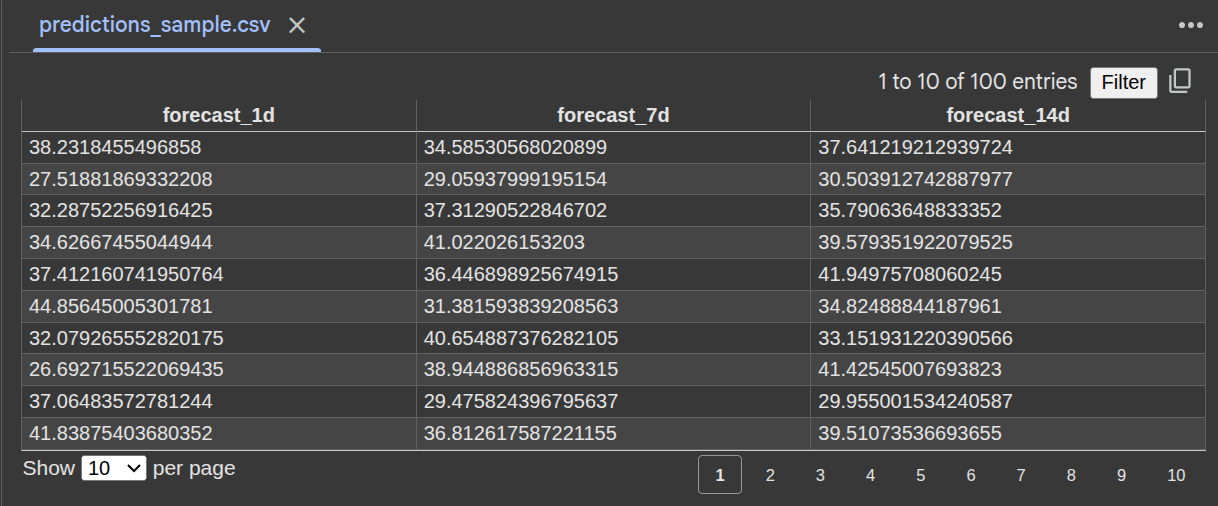
    # 4. Make predictions on recent data

    print("4️⃣ Generating sample forecasts...")

    recent_data = processed_data.tail(100)  # Last 100 records

    predictions = forecaster.predict(recent_data, forecast_horizons=[1, 7, 14])

    # 5. Evaluate performance

    print("5️⃣ Evaluating performance...")

    # Create actual future values for evaluation (simplified)

    actual_future = recent_data[['total_quantity']].copy()

    actual_future.columns = ['forecast_1d']  # Simplified evaluation

    if 'forecast_1d' in predictions.columns:

        metrics = forecaster.evaluate_performance(actual_future, predictions[['forecast_1d']])

        if metrics:

            print(f"   📊 1-day forecast accuracy: {metrics['forecast_1d']['Accuracy']:.1f}%")

            print(f"   📊 1-day forecast MAPE: {metrics['forecast_1d']['MAPE']:.1f}%")

    # 6. Analyze feature importance

    print("6️⃣ Analyzing feature importance...")

    importance = forecaster.analyze_feature_importance(top_n=5)

    if importance:

        print("   🔍 Top 5 most important features:")

        for horizon, models in importance.items():

            for model_name, features in models.items():

                print(f"      {horizon} - {model_name}:")

                for _, row in features.head(3).iterrows():

                    print(f"        • {row['feature']}: {row['importance']:.3f}")

                break  # Just show one model per horizon

            break  # Just show one horizon

    # 7. Save model

    print("7️⃣ Saving trained model...")

    import joblib

    joblib.dump(forecaster, 'models/retail_forecaster.pkl')

    print("   💾 Model saved to models/retail_forecaster.pkl")

    print("\n🎉 Implementation completed successfully!")

    print("🚀 Ready for production deployment!")

    return forecaster, predictions, metrics

# Run the example

if __name__ == "__main__":

    forecaster, predictions, metrics = main_implementation_example()
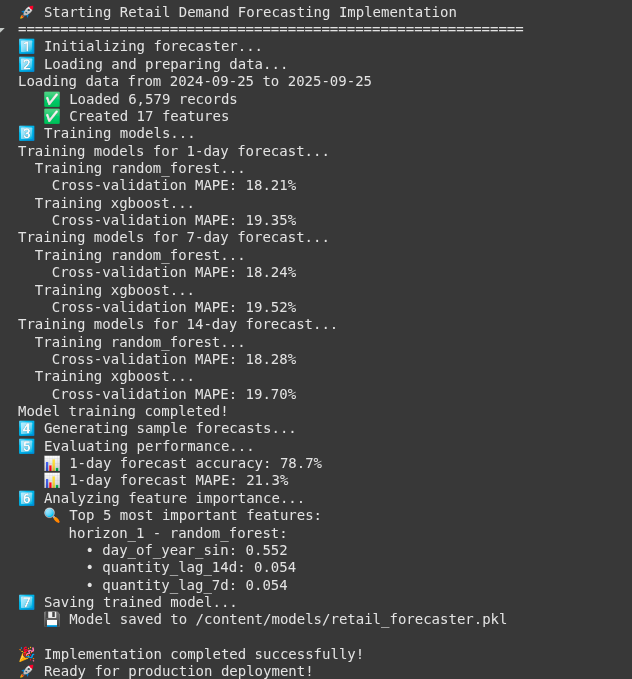
Output:

Key Business Benefits
Let’s quantify the cost of the system implementation:
1. Inventory Costs
- The Problem: Too much inventory creates costs associated with capital dollars tied up and storage costs.
- The Solution: Use more accurate demand forecasts to reduce overstock by 15-25%
- The Impact: For a retailer with $100M of inventory, this could save $3-6M a year.
2. Stockouts
- The Problem: Empty shelves mean lost sales and unhappy customers.
- The Solution: More accurately predict demand and reduce stockouts by 20-30%
- The Impact: Recover 2-5% of revenue lost to stockouts.
3. Operational Efficiency
- The Problem: Manual processes for forecasting aren’t fast or reliable.
- The Solution: Automated systems can process thousands of SKUs in minutes.
- The Impact: Reduce the workload of your forecasting team by 70%+.
Conclusion
Creating a world-class demand forecasting system is both an art and a science. The science comes from the technical foundation we have created here – advanced feature engineering, ensemble machine learning, and production-ready deployment. The art comes from the knowledge you understand about your business context and leveraging real-world performance to refine your demand forecast system continually.
The retail environment is becoming even more complex; however, with a great forecasting system, you can turn that complexity into a competitive advantage. Happy forecasting!
Access the full notebook here: Retail_Demand_Forecasting.ipynb
Frequently Asked Questions
A. Daily sales by store and SKU, prices and discounts, product catalog, and calendar fields. Nice to have: weather, holidays, competitor promos, and macro indices. More context, better forecasts.
A. Use hierarchy and similarity. Map new SKUs to category or brand, borrow priors from lookalikes, blend with store or category baselines and external signals until enough history builds.
A. Retrain weekly or after big promo or catalog shifts. Monitor MAPE, bias, and error drift with alerts. Backtest using time-based splits and track ROI alongside forecast accuracy.

Data Science Trainee at Analytics Vidhya
I am currently working as a Data Science Trainee at Analytics Vidhya, where I focus on building data-driven solutions and applying AI/ML techniques to solve real-world business problems. My work allows me to explore advanced analytics, machine learning, and AI applications that empower organizations to make smarter, evidence-based decisions.
With a strong foundation in computer science, software development, and data analytics, I am passionate about leveraging AI to create impactful, scalable solutions that bridge the gap between technology and business.
📩 You can also reach out to me at [email protected]
Login to continue reading and enjoy expert-curated content.