- The fourth iOS 26.1 beta is out now
- It includes a toggle to reduce the transparency of the Liquid Glass interface
- It also lets you disable the ability to launch the camera with a swipe from the lock screen
The fourth iOS 26.1 beta has now landed, and it includes a couple of changes, including the ability to change the transparency of Liquid Glass.
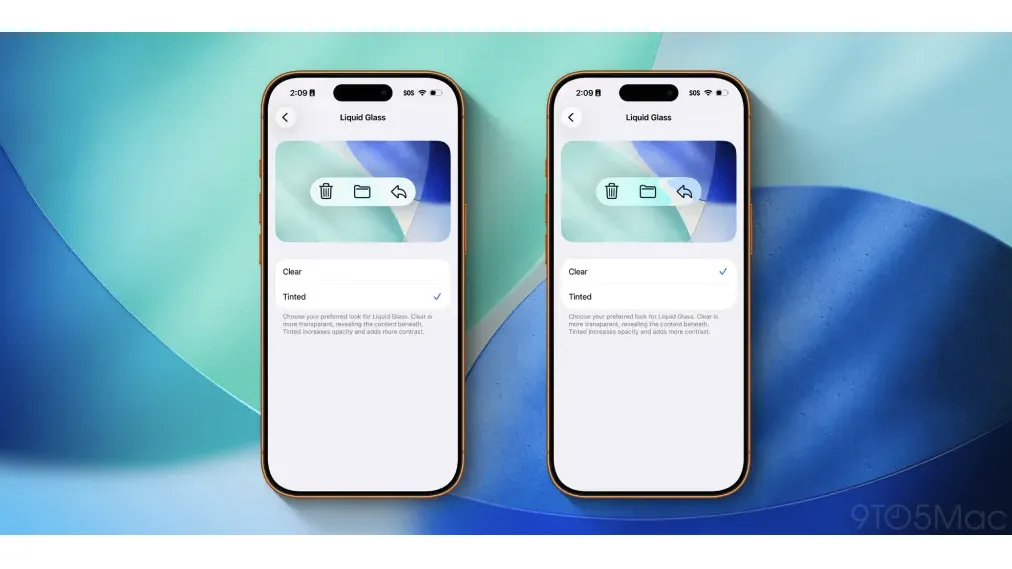
With this latest update, there’s now a toggle to select between ‘Clear’, which is the version of Liquid Glass that iOS 26 launched with, and ‘Tinted’, which makes it a bit less transparent, as shown in the comparison image below, shared by 9to5Mac.
You can find this toggle in Settings > Display & Brightness > Liquid Glass, and so far, it seems popular with users. A Reddit thread about this change includes comments like “this is good” and “finally, a win for the people with poor eyesight.”
That latter comment is a reference to the fact that some people found Liquid Glass offered poor readability in its debut state. On top of this, there have also been complaints about it causing eye strain and vertigo, which might also be lessened with this new tinted option.
Plenty of other people – this writer included – simply dislike how Liquid Glass looks, so having the option to tint it a bit is certainly desirable. And for those who love it how it is, there’s no need to make use of the new option, so it’s the best of both worlds, really.
The new ‘Clear’ and ‘Tinted’ options will sit alongside existing accessibility settings like Increase Contrast and Reduce Transparency, which have allowed users to reduce the intensity of Liquid Glass since its launch.
No more accidental camera launches
iOS 26.1 beta 4 FINALLY adds a setting to disable “swipe to open camera” on the lock screen! pic.twitter.com/kgLHMSClorOctober 20, 2025
As well as this toggle, the latest iOS 26.1 beta also includes a toggle to disable the lock screen’s ‘Swipe to open Camera’ feature, spotted by @aaronp613.
This might be a bit niche, but if you’ve ever accidentally opened the camera with a swipe, then it could be desirable. You can find this toggle in Settings > Camera > Lock Screen Swipe to Open Camera.
Sol, this latest beta is all about toggles, it seems, but previous iOS 26.1 betas have made additional changes, including changing the Apple TV logo, making it harder to sleep through your alarms, and adding some gesture controls to Apple Music.
If you’re keen to try all this out, you can download the latest iOS 26.1 beta now. Mind you, we expect the finished version of iOS 26.1 to land very soon, and that should be more stable.
And of course you can also follow TechRadar on TikTok for news, reviews, unboxings in video form, and get regular updates from us on WhatsApp too.