This was expected, but still wild to witness. I was still recovering from everything Gemini 3 could do. Building full apps in seconds, delivering true multimodality, and pushing AI capability to a new level. And then Google dropped another surprise for AI enthusiasts… the long-awaited Nano Banana Pro. It is far more powerful and feature-packed than the previous version. In this blog, I’ll walk you through 10 creative ways to use Nano Banana Pro, from enhancing selfies to generating full comic books and infographics using nothing but prompts.
Let’s dive in!
Nano Banana vs Nano Banana Pro
Nano Banana Pro brings a major upgrade over the original Nano Banana, adding advanced text rendering for clear on-image text, precise editing controls for lighting, camera angle and aspect ratio, crisp 2K resolution outputs, improved world knowledge for accurate diagrams and infographics, and the ability to combine even more photos seamlessly. It takes everything the base model was good at and elevates it for professional, high-quality creative work.
How to Access Nano Banana Pro?
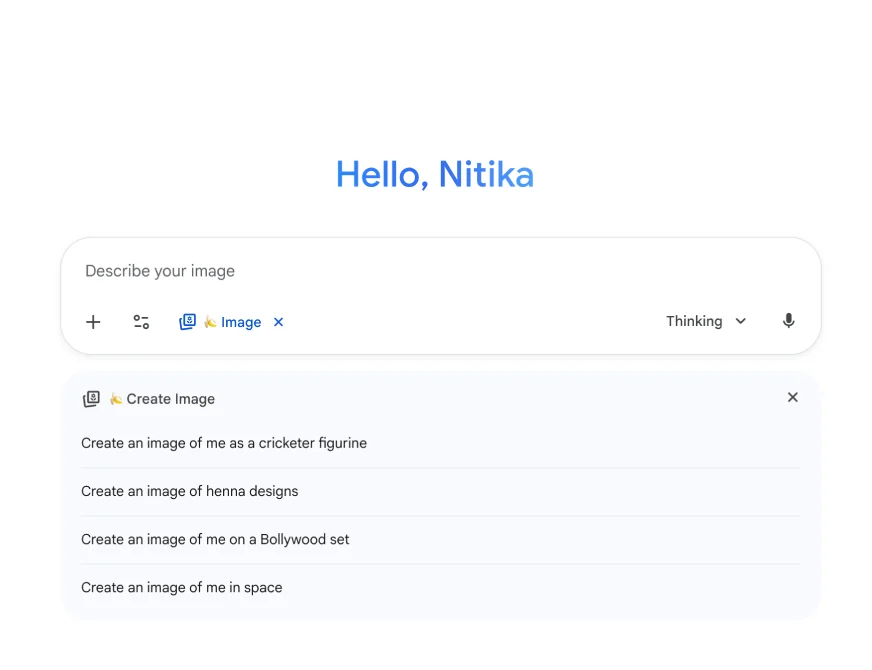
ano Banana Pro is available globally inside the Gemini app under the Create images option when you choose the Thinking model. Free-tier users get limited Pro quotas, after which it switches back to the original Nano Banana. Google AI Plus, Pro and Ultra subscribers get higher limits.
10 Nano Banana Prompts that You Must Try Today
I am going to keep these prompts as a mix of personal and professional photo edits. There is something for everyone – students, professionals, content creators and AI enthusiast!
Task 1: Blog to Image
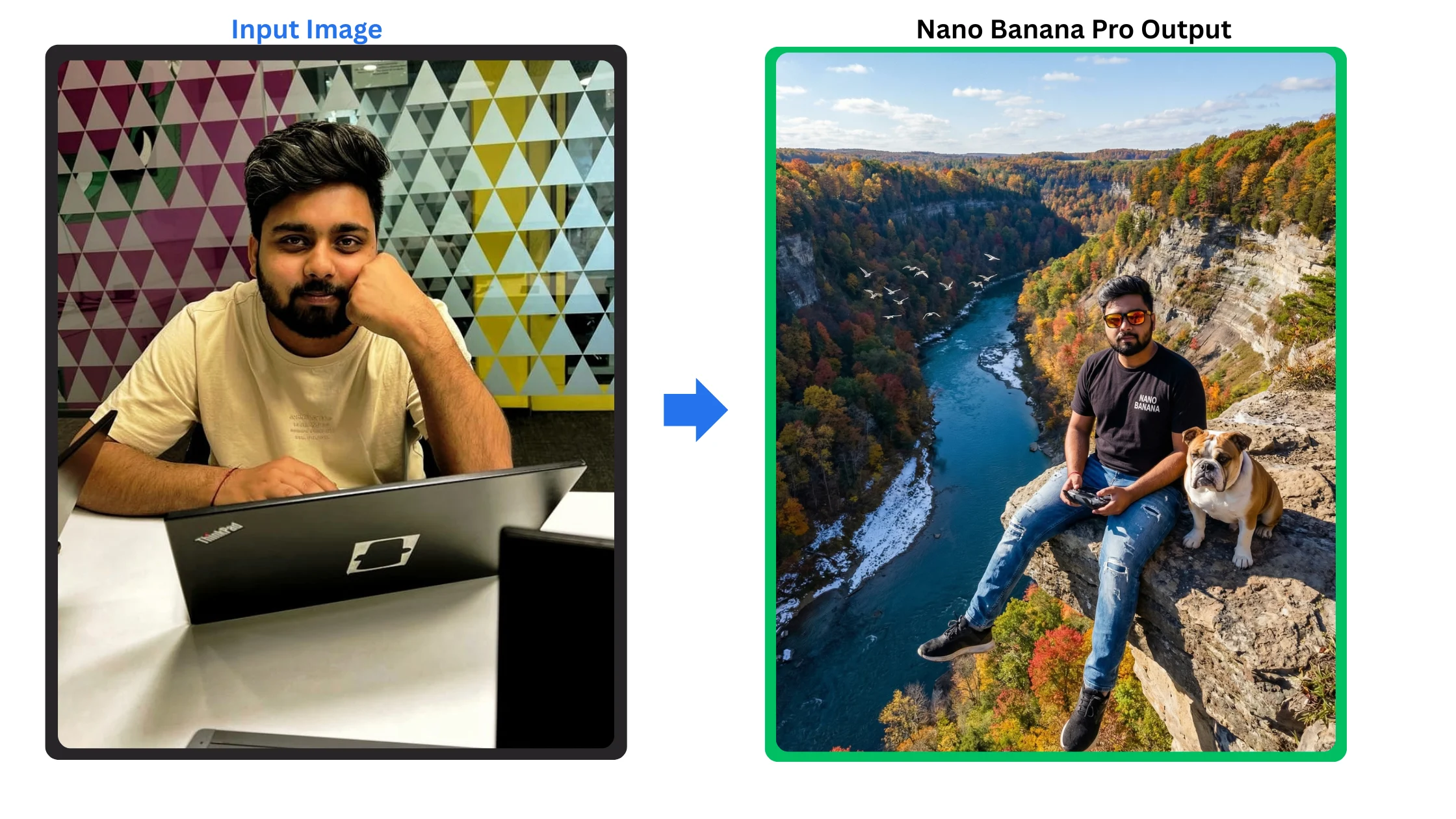
For this task, I am taking blog link and asking Nano Banana to summarize it with an image.
Generate a hyper-realistic landscape image of a drone shot of a man (attached photo as reference, Keep the face of the person 100% accurate from the reference image , full body shot, the drone shot was ten feet away from the woman) sitting on a ledge off a cliff. He is wearing a black t-shirt with a printed “NANO BANANA” on it, a fitted distressed blue jeans and Oakley with orange lens. His two legs dangling from the ledge while his expression is calm and looking directly at the drone while he is holding the remote control of the drone. Beside him sits his English bulldog. The drone cam also captures the the stunning and breath-taking view of the surroundings. The view from the drone camera is nothing sort of ordinary since its overlooking the epic grandeur of the scenery below which is a like a detailed landscape of two mountainous gorge with a clear blue river or lake that passes between the two mountains. There are also a flock of white seagulls flying from the distance. The epic landscapes’ are showing patches of different colors such as red, orange and yellow of autumn originating from the leaves of the trees that grew from it but the dominant color is still green. There are also patches of snow showing on the riverbank. The sky is sunny and clear blue with lots of scattered clouds that completes the epic scenery. Render this shot in 8K DSLR high resolution. Natural lightings, Create a realistic, lifelike image that captures the essence of the picture. Make sure the lighting, expressions, and details look as natural as possible, with a sense of realism. Ensure the background and foreground blend seamlessly for a cohesive and genuine look.
Output:
Task 3: Infographics
Prompt:
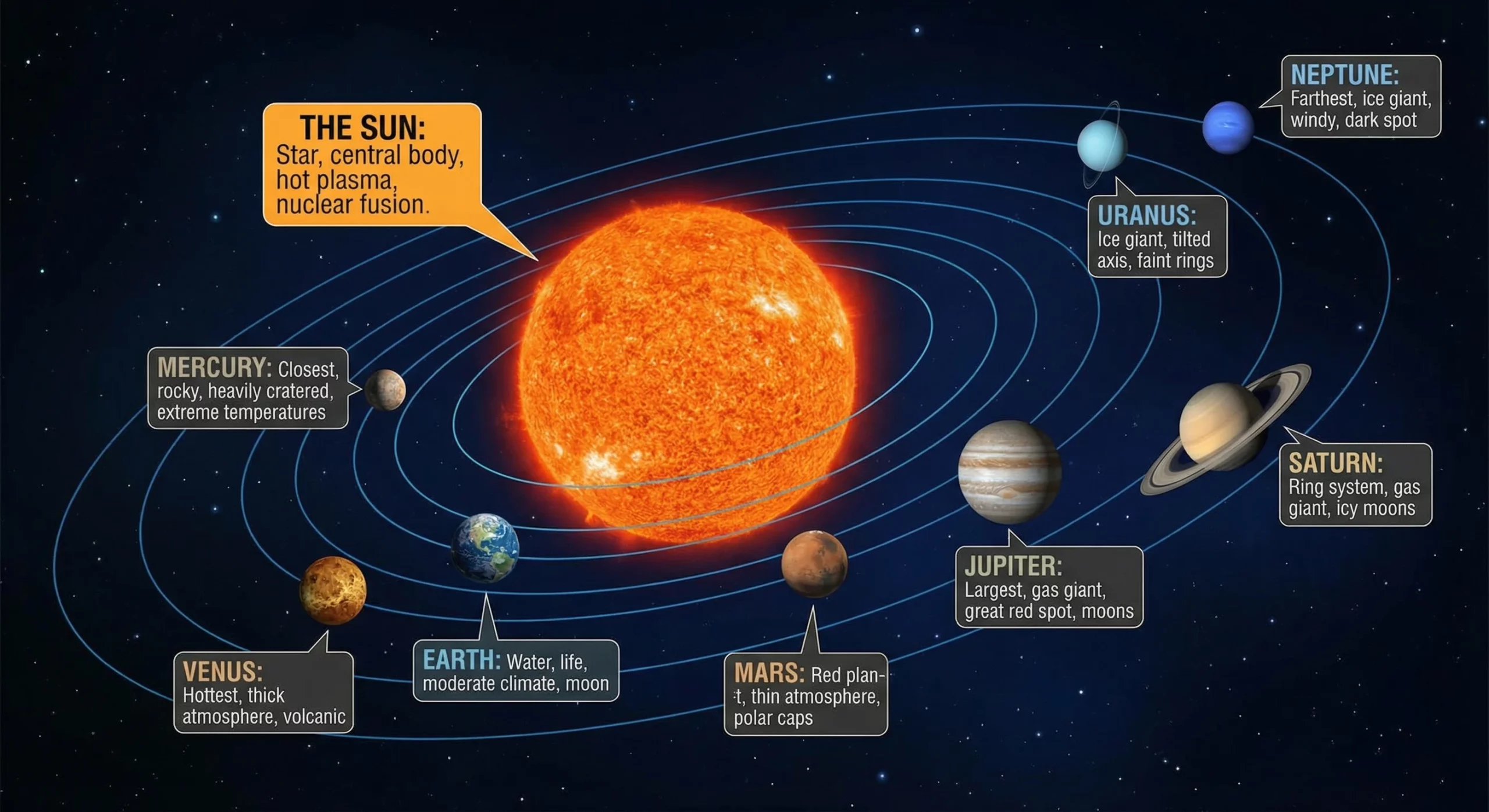
Create an Ultra HD image of the solar system and add the key features of each planet.
Output:
Task 4: Visualize your 2D Designs
Prompt:
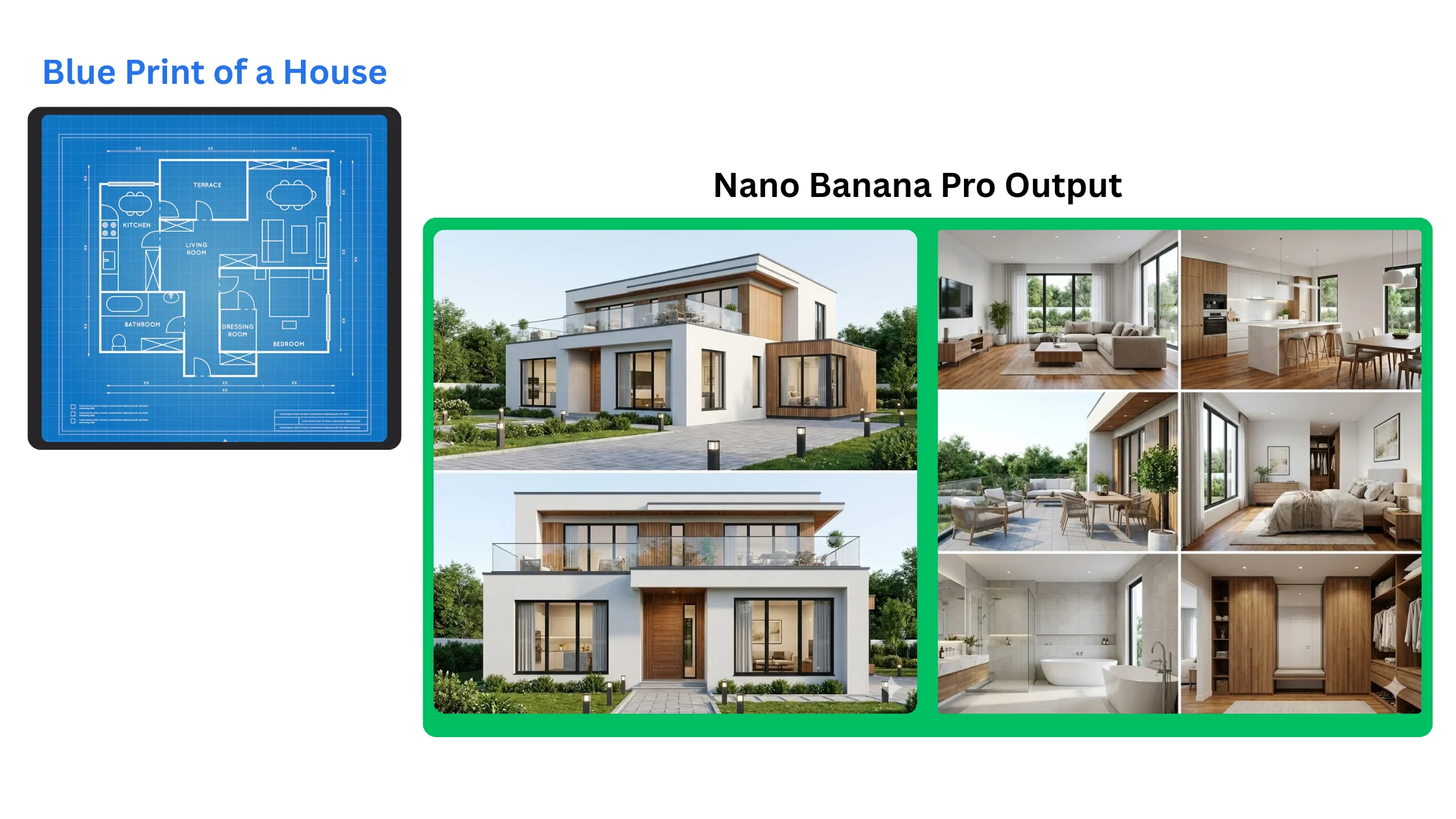
I am uploading a blueprint of a house. Please generate a realistic, high-quality rendered image showing how the completed house would look in real life. Use the blueprint for accurate proportions, layout, window placement and structure.
Output:
Task 5: Study Material
Prompts:
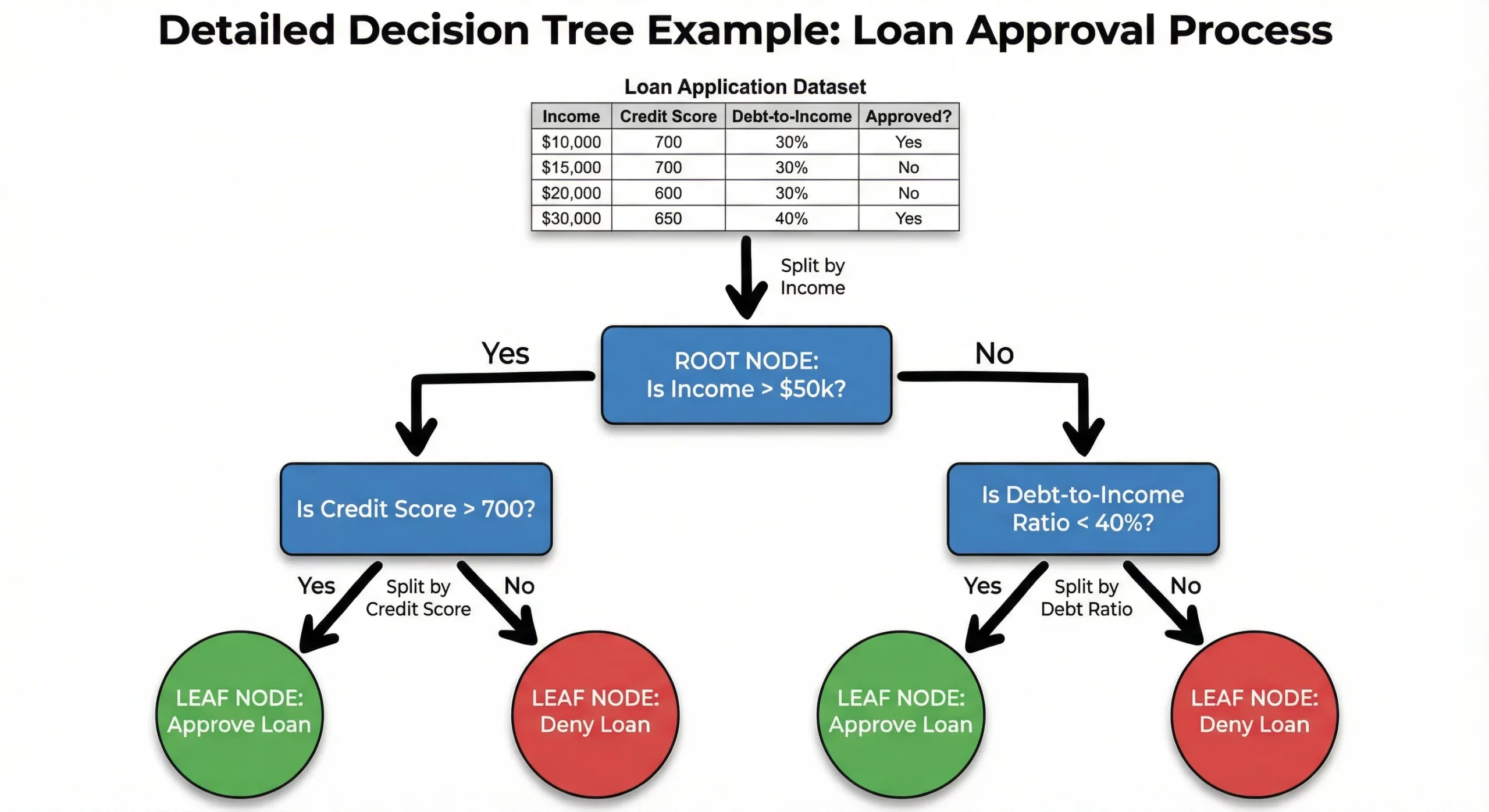
High-quality, top-down flat lay infographic that clearly explains the concept of a Decision Tree in machine learning. The layout should be arranged on a clean, light neutral background with soft, even lighting to keep all details readable. Create a simple, step-by-step visual flow from top (root node) to bottom (leaf nodes), using clean black hand-drawn arrows to guide the viewer’s eye. Annotate each part of the tree with short labels: root node, feature split, decision rule, branch, leaf, prediction. Include a small example dataset and show how the tree splits the data. Keep the style educational, modern and easy to understand. Format 16:9.
Output:
The decision tree image looked visually good, but the logic was wrong. It misinterpreted the dataset and routed branches incorrectly. Even after prompting for a fix, it couldn’t correct the mistake. The visual quality is great, but accuracy still needs improvement.
Task 6: Annotated Diagrams
Prompt:
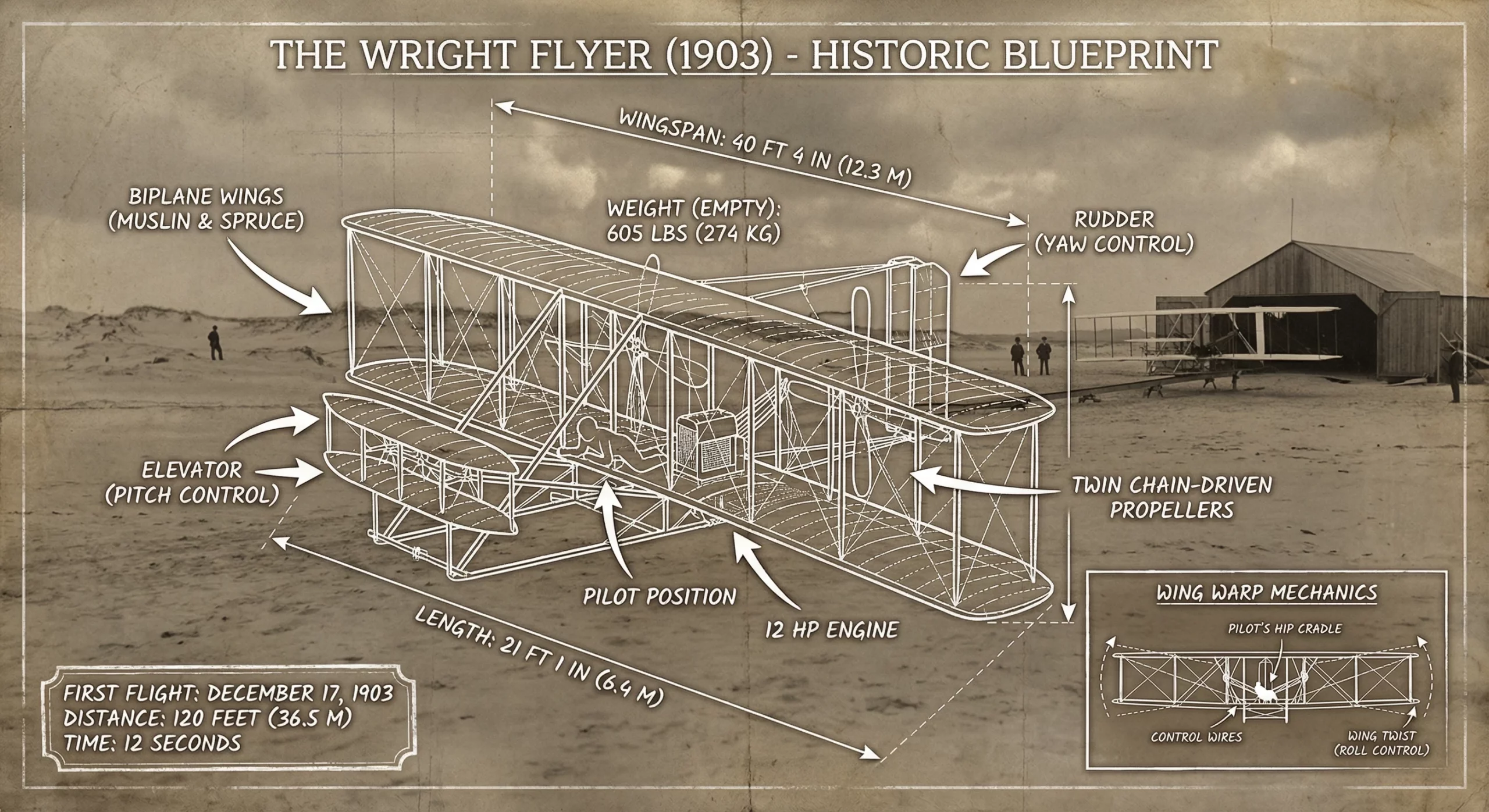
Create a vintage, annotated blueprint-style infographic of the Wright Flyer (1903) placed over a historic sepia-toned photograph of a sandy airfield. Draw clean white technical linework around the aircraft showing labeled parts such as biplane wings (muslin & spruce), elevator (pitch control), rudder (yaw control), twin chain-driven propellers, 12 HP engine, pilot position, wingspan, length, and weight. Add hand-drawn arrows, measurement lines, and a small schematic showing wing warp mechanics. Include a box noting the first flight date, distance, and time. Keep the aesthetic technical, historical, and visually clear.
Output:
Loved this one. The Wright Flyer diagram looked like something out of an aviation museum. Clean annotations, beautiful overlay, and a perfect blend of history + design. One of my favorite outputs.
Task 7: Orthographic Blueprint of Taj Mahal
Prompt:
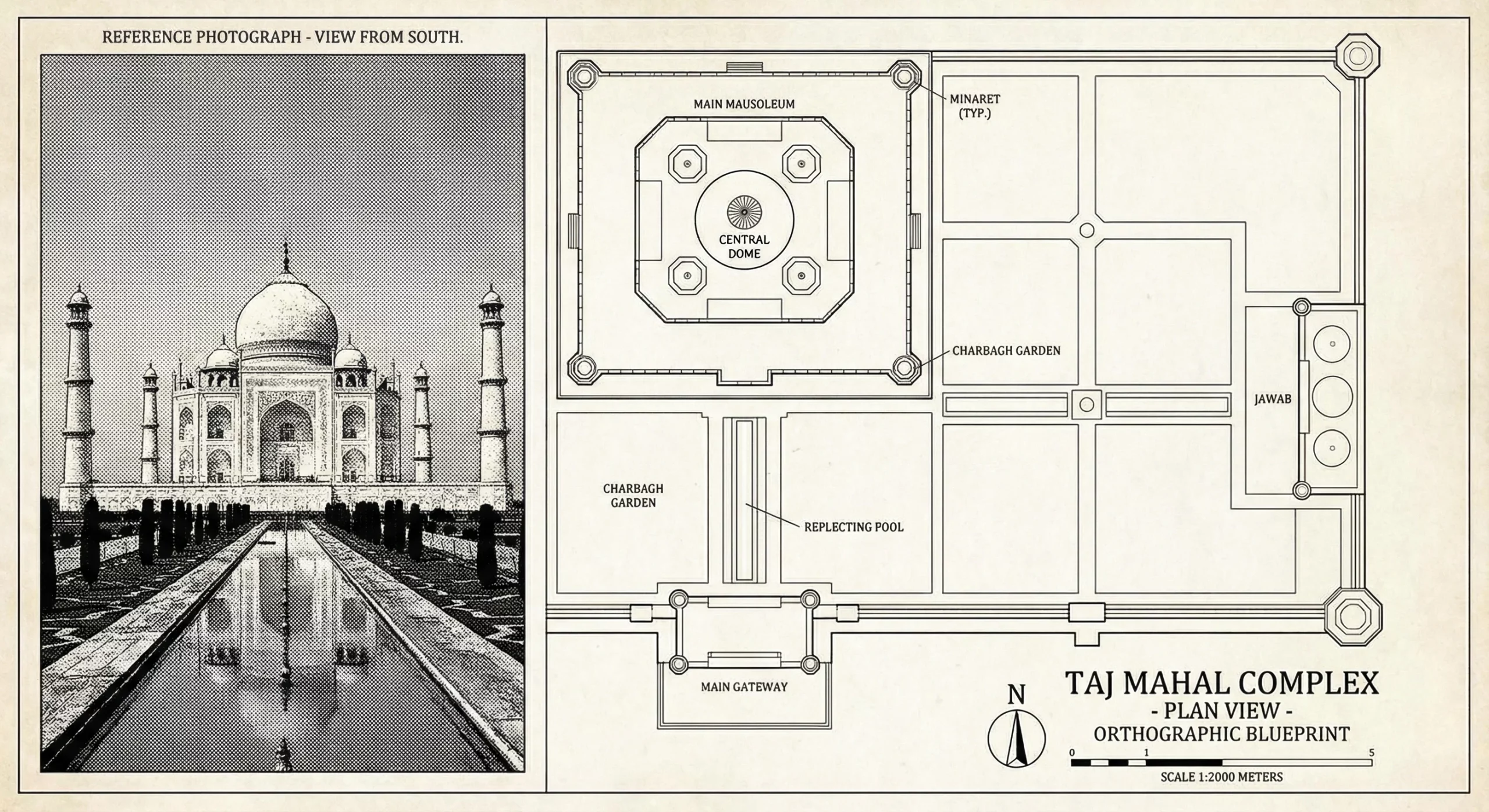
Create an orthographic blueprint-style illustration of the Taj Mahal in plan view, using clean architectural linework with accurate proportions of the central dome, minarets, plinth and surrounding structures. Render it in a professional black-and-white blueprint aesthetic with labeled key elements, symmetry lines and scale markers, capturing the geometric layout and structural elegance of the monument
This was stunning. The Taj Mahal blueprint looked elegant, detailed and architecturally precise. It genuinely felt like a professional CAD-style render. One of the best results in the entire test.
Task 8: Image Blending
Prompt:
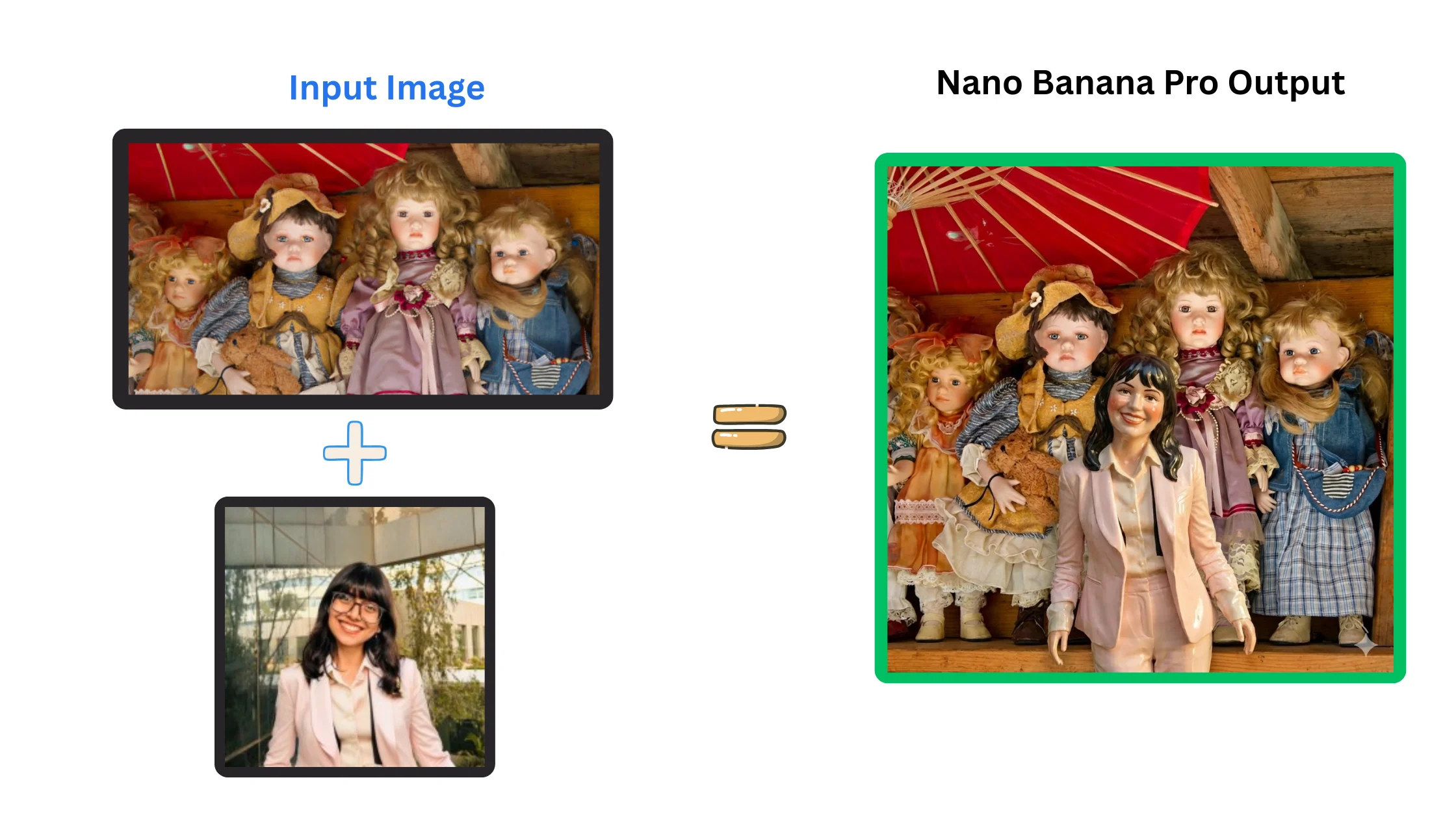
Using the two images I am uploading — the first image of the dolls and the second image of me — create a new version of the dolls image by adding a doll that looks like me. Match the style, proportions, material, colors and lighting of the existing dolls so my doll blends naturally into the scene. Keep the background, composition and overall aesthetic consistent with the original dolls photo.
Output:
This one didn’t work well. The model struggled to blend my face into the doll frame naturally. The proportions and textures were off, and the final result didn’t look cohesive. Image blending clearly has room to grow.
Task 9: Design your Logo and Products
Prompt:
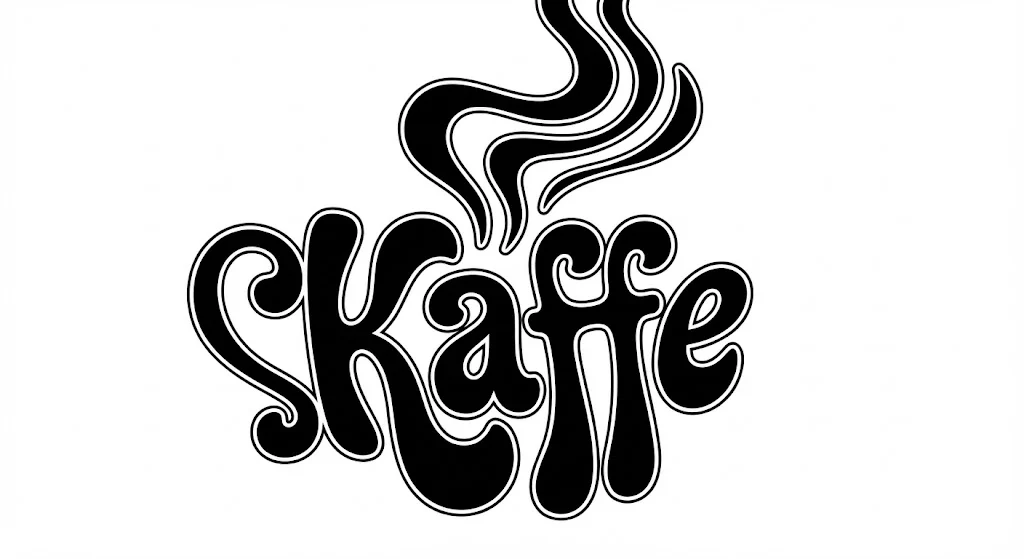
Create a cute, smooth logo for a coffee brand called Kaffe in a vibrant, playful graphic style inspired by retro 1960s–1970s design. Use a groovy, psychedelic-inspired typeface with soft, rounded, fluid letterforms that flow together naturally. The logo should function like a calligram, where the word Kaffe subtly forms the silhouette of a steaming coffee cup or a gentle coffee wave. Do not copy any sketch exactly, use it only as loose inspiration. Distort, stretch, and curve the letters to create a cohesive, iconic shape. Use a simple two-tone palette: light blue background and deep blue logo to maintain a nostalgic, warm vintage feel. Keep the final design charming, bold, and instantly memorable.
Output:
Now, let’s design some products for this brand!
Prompt:
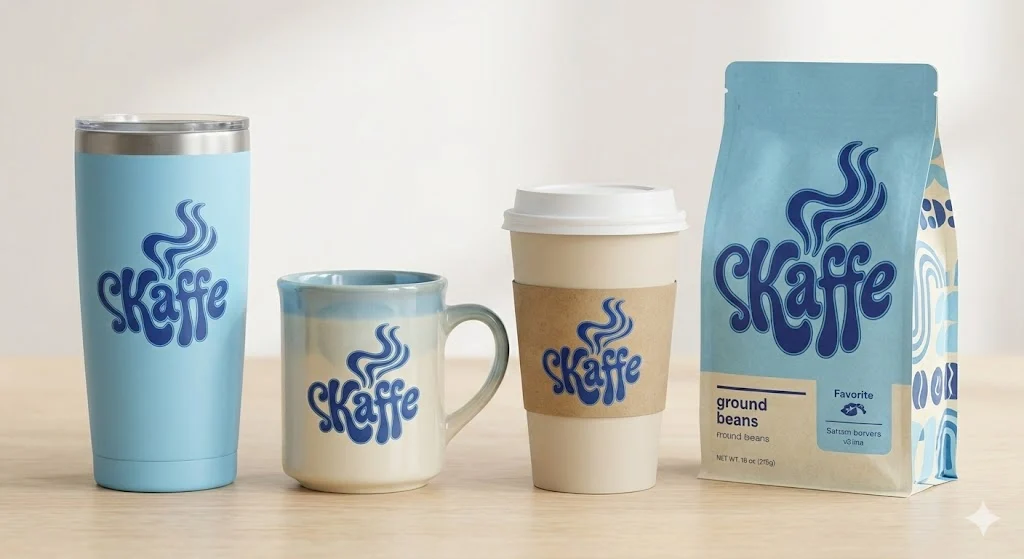
Now generate product mockups using the same visual style and color palette as the logo above. Create high-quality images of a matte-finish coffee tumbler, a ceramic coffee mug, a takeaway paper coffee cup with lid, and a branded pouch for ground coffee beans, each featuring the same retro, groovy graphic aesthetic and smooth two-tone lettering. Keep the presentation clean, modern, and consistent with the logo’s playful 60s–70s vibe, using soft lighting, simple backgrounds, and a cohesive layout that feels like part of the same product line.
Output:
The retro-style “Kaffe” logo looked adorable, clean and very on-theme. The product mockups followed the palette perfectly and felt like a real brand line. This is one of Nano Banana Pro’s strongest use cases designing brand kits quickly.
Task 10: Story Board
Prompt:
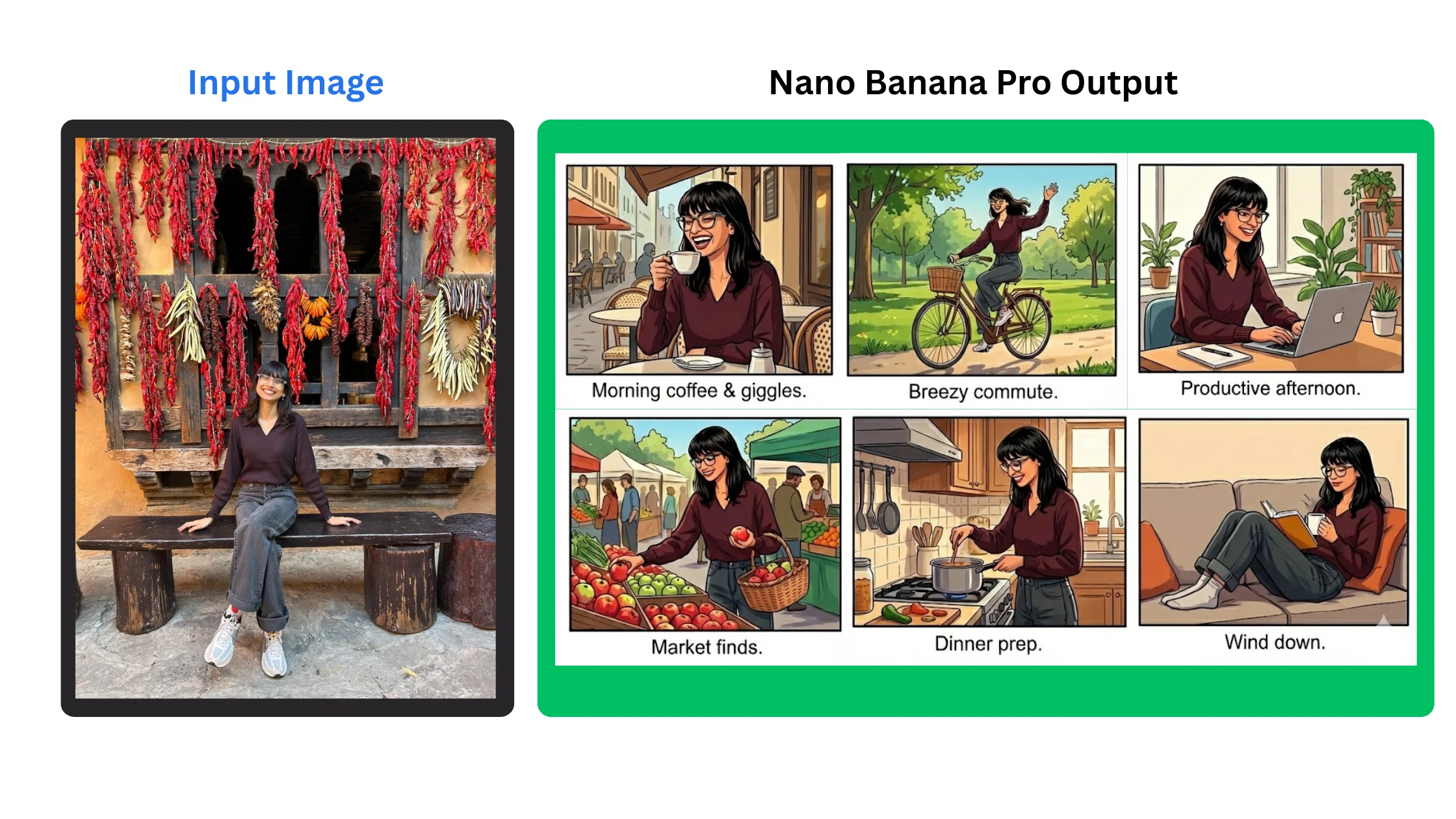
Using the photo I’ve uploaded, create a short 6–8 frame storyboard featuring me as the main character. Keep the style fun, cinematic, and easy to follow. Use my appearance accurately in each frame and place me in different everyday scenes that flow together as a simple visual story. Add brief captions for each frame to describe what’s happening.
Output:
The storyboard sequence seems random more like a set of unrelated moments rather than a connected story. The background from the input photo wasn’t carried into the frames, which defeated the whole purpose of giving it context. It’s great for quick visual ideas, but still not reliable for storytelling.
Conclusion
Nano Banana Pro is genuinely impressive. Some tasks miss the mark, but the ones it gets right are incredibly fun and creatively powerful. The Taj Mahal blueprint, annotated diagrams and product mockups were standouts. If you enjoy experimenting with visuals or want quick creative inspiration, this tool is absolutely worth trying.
Let me know what are you planning to do with Nano Banana Pro in the comment section below!
Hello, I am Nitika, a tech-savvy Content Creator and Marketer. Creativity and learning new things come naturally to me. I have expertise in creating result-driven content strategies. I am well versed in SEO Management, Keyword Operations, Web Content Writing, Communication, Content Strategy, Editing, and Writing.
Login to continue reading and enjoy expert-curated content.