In today’s markets, where billions are made in seconds, waiting hours for stock analysis is no longer viable. Imagine typing “plot me stock gains of X” and instantly receiving a clean chart. No manual data collection, coding, or debugging. In this guide, we’ll build a Personal Market Analyst using CrewAI and MCP. By the end, you’ll have an assistant that transforms natural language queries into actionable stock insights.
Objective
Our MCP-powered financial analyst streamlines financial data analysis using AI agents. It bridges the gap between complex financial data sources and user queries, delivering real-time, context-aware insights. This approach not only saves time and reduces manual errors but also ensures better security, interoperability, and transparency.
System Overview
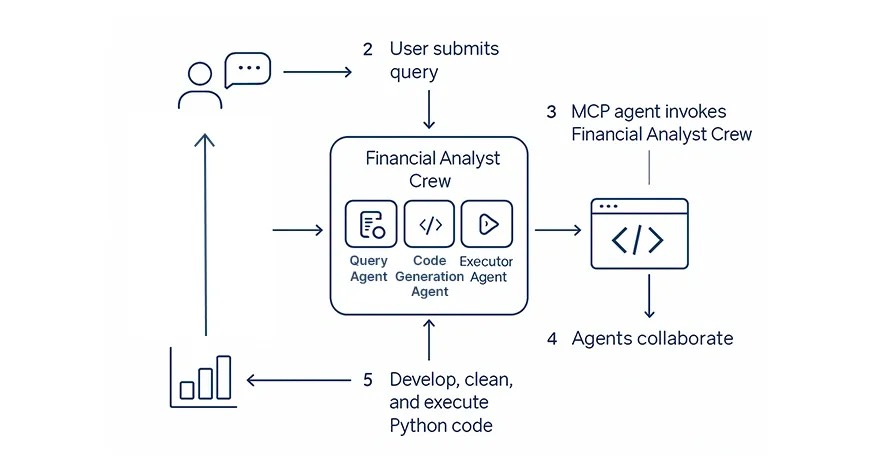
- User query: A natural-language request, e.g., “Show me Tesla’s stock performance over the past year.”
- MCP agent: Invokes the Financial Analyst Crew – a set of specialized agents.
- Agents collaborate: They parse the query, generate Python code, execute it, and validate results.
- Output: The user receives a clean chart with immediate, actionable insights.
Step-by-step: Build the Personal Market Analyst
Prerequisites
Here are some necessary Python packages
pip install crewai crewai-tools pydantic yfinance python-dotenvBuilding an AI-Powered Financial Analyst with MCP
We will be building out two main components:
- The Financial Analyst Crew: backed by CrewAI agents that read the user query, create Python code, and run it to visualize stock data.
- The MCP Server File: a Model Context Protocol server that will present this as AI tools, so that it can be plugged straight into your AI workflows.
Let’s break it down.
The Financial Analyst Crew
Here’s where the real intelligence happens. We are using CrewAI to coordinate multiple agents with different roles:
Step 1. Define the Output Structure
class QueryAnalysisOutput(BaseModel):

    symbols: list[str]

    timeframe: str

    action: str
This Pydantic model ensures structured extraction from the user’s query.
Step 2: Configure LLM
llm = LLM(

    model="openai/gpt-4o",

     temperature=0.7

)
Step 3 Creating Agents
Agent 1: Query Parser
- It reads the query
- Extracts stock tickers, timeframes, and the intended actions
- Also, it turns natural language into structured JSON
query_parser_agent = Agent(

    role="Stock Data Analyst",

    goal="Extract stock details and fetch required data...",

    output_pydantic=QueryAnalysisOutput

)
Agent 2: Code Writer
- Takes the structured query output
- Writes clean, executable Python code using
- yfinance ( fetches stock data)
- pandas (For data manipulation)
- matplotlib (plotting)
code_writer_agent = Agent(

    role="Senior Python Developer",

    goal="Write Python code to visualize stock data..."

)
Agent 3: Code Executor
- Runs the generated code
- Fixes errors if something breaks
- Can delegate back to the code writer for fixes
code_execution_agent = Agent(

    role="Senior Code Execution Expert",

    allow_code_execution=True,

    allow_delegation=True

)
Step 4: Crew Processing
We will follow a sequence while using these agents, i.e.:
- Parser query
- Write Python Code
- Execute & verify results
crew = Crew(

    agents=[query_parser_agent, code_writer_agent, code_execution_agent],

    tasks=[query_parsing_task, code_writer_task, code_execution_task],

    process=Process.sequential

)
Step 5: The Main Function
Orchestrates the entire multi-agent system and returns the final executable Python code.

def run_financial_analysis(query):

    result = crew.kickoff(inputs={"query": query})

    return result.raw
Now we will create the MCP Server File:
- Creating interface: This is the interface that allows AI assistants to call our function
from mcp.server.fastmcp import FastMCP

from finance_crew import run_financial_analysis

FastMCP: A lightweight MCP server framework for exposing functions as AI tools

run_financial_analysis: The main function from the above code that does all the heavy lifting.- Creating the MCP Instance
We name our MCP toolset as “financial-analyst”. This acts like the app name.
mcp = FastMCP("financial-analyst")Tool 1: analyze_stock()
- Takes a natural language query
- Passes it to the Financial Analyst Crew (Our Agents)
- Returns a Python script as a string that can fetch and visualize the requested stock data.
@mcp.tool()

def analyze_stock(query: str) -> str:

    ...

    result = run_financial_analysis(query)

    return result
Tool 2: save code
Saves the generated Python code into a file, stock_analysis.py
Ensures the file is valid and executable.
@mcp.tool()

def save_code(code: str) -> str:

    with open('stock_analysis.py', 'w') as f:

        f.write(code)
Tool 3: run_code_and_show_plot()
- Executes the saved script directly
- Generates the requested stock visualization in real time
Runs the MCP server locally over stdio, ready to integrate into any AI platform that supports MCP.
if __name__ == "__main__":

    mcp.run(transport="stdio")
Final Output
With this setup, typing a query like “Plot Apple’s stock performance for the last 6 months” produces a ready-to-use chart – no manual coding required.
Also Read: How to Create an MCP Client Server Using LangChain
Conclusion
Building a MCP-powered Financial Analyst with CrewAI shows how multi-agent systems can transform financial analysis. By combining structured query parsing, automated Python code generation, and real-time execution, we eliminate the bottlenecks of manual coding and debugging. This project highlights how AI agents can handle complex workflows efficiently and sets a new benchmark for user-focused financial analytics.
If you want to learn the basics of MCP, enroll in our FREE course: Foundations of Model Context Protocol
Frequently Asked Questions
A. MCP-powered financial analyst uses Model Context Protocol and CrewAI agents to automate financial data analysis, transforming natural language queries into actionable stock insights instantly.
A. CrewAI coordinates multiple AI agents that parse queries, write Python code, and execute it. This enables real-time, automated stock analysis without manual coding or data preparation.
A. Yes, MCP integrates smoothly with financial workflows by exposing AI tools like analyze_stock and run_code. It enhances interoperability, automation, and security for financial data analysis pipelines.
A. AI agents reduce manual errors, accelerate insights, and provide real-time, data-driven analysis. They automate repetitive financial tasks, helping analysts focus on decision-making and strategy rather than coding.

I am a Data Science Trainee at Analytics Vidhya, passionately working on the development of advanced AI solutions such as Generative AI applications, Large Language Models, and cutting-edge AI tools that push the boundaries of technology. My role also involves creating engaging educational content for Analytics Vidhya’s YouTube channels, developing comprehensive courses that cover the full spectrum of machine learning to generative AI, and authoring technical blogs that connect foundational concepts with the latest innovations in AI. Through this, I aim to contribute to building intelligent systems and share knowledge that inspires and empowers the AI community.
Login to continue reading and enjoy expert-curated content.